50% Complete
Your Free Excel Guides will arrive in your email in about 5 minutes 🕒...
(If you still don't see it, please check your spam or promotions folder)
In the meantime as a BONUS Thank-You...
Claim Your 30 Day Trial to our 30+ Microsoft Excel & Office Online Courses Today and Elevate Your Skills... For ONLY $1!

Advance your Microsoft Excel & Office Skills with the MyExcelOnline Academy for ONLY $1!
- And Dramatically Reduce Repetition, Stress, and Overtime!
- And Exponentially Increase Your Chances of a Promotion, Pay Raise or New Job!
98.5%
Success30+
Courses10K+
Students4.8 
Trustpilot Rating





Select your plan
Monthly
For 30 days!

Annual Best value

get 2 months FREE + Bonus Academy Welcome Pack


$1 Trial for 30 days

$1 Trial for 30 days
Then $47/Month- 30+ Excel & Office Courses
- Practice Workbooks
- Certificates of Completion
- 5 Amazing Bonuses
- 🚀Increase Productivity
- 💼Better Job Opportunities
Best Value
Your Benefits at a Glance
- 30+ Excel & Office Courses
- Practice Workbooks
- Certificates of Completion
- 5 Amazing Bonuses
- 🚀Increase Productivity
- 💼Better Job Opportunities
Get 2 months FREE
& Academy Welcome Pack
Course Curriculum

Beginner
5 courses • 56 Lessons • 7 Hours
Introduction
An introduction to Microsoft Excel taking you through the workbook interface, menu ribbon features, entering data into your worksheet and saving.

Formulas
An introduction to Formulas, cell referencing, order of operations, relative v absolute references and exposure to common formulas that will get you up and going fast!

Charts
Introduction to Images, Shapes, Smart Art & various Charts to spice up your presentations!

Formatting
Learn the most used formatting features like adding/deleting columns or rows, copying & moving worksheets, font formatting, number formatting and conditional formatting.

Printing
Learn how to properly layout your page, print your documents and create custom templates that you can reuse time and time again.


Intermediate
5 courses • 216 Lessons • 10 Hours
Formulas
Learn how to create Named Ranges, the various useful IF formulas, VLOOKUP, HLOOKUP, INDEX & MATCH, OFFSET, INDIRECT, SUMPRODUCT, TEXT formulas, nesting formulas, auditing your formulas and List formulas!
Pivot Tables
Build your must have Pivot Table skills and learn its various powerful data analytic features including: Summarize Values, Group data, Filter & Sort, Slicers, Calculated Fields & Items, Pivot Charts plus Conditional Formatting!

Macros & VBA
An introduction to Macros & VBA, recording Macros, creating Macro buttons and editing your Macros that will save you hours each week!

Data & Analysis
Learn the must know analytical tools within Excel like: Sorting & Filtering, Excel Tables, Data Validation drop down menus, Text to Columns, Flash Fill plus MORE!

Charts
Visualize your data with Charts like Column, Bar, Pie, Bubble, Scatter and Sparklines.

Advanced
10 courses • 569 Lessons • 29 Hours
Formulas
Advance your Formula skills with various nested formulas, Array formulas and advanced Lookup formulas like VLOOKUP, INDEX/MATCH, OFFSET, SUMPRODUCT plus heaps MORE!
Pivot Tables
Learn the tips that Excel gurus use to analyze their data with a few mouse clicks, create KPIs on you business, interactive Excel Dashboards, learn the GETPIVOTDATA formula plus much MORE!
Macros & VBA
Learn the key VBA concepts to automate your Excel reports & make you more productive, like: Worksheet & Range Objects, Relative References, Modules & Procedures, Variables & Data Types, Conditional Statements & Loops, Message & Input Boxes plus create interactive data entry User Forms! WOW!
Power Query
Learn how to install Power Query, consolidate workbooks & worksheets and create management, clean up your dirty data and transform your data into easy to read reports!

Power Pivot
Expand on your Pivot Table knowledge with this super charged add-in! You will learn how to import your data, create relationships, advanced calculations/measures plus various DAX formulas. This is Pivot Tables on STEROIDS!

Data & Analysis
Gain insights on how to use the various data predictive tools like: Goal Seek, Solver, Data Table, Scenario Manager, Relationships and Forecasting!
Charts
Expand on your Charting knowledge by learning the advanced Charts, formatting Charts and the new Excel 2016 Charts!
Power BI
Learn Microsoft's most powerful Business Inteligent platform. Power BI is a business analytics service that delivers insights to enable fast, informed decisions. Transform data into stunning visuals and share them with colleagues on any device.

Excel Dashboards
Learn to create awesome interactive Excel Dashboards that showcase your Key Performance Indicators (KPIs) on one page by using Excel Charts, Formulas, Tables, Form Controls and more!

Financial Modeling
Learn how to create a Financial Model using the core Excel concepts & formulas, learn various Financial Modeling skills and create a real life Financial Model business case with Profit & Loss, Cash Flow, NPV, IRR, payback periods, scenario analysis plus MUCH MORE!


Microsoft 365
13 courses • 288 Lessons • 11 Hours
Copilot

Microsoft Copilot is your AI-powered productivity assistant inside Microsoft 365, designed to help you work faster, think smarter, and create better results across tools like Excel, Word, PowerPoint, Outlook, and Teams. In this course, you’ll learn how to use Copilot to write emails, summarize documents, analyze data, create presentations, generate ideas, automate repetitive tasks, and save hours every week. Whether you’re a beginner or an experienced Microsoft user, this course will show you practical, real-world ways to turn Copilot into your everyday work assistant.

Word
Use Microsoft Word to create business letters, business cards, resumes, product manual, reports, flyers, restaurant menus, invitation cards, labels, forms, and many more.

Outlook
Microsoft Outlook is a powerful email client used by most corporate enterprises in the world. It also includes such functions as calendaring, task managing, contact managing, note-taking, journal logging and web browsing.

PowerPoint
Microsoft PowerPoint is your tool to create slides for your presentations. PowerPoint supports audio, videos, and animation effects to help you give your presentation greater impact.

Access
Microsoft Access is an application used to create databases to store and manage your business data. It provides you with tools to create data tables, queries, forms, reports, and tools to help you write Visual Basic codes to customize the functionality of your database application.

OneNote
Microsoft OneNote is a feature-rich note-taking application. OneNote keeps your notes, plans, and thoughts all in one place. You create sections, pages, and sub-pages just like a tradition paper notebook and use color codes to organize your notes.

Teams
Microsoft Teams is a feature-rich and secure collaboration and communication application. It supports instant message/chat, audio calls, video conferencing, and collaboration features. Other features include the ability to host meetings with thousands of participants, record your meetings, and to share your screen for when you are hosting a training session.

Power Automate
Formerly Flow, Microsoft Power Automate is a cloud-based tool to help organizations develop workflows to automate tasks and processes. It's a useful tool to help bring automation to repetitive tasks, such as approval workflows, data collecting, or synchronize files between applications.

Power Apps
Microsoft Power Apps is a collection of tools to help you build customized web-based and mobile apps to meet your business needs. It's biggest benefits are automation and workflow. These enable businesses to improve productivity and processes, streamline tasks, and minimize the use of paper.

SharePoint
Microsoft SharePoint is a cloud-based application used to build intranet websites to share and management information and collaborate with others within your organization. Features of SharePoint can be used to create as a document management tool, a knowledge base, a management workflow, a calendar of events, a ticketing system, and much more.

Visio
Microsoft Visio is a diagramming and vector graphics application. You can create diagram types such as Flowcharts, Org Charts, Floor Plans, Network Diagrams, UML Diagrams, Mind maps and more.

Project
Microsoft Project is a powerful and popular tool to plan and manage projects. It provides the tools to management tasks, dependencies, milestones, Gantt chart and more.

Forms
Microsoft Forms is a web-based application that allows you to create forms to collect data and feedback from users, such as surveys, questionnaires and polls.


30+ Excel & Office Courses
30+ Beginner, Intermediate & Advanced courses covering ALL Microsoft Excel & Office features with 1,000+ bite-sized video tutorials


Practice workbooks
Downloadable practice workbooks & PDF cheat sheets, so you can increase your skills

Certificates of completion
Course Completion Certificates to enhance your CV or LinkedIn Profile

Bonuses
PLUS 5 Amazing limited time bonuses to enhance your productivity
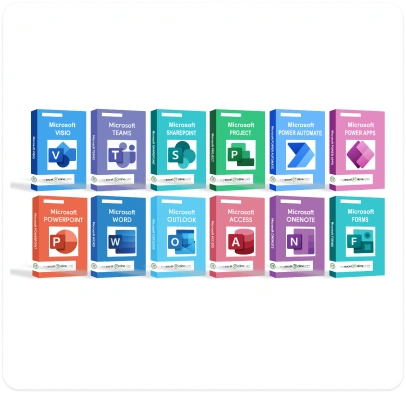
Instant access to 13 Microsoft Office courses that will increase your office productivity!
- Copilot
- Word
- PowerPoint
- Outlook
- Teams
- Plus More!
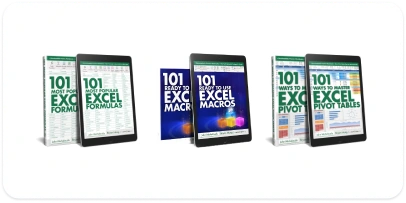
Get access to our comprehensive resources:
- 101 Most Popular Excel Formulas E-Book
- 101 Ways to Master Excel Pivot Tables E-Book
- 101 Ready-to-Use Excel Macros E-Book
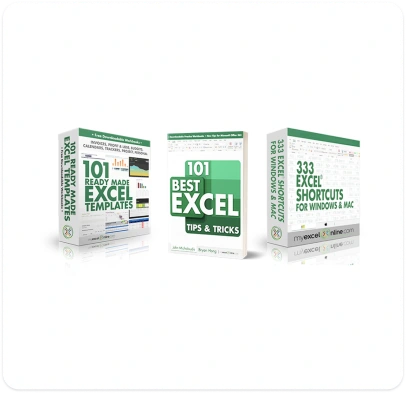
Excel Time-Saving Resources that will save you hours per day at work!
- 101 Excel Tips E-Book
- Ready-Made Excel templates
- 333 Excel Shortcuts Course
Boost your skills and career with this incredible offer!
Gain an edge in your job interviews with our priceless Cheat Sheet featuring insights from world-class Excel and HR experts. Discover:
- Top Excel questions that get asked
- Best strategies for answering them
- Expert Insights from leading Excel and HR professionals
Prepare effectively and impress your potential employers!

Receive unparalleled assistance with our support services:
- Technical & Administrative Support
- Instant answers via our Q&A Forum
- Never Feel Alone
Stay confident and productive with our dedicated support system!

An Exclusive Academy Welcome Pack:
- Academy pen & mouse pad
- Laminated Excel Keyboard Shortcuts template
- “I Excel” Academy T-Shirt
...that will be mailed out to you, free of charge!
(For Annual Members Only!)

Select your plan
Monthly
For 30 days!
Annual Best value
get 2 months FREE + Bonus Academy Welcome Pack
Testimonials

I got another job and my career has improved immensely!
To get a promotion or to get another job, I did need to have better Excel skills. I've got a new job and I feel that I can use some of the aspects of Excel without even doubting that I can do them, which I did before!

Anne Train
Finance Officer
I can now demand a higher level of compensation from my clients
I can now demand a higher level of compensation from my clients. I can do more myself and not have to pay other people to do something that I would have to job out.
Andrew Phillips
Business Consultant
It really saved me tons of time
It really saved me tons of time and my financials were done within a week and a half versus a month! Just do it!
Sue Koenig
Book Keeper & Office Manager
It's really improved my confidence in working with Excel
It's really improved my confidence in working with Excel and also just opened up a lot of opportunities that I didn't have before because I didn't even know the huge amount of things you can do with Excel.
Jonathan Group
Sales Manager
I am saving so much time that I'm actually getting off on time and taking breaks
I am saving so much time that I'm actually getting off on time and taking breaks, because I'm not just behind all the time. People are now coming to me and saying "Can you help me with this?", instead of, I was always the one going to people. It's been kind of a turnaround.
Lori Crossen
Director of Front Office Systems
It's your first source to go to
When you don't know something you tend to go to Google to try to find it, but using MyExcelOnline, that is your first source to go to and they've been really good about keeping the training courses relevent and updated all the time.
Gary Kendrick
Data Analyst
It's been the best investment I've ever done!
Like anything online I'm very sceptical about memberships, and I was very hesitant to start with but I liked what I saw and I thought I'd give it a go.
I've never looked back since, it's been the best investment I've EVER done!
Mark Moggridge
Maintenance Planner
It's helped my confidence immensely
It's nice that people can come to me and say 'Michele can you do this for me?' and I can actually say 'YES I CAN!'. It's helped my confidence immensely.
Michele Porchina
Office Administrator
It's one of the best investments
I think it's one of the best investments that I've ever made on myself, besides school!
Debbie Trenholm
Business Analyst
You need to enroll. You don't have any idea what I've learnt.
You need to enroll. Do you think you know so much about Excel? You don't have any idea what I've learnt. Even I started from the basics and I'm like "oh, I didn't know I could do that".
Sophia Ekokobe
Finance and Business Economist
What customers say about us
We do our best to provide you the best experience ever


Need your team trained up in Excel & office skills without breaking training budget?
Training solutions for companies of all sizes
 Click here to get in touch!
This Course Is for You!

Gain a Competitive Edge with Microsoft Excel Mastery for All Professionals
You're starting to learn Microsoft Excel late in life or you've been using it for decades, you're a manager, accountant, finance analyst, administrator, CFO or any other corporate professional, and have wondered how to get an advantage over your colleagues or peers.

Ace Your Job Interviews with Rapid Excel Mastery
Preparing for job interviews and looking for a fast way to boost your Excel confidence? Enhance your skills quickly to increase your chances of landing your dream job!

Your Ultimate Solution for Excel Answers and Support
Tired of constantly searching Google and YouTube for Excel solutions? Discover a more comprehensive, reliable, and up-to-date source for all your Excel questions, complete with quick support whenever you need it.

Save Hours on Data Analysis and Reporting
You spend hours each month running reports and analyzing data. Wondering if there’s a better, more efficient way of doing things, so you can save hours from your busy schedule and go home early to your loved ones.

Master Your New Data Responsibilities with Minimal Excel Training
You’ve been given new data handling, analysis, and reporting responsibilities with little or no Excel training.
Select your plan
Monthly
For 30 days!
Annual Best value
get 2 months FREE + Bonus Academy Welcome Pack
Frequently Asked Questions
- New users, beginners, intermediates and advanced Excel users.
- Professionals working in the corporate world or government sectors who want to leverage Excel for increased productivity, accurate data management and reporting.
- People who want to change career and apply for a new job that requires knowledge of Microsoft Excel
The tutorials were recorded using Excel 2010, 2013, 2016, 2019 and Office 365.
Most of the concepts taught are compatible with:
- Excel for Windows: 2007, 2010, 2013, 2016, 2019 & Office 365
- Excel for Mac: 2011, 2016, 2019 & Office 365
No - this isn’t like school - this is self-paced learning - you decide when you start and when you finish.
You get access to all the training materials.
You can access the course site from your work computer, home computer, tablet, smartphone or any other device with an internet connection.
The course site remembers your progress, so you can pick-up right where you left off on any device. That means you can watch a few videos at work, then continue right where you left off on your home computer.
If you choose to cancel your membership you will no longer have access to the membership resources.
MONTHLY MEMBERSHIP - You have access to the Academy courses & teacher support each month, as long as you are a paying monthly member. Once you cancel your membership your course access and teacher support will end and you will not be rebilled again the following month.
ANNUAL MEMBERSHIP - You have access to the Academy courses & teacher support for 12 consecutive months. After 12 months you will be rebilled for another 12 months access. You can cancel your membership at any stage and you will not be rebilled again.
* Our 30-Day Money Back Guarantee means you can enroll today, get instant access to all the training resources & support, and if you then decide the Academy isn’t for you, we’ll give you a full refund within 30 days of enrolment.
* There are no pro-rata refunds on the ANNUAL MEMBERSHIP for cancelling after 30 days.
The Academy course is broken down into the following levels:
• Excel Beginner - 7 hours
• Excel Intermediate - 10 hours
• Excel Advanced - 29 hours
• Microsoft Office - 10 hours
This depends on how much time you have to spend each day watching the videos. We recommend watching one or two videos a day and then practicing the techniques in your job.
Each person learns at a different pace, so one can finish all the courses within a few weeks or a few months.
Yes! You will be able to download and keep all the excercise files in each of the courses inside the Academy as well as our PDF Cheat Sheets.
This makes it easy to follow along and practice with our data, whether you are online or offline.
Yes, the Academy course and all the training materials can be accessed on any tablet or smartphone, and it looks beautiful. You can watch the course on your iPad, Tablet or mobile phone anywhere and anytime!
Each video has a discussion section. You can use this section to ask questions and see what questions other students have. We will be there helping to answer your questions.
You can also find answers to your questions on the MyExcelOnline Forum which all members have access to.
You can also send an email to our dedicated email support if you cannot find your answer.
Yes, you can use your company's credit card to pay for the course. A receipt will also be emailed to you that you can submit for reimbursement to your employer. Most companies are willing to invest in making their employees even more awesome at Excel!
Yes, there is a team package available at a discounted price. If you get 1 or more of your colleagues or friends to join up to The MyExcelOnline Academy, then we will give you all a 30% discount on your membership!
Each team member will have their own account and be able to track their progress in the course. Get a quote by filling in this form here: https://www.myexcelonline.com/corporate-academy-team-packages
MONTHLY MEMBERSHIP - You will automatically be billed on the same day every month as you made your first payment. So if you enroll on the 15th of the month, you will be billed on the 15th of each month.
ANNUAL MEMBERSHIP - You will automatically be billed every 12 months. So if you enroll on the 15th of the January 2020, you will be billed again on the 15th of January 2021.
You can cancel your membership at any time and your next scheduled payment will not be taken.
You can get a full refund of your purchase within 30 days of Academy enrolment, with our 30 day money back guarantee.
You can cancel your Academy Membership at any time during your subscription.
If you are cancelling your membership outside the initial 30 day money back guarantee period, a refund will not be issued for your account.
We accept all major credit cards like Visa, MasterCard and American Express, as well as PayPal for the ANNUAL membership only.
The course fees are shown in USD $
Get in contact with us if you want to pay via bank transfer or check at [email protected]
If you need a Tax Invoice for your records, then this can be emailed to you.
We are happy to complete any paperwork your company or government may require.