When we think about document design in Microsoft Word, we must not overlook the significance of typography. Effective typography breathes life into our content, elevating the overall look. It speaks volumes before the reader even begins to process the words. Crafting a document with the right font can turn mundane text into a captivating narrative and hold the reader’s attention from start to finish.
Key Takeaways
- Cute fonts often have unique features like unusual letter shapes, playful curls, or a handwritten appearance, which can make text appear more personal and engaging. Fonts like Curlz MT with its spirals and curls, or Lucida Handwriting with its youthful cursive look, are excellent examples of cute fonts that add personality to documents aimed at younger audiences or for informal purposes.
- To use cute fonts in Microsoft Word, users can simply select the text they wish to change and then choose their preferred cute font from the font options menu. This personalizes the document to match the intended tone or theme, whether it’s for children’s books, invitations, or creative projects.
- Downloading and using new fonts in Microsoft Word involves finding a credible source such as WPS Academy, selecting the desired font, and installing it on the system. Once installed, these fonts become available in the font options menu in Word. This allows us to enhance the documents with fresh and appealing typography.
Table of Contents
Top 10 Cute Fonts in Microsoft Word
1. Bradley Hand ITC – Playful and Personable
The most common choice for a cute font in Microsoft Word will be Bradley Hand ITC. It is used when we want the text to look like it’s handwritten and add a friendly and personal touch to the document. 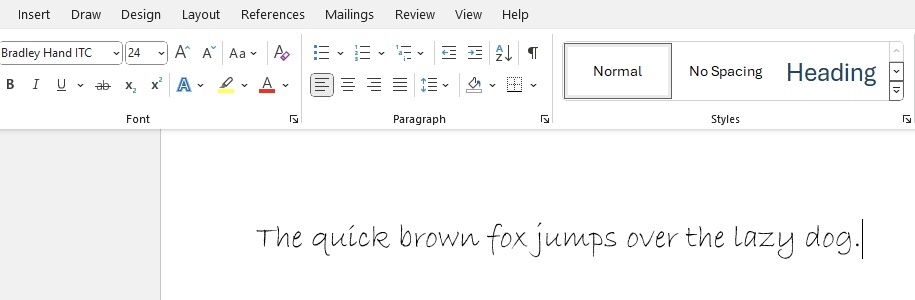
Best For: Casual instructions, teacher’s notes, and personal blogs.
Top 5 Features:
- Handwritten
- Irregular stroke widths
- Large, expressive curves
- Casual vibe suitable for informal settings
- Excellent for mimicking personal handwriting
Five Benefits:
- It adds a human touch to digital text.
- Great for engaging and informal communications.
- Helps to soften the voice of the document.
- Makes text appear more inviting.
- Suitable for a wide range of creative projects.
Two Cons:
- May not be suitable for formal or corporate documents.
- Can be difficult to read in smaller sizes.
2. French Script MT – Elegantly Whimsical
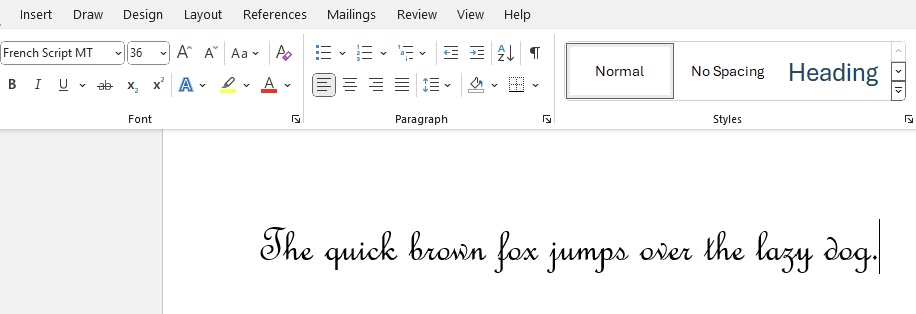
French Script MT steals the second spot on my list for its elegantly whimsical charm. Its calligraphic style was inspired by nineteenth-century penmanship, exuding an air of formality and grace. This typeface carries the sophistication of old-world French handwriting, which is perfect for documents that require an aristocratic touch.
Best For: Wedding invitations, formal correspondence, and stylish branding.
Top 5 Features:
- Elegant calligraphy-inspired letterforms
- Refined and sophisticated design
- Excellent for elevated presentation
- Rich in historic character and style
- Legible while maintaining decorative flair
Five Benefits:
- Conveys a high-class and cultured vibe
- Instantly adds elegance to any document
- Remains readable despite its complex design
- Versatile for a variety of formal occasions
- Captures attention with its unique appearance
Two Cons:
- Can be less suitable for long blocks of text due to ornate details
- May not fit casual or modern-themed documents well.
3. Segoe Print – Casual and Friendly
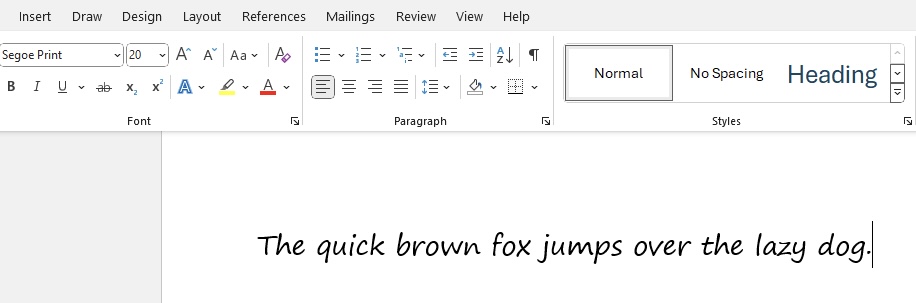
Segoe Print is a handwritten and friendly style font that makes the content look playful without looking messy. This font offers a modern and clean look, making it an ideal choice for anyone who wants to make the dcument informal yet professional.
Best For: Informal cards, Story Books, Personal Notes.
Top 5 Features:
- Looks handwritten
- Easy to read in different font sizes
- Contemporary feel with a friendly vibe
- Characters are equally spaced
- Part of the Segoe family
Five Benefits:
- Adds personalisation to documents without sacrificing professionalism
- Easy to read, making it practical for various applications
- Keeps the document light-hearted and approachable
- Suitable for digital and print mediums
- Newer and less overused compared to similar fonts
Two Cons:
- May not convey the necessary gravitas for very formal documents
- Some may prefer a less stylized font for dense text
4. Comic Sans MS – The Controversial Cutie
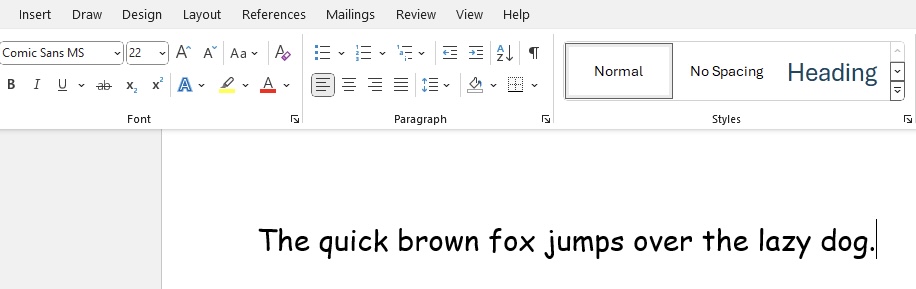
Comic Sans MS undoubtedly earns its reputation as the ‘controversial cutie’ among fonts. Designed with the intention of being light-hearted and fun, it’s reminiscent of comic book lettering, which is where it gets its name. Despite its critics, Comic Sans MS maintains a steadfast popularity in informal settings due to its playful and child-friendly character.
Best For: School newsletters, informal event flyers, and engaging presentations.
Top 5 Features:
- Fun and comic book-inspired style
- Highly readable even at smaller sizes
- Familiar to many users as a Microsoft staple
- Rounded, sans-serif typeface with a soft aesthetic
- Widely recognized and available
Five Benefits:
- Helps create engaging and approachable content
- Can make reading easier for dyslexic individuals
- Invites an informal, relaxed context for the reader
- Offers excellent on-screen readability
- Maintains its clarity when printed in color or black and white
Two Cons:
- Often deemed unprofessional in formal or corporate environments
- Its popularity has led to overuse and backlash in design circles
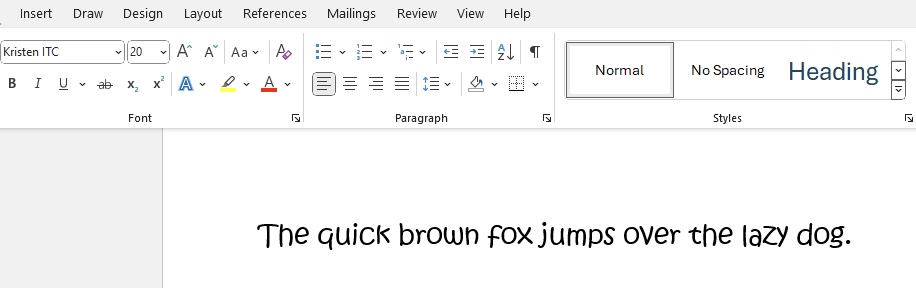
5. Kristin ITC – Sweet and Quirky
Kristin ITC is a sweet and quirky font choice that caught my eye for its charming irregularities and playful design. Designed to appear as though written by a child, its letters are bubbly and animated, with the kind of endearing imperfection that gives off a homemade vibe. This font is fantastic for injecting personality and fun into projects.
Best For: Themed party invitations, children’s books, and creative branding elements.
Top 5 Features:
- Childlike handwriting feel
- Lively and uneven letter shapes
- Bold for increased visibility
- Whimsical tone for engaging content
- Friendly and inviting to readers of all ages
Five Benefits:
- Instills a sense of joy and creativity into documents
- Perfect for audiences that appreciate a touch of fun
- Helps text stand out due to its bold form
- Fosters a playful atmosphere in textual communication
- Ensures your message won’t be missed or forgotten
Two Cons:
- Can be less appropriate for serious or formal documents
- Overuse within a document may lead to a decrease in readability
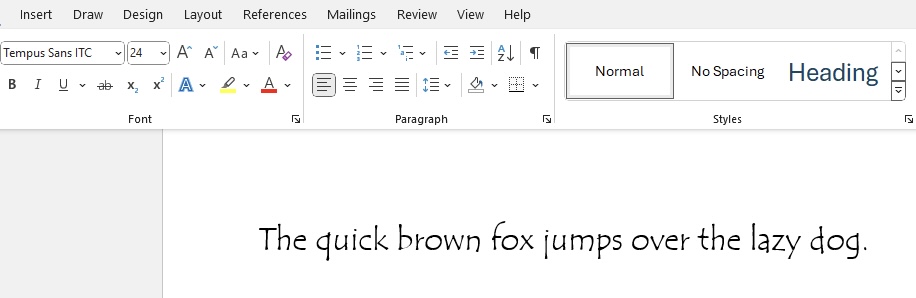
6. Tempus Sans ITC – Soft and Approachable
Tempus Sans ITC makes an appearance on my list as a soft and approachable choice. Its story is quite unique, having been designed on inexpensive, porous paper with a fountain pen, which contributes to its organic and hand-drawn appearance. This font truly captures a contemporary feel while being easy on the eyes, making it a versatile asset in my font collection.
Best For: Modern brochures, stylish advertisements, and expressive digital content.
Top 5 Features:
- Hand-drawn aesthetic with modern craftsmanship
- Unique look due to the creation process
- Soft edges and approachable design
- Maintains legibility across various applications
- Less formal than traditional serif fonts
Five Benefits:
- Brings a personal touch to professional documents
- Stands out without being overwhelming
- Easy to integrate into various design schemes
- Excellent for both headers and body text
- Conveys a sense of innovation and creativity
Two Cons:
- Might not match the tone of extremely formal or traditional projects
- Could be less impactful in situations requiring a bolder statement
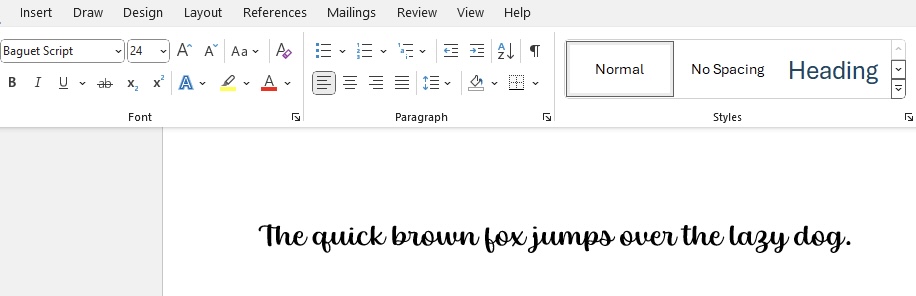
7. Baguet Script – Bubbly and Artistic
Baguet Script is a gem in the world of cute fonts, offering a bubbly and artistic flair that I find simply irresistible. With its script-like flow and decorative alternates, it can transform any project into a piece of art. This font radiates a sense of romance and creativity, perfect for those who wish to leave a lasting impression with their designs.
Best For: Special invitation cards, creative logotypes, and unique branding initiatives.
Top 5 Features:
- Script font with alternates and washes
- Bubbly and fluid letterforms
- Artistic touches that add unique flair
- Groovy and romantic vibe perfect for distinct projects
- Offers a range of customization for various uses
Five Benefits:
- Elevates the aesthetics of any project
- Suitable for custom and special occasion designs
- Adds a personal and handcrafted feel
- Delivers versatility through alternate characters
- Engages audiences with its fun and lively appearance
Two Cons:
- May not be ideal for contexts requiring high readability, like dense text
- Its decorative nature might not align with conservative brand images
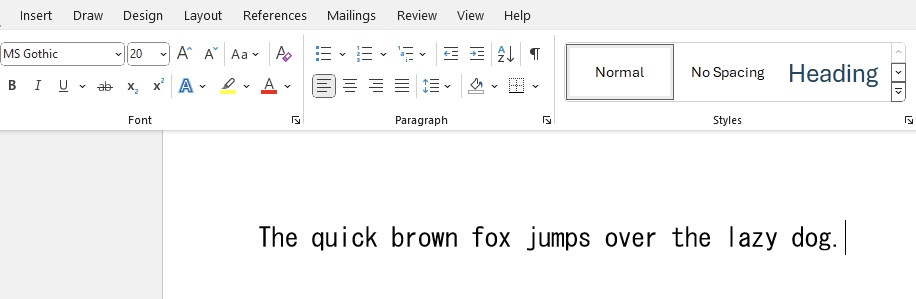
8. MS Gothic – Innocent and Fun
MS Gothic is like a breath of fresh air in the font world, bringing with it an innocent and fun vibe that is perfect for projects geared towards a youthful audience. Its unique bouncy character invites readers into a whimsical world, making it an excellent choice for social media posts, greeting cards, and any design that aims to bring a smile to the viewer’s face.
Best For: Blogging, social media graphics, branding for kid-centric businesses.
Top 5 Features:
- Unique script signature font with a bouncy character
- Appears handcrafted and personable
- Perfect for youthful and playful designs
- Suitable for digital and print mediums
- Radiates an entertaining and approachable personality
Five Benefits:
- Creates a lighthearted mood in communication
- High charm factor increases engagement
- Keeps content looking fresh and modern
- Ideal for making memorable brand impressions
Two Cons:
- Might not be taken seriously in formal or traditional business contexts
- The playful quirks may reduce legibility in smaller print sizes
9. Candara Light – Sleek and Graceful
Candara Light is absolutely worth mentioning when we talk about sleek and graceful fonts. As a sans-serif typeface with slightly angled verticals, it radiates modernity and sophistication. It possesses a unique blend of readability and style that makes it a brilliant choice for both digital and print use.
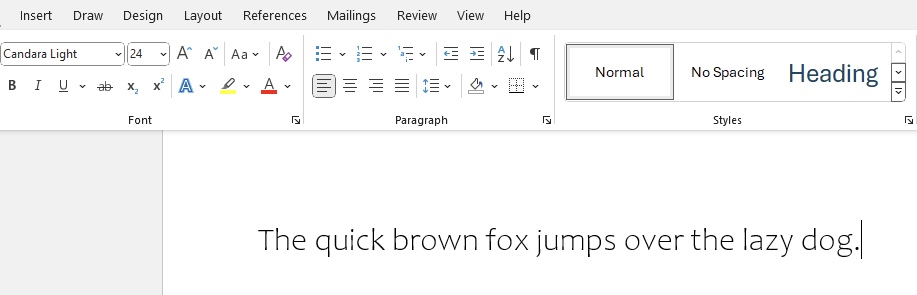
Best For: Professional presentations, contemporary print media, and user interfaces.
Top 5 Features:
- Modern humanist sans-serif
- Slightly angled vertical strokes for a dynamic look
- Excellent readability
- Clean lines that convey elegance
- Designed to perform well on screens and in print
Five Benefits:
- Imparts a contemporary elegance to documents
- Balances legibility with aesthetic appeal
- Versatile font for a broad range of applications
- Light and airy feel suitable for large bodies of text
- Supports a user-friendly experience in digital designs
Two Cons:
- Might not provide enough personality for more whimsical or thematic designs
- Its subtleties can be lost when printed at very small sizes
10. Jokerman – Cheerful and Exciting
Jokerman is a font that’s bubbly with a fun personality, making it the perfect closer for my roundup of cute fonts. With its embellishments and unique character accents, Jokerman provides that upbeat and enthusiastic vibe to any project. It’s whimsical enough to make any text spring to life which is why I find it ideal for anything that should scream fun and excitement.
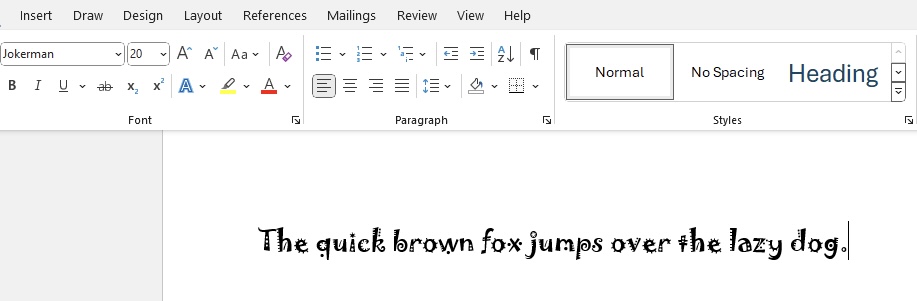
Best For: Display text for themes parks, children’s birthday invitations, and funky branding initiatives.
Top 5 Features:
- Highly decorative with unique character designs
- Playful embellishments and accents
- Bold and attention-grabbing
- Exudes a fun, casual vibe
- Particularly impactful for titles and headings
Five Benefits:
- Instantly injects energy and enthusiasm into documents
- Makes a memorable impact on audiences
- Stands out in marketing and promotional materials
- Transforms ordinary text into eye-catching statements
- Conveys cheerfulness and friendliness in visual communication
Two Cons:
- Limited in terms of readability for lengthy text passages
- Its distinctive style may not be versatile enough for more serious contexts
Matching Cute Fonts with Your Document’s Purpose
Personal Projects and Party Invitations
I’ve always felt that personal projects and party invitations offer the perfect opportunity to give free rein to your creativity with fonts. For instance, creating invitations with fonts like French Script MT or Baguet Script adds a bespoke elegance that makes your guests feel special. Cute fonts like Bradley Hand ITC and Ink Free embody the essence of personality and warmth, perfect for personal letters or homemade greeting cards that touch the heart.
For vibrant party invitations, Jokerman or Comic Sans MS will capture the festive spirit with their fun and lively essence. These fonts make the event details stand out, and it’s a surefire way to build excitement and set the tone for the party.
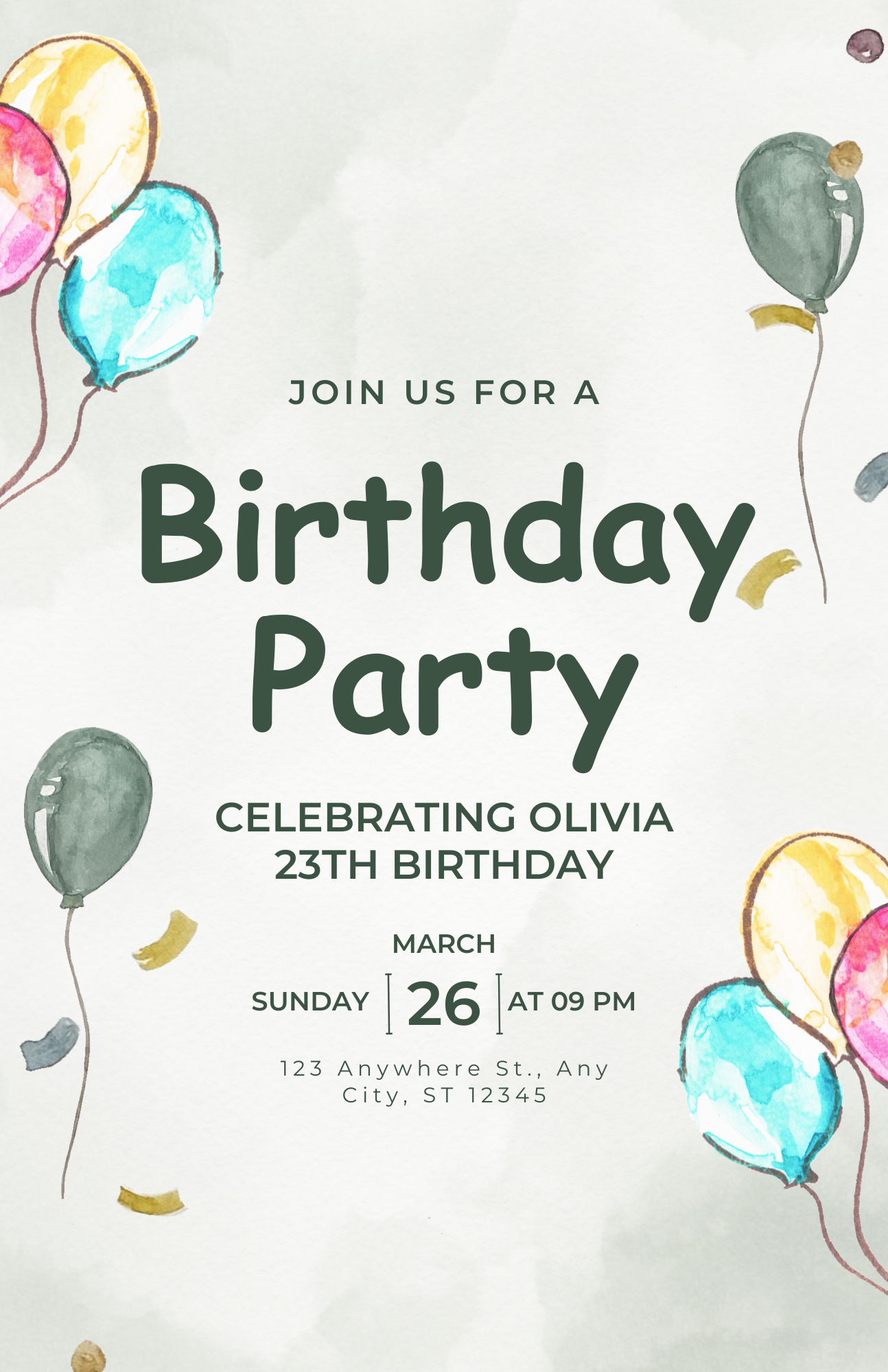
Here, I enjoy aligning the font choice with the party’s theme—be it playful and quirky, or chic and sophisticated, the right font sets expectations and intrigues guests.
Reading Materials for Children
When creating educational materials for children, it is very important to choose a correct font that makes the book interesting and engaging for them. Fonts like Segoe Print and Baguet Script provide a fun vibe and are also practical to use. These fonts can be easily read by children, and they also make the reading material fun and playful.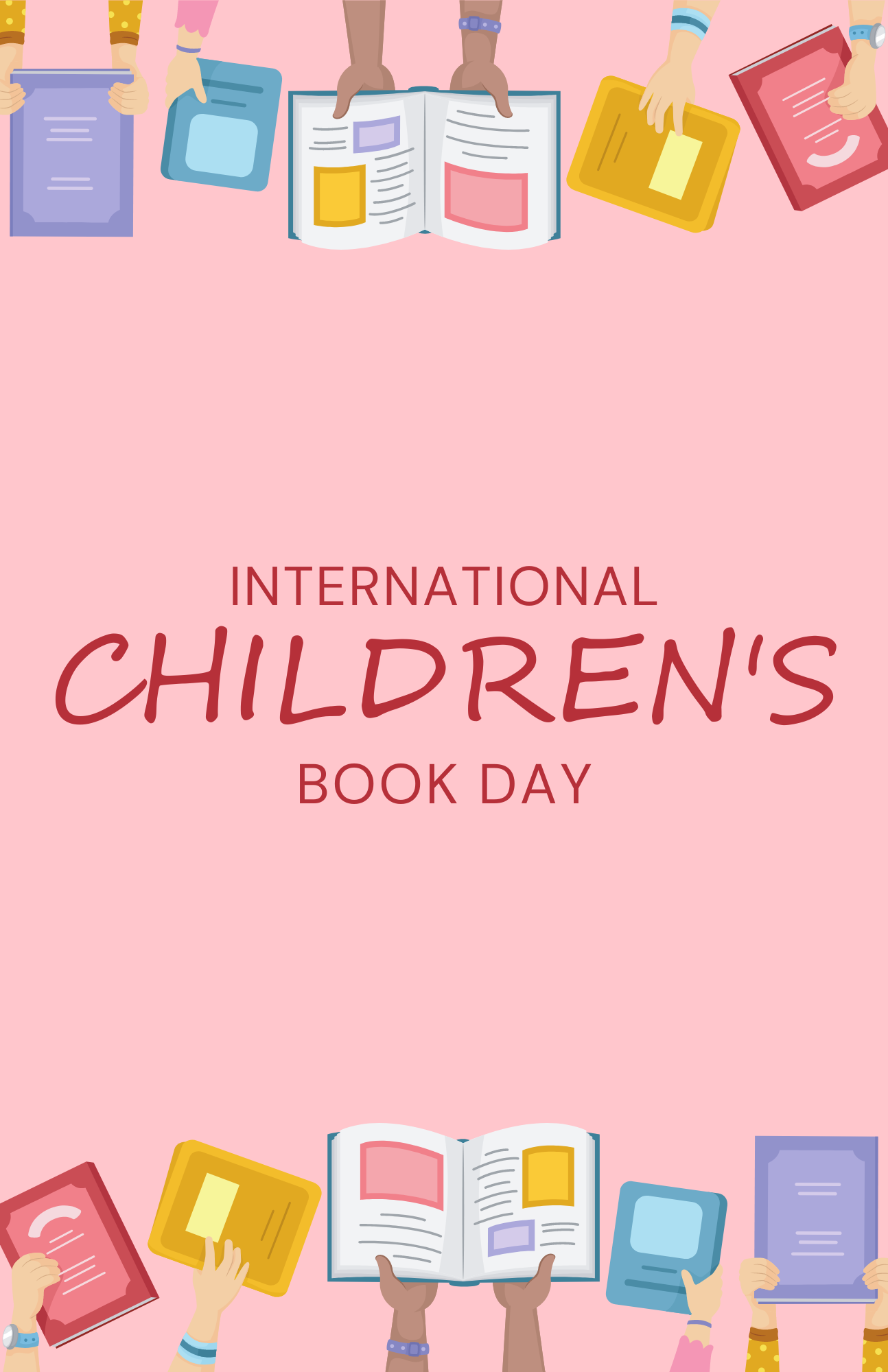
The motive behind selecting an appropriate font is not only its readability but also the subject matter. For example, we should use a playful style for an environment unit or a classic, old-style font when teaching history.
Tips & Tricks
Balancing Clarity with Style
When I am selecting a cute font, I make sure that it is not only readable but also looks fun. For instance, Candara Light and Segoe Print do this well and provide a perfect balance. We can easily use these fonts as headers that will highlight the topic without overshadowing the content.
For long texts where detailed information is present, it is ideal to choose fonts like Tempus Sans ITC as they provide clarity. For sections that we need to highlight, we can opt for fonts like French Script MT to make the section shine.
Combine Fonts to Create a Pleasing Look
Pairing fonts is not a simple task; the idea behind it should be to elevate the overall look of the document while keeping it readable. For headings, we can use a happy font like Bradley Hand ITC to make the sentence more expressive and for the content, we can use a font like Candara Light to make it simple and provide clarity.
If this is done correctly, the reader will go through the document smoothly and also emphasise the important sections. Also, make sure to stick to two or three fonts at most in the entire document. Too many fonts can make it cluttered and hard to read.
How to Install New Cute Fonts
Step by Step Guide
The process to add a new font to Microsoft Word is quite straightforward. Firstly, make sure that we are downloading the font from a reputable source like Google Fonts or DaFont.
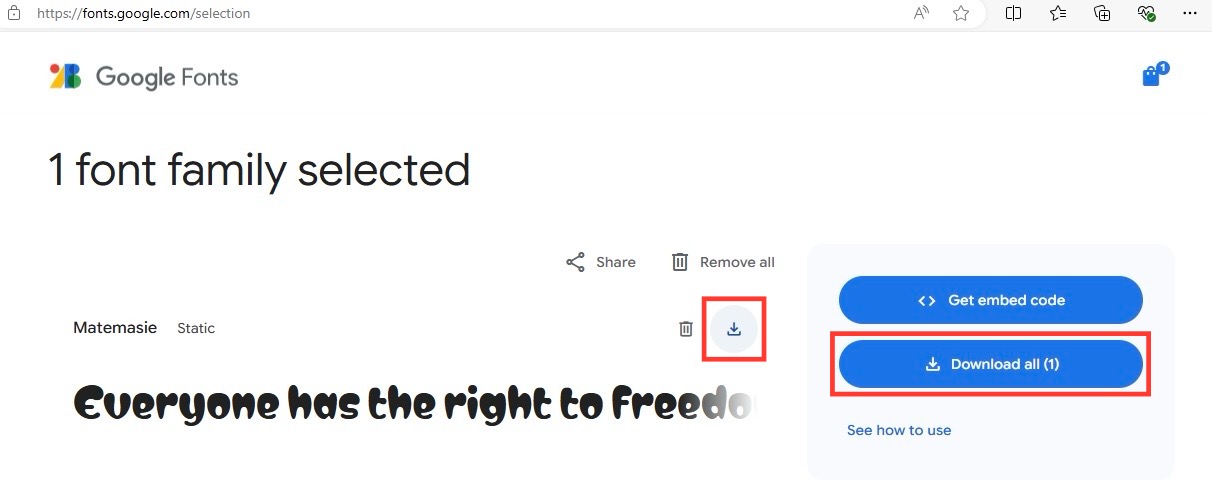 After downloading, simply right-click the font file and choose Install. This will automatically add the new font to the Word font library.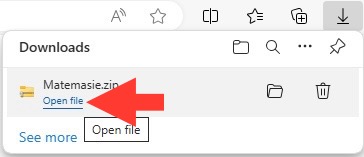
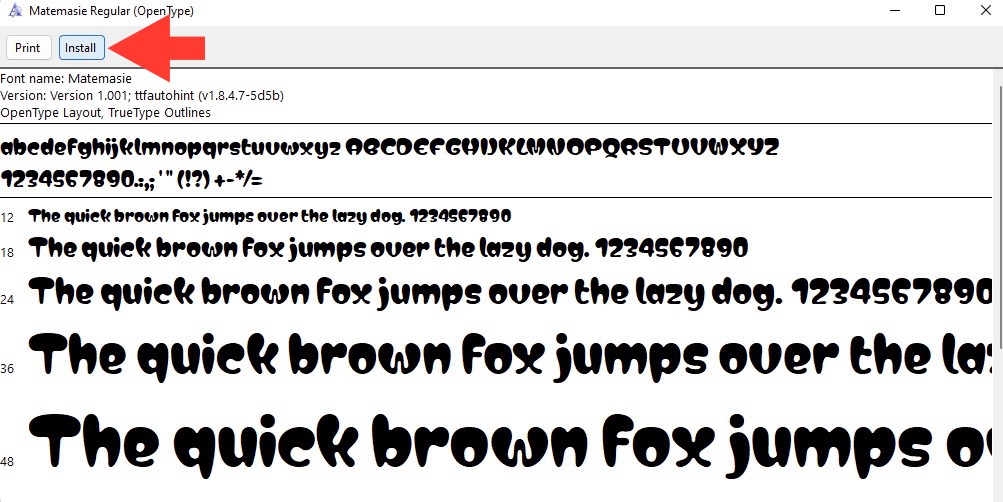
Mac users can open the downloaded font file and click on the ‘Install Font’ option. It is important to restart Microsoft Word once the installation has been completed. This will ensure that the new font is available to be used. By using new typography elements, we can provide a fresh perspective on the document.
Ensuring Compatibility across Versions of Microsoft Word
We need to be careful about our font selection when the document is being shared with others. It is safer to use widely available fonts such as Arial or Times New Roman; otherwise, text might not display correctly on another person’s computer.
If we plan to use a unique font, we should embed it into the document before sharing. To do so, click the File > Options and then select ‘Save’. Finally, check the box for ‘Embed fonts in the file’ under Preserve fidelity. Not all fonts have the license to be embedded in the document, so please check the font’s usage rights.
We can also save the document as a PDF to ensure that the document stays the it is intended to be, regardless of the version being used.
FAQs
Which fonts can be used in Professional Documents?
For professional documents, one should use a font that is readable and looks formal. For example, Times New Roman and Garamond can be used in academic material as they look traditional. Arial or Calibri can also be used as they offer clarity and modern style.
Is it safe to download custom fonts?
Yes, custom fonts are considered to be safe if they are downloaded from a reputable source like Google Fonts or Font Squirrel. This will ensure that there are no malware present. As an additional precaution, it is advised to scan your downlaod with an antovirus software.
How to choose the correct font for a project?
To choose the right cute font, you should first understand the tone and readability of the project. For playful and informal project, use Bradley Hand ITC or Comic Sans MS and for elegant projects, use French Script MT. Always check how the font with your content to ensure it conveys the right message.
Can the installed font be used on other software?
Once you have installed the font on your computer, it can be used in other software like Adobe Photoshop as well. Just make sure the font license permits the same.

John Michaloudis is a former accountant and finance analyst at General Electric, a Microsoft MVP since 2020, an Amazon #1 bestselling author of 4 Microsoft Excel books and teacher of Microsoft Excel & Office over at his flagship MyExcelOnline Academy Online Course.

 30 Days - Full Access









