 Free Practice Workbook
If you work with financial data in Excel, the interest rate is the most common term you use. You may have to convert the effective interest rate to the nominal interest rate; this is where the NOMINAL function becomes useful. In this article, you will learn how to calculate the nominal interest rate in Excel.
Key Takeaways:
- The NOMINAL function converts an effective interest rate into a nominal rate.
- It requires two inputs: effective rate and number of periods per year.
- The nominal rate does not include the effect of compounding.
- It helps compare loans and investments on the same basis.
- Correct inputs are important to avoid wrong results.
Table of Contents
Introduction to Interest Rate
Nominal interest rate is the first figure you will encounter when considering an investment or a loan. However, while nominal rates provide a baseline, they do not capture the full picture. They exclude the effects of compounding.
Since these rates are quoted per period, it can be misleading if compounding is not considered. Whether you are saving for retirement or looking into bonds, understanding both the nominal and effective rates is important.
Understand Nominal Formula
What is the NOMINAL Function?
The NOMINAL function in Excel is a great tool for interest rates. It calculates the nominal annual interest rate given an effective rate and the number of compounding periods per year.
- The effective rate includes the impact of compounding.
- The nominal rate excludes the impact of compounding.
The NOMINAL function helps convert the effective rate back into a nominal rate so you can compare or use it in different financial calculations.
Syntax and Parameter
The formula is:
NOMINAL(effect_rate, npery)
- effect_rate: The effective annual interest rate expressed as a decimal
- npery: The number of compounding periods in a year
Practical Applications
Calculate Annual Nominal Interest Rate
Let’s say you have an investment with an effective annual interest rate of 5%, compounded monthly. Here’s how to calculate the nominal annual interest rate:
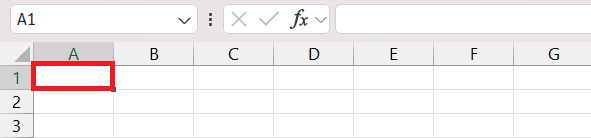
STEP 1: Select a blank cell where you want the result to appear.
STEP 2: Enter the NOMINAL function formula:
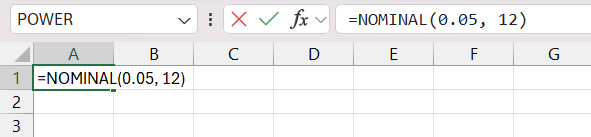
Here:
- 0.05 is the effective annual interest rate (5%).
- 12 represents the number of compounding periods per year (monthly).
STEP 3: Press Enter.
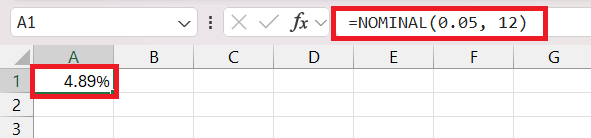
The cell will display the nominal annual interest rate, which is approximately 4.89%.
Loan Comparison
When you look at two different loan offers with varying effective interest rates and compounding cycles, the differences in compounding make a straightforward comparison challenging. By converting these rates to their nominal counterparts using Excel, I can make an apples-to-apples comparison.

Tips and Tricks
- Make sure that the npery mentioned in the formula is correct. An incorrect number can skew the results.
- Remember that the NOMINAL function can only provide an annual rate. When working with rates for different time spans, you need to adjust them to an annual basis.
- Do not confuse the nominal rate with the effective rate.
- Forgetting to separate parameters with a comma can return an error.
Advanced Techniques
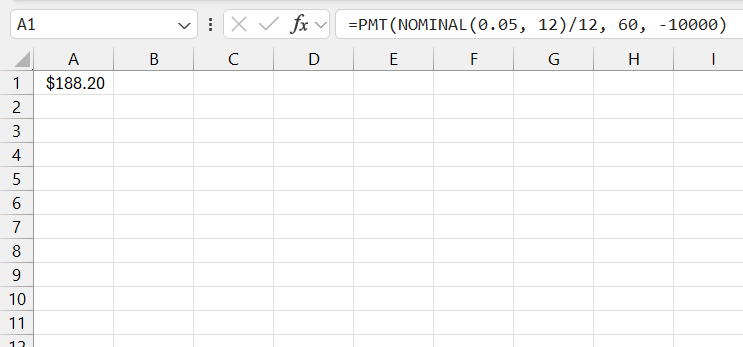
To calculate the monthly payment on a $10,000 loan with an effective annual rate of 5% compounded monthly over 60 months, you can use the following:
FAQs
What does the NOMINAL function do?
It converts an effective annual interest rate into a nominal interest rate.
What is the syntax of the NOMINAL function?
The syntax is:
=NOMINAL(effect_rate, npery).
What does npery mean?
It is the number of compounding periods in one year.
Can I use NOMINAL for monthly rates?
No, it returns an annual nominal rate only.
What happens if I enter the wrong values?
Excel may return an error or an incorrect result.

John Michaloudis is a former accountant and finance analyst at General Electric, a Microsoft MVP since 2020, an Amazon #1 bestselling author of 4 Microsoft Excel books and teacher of Microsoft Excel & Office over at his flagship MyExcelOnline Academy Online Course.

 30 Days - Full Access









