 Free Practice Workbook
Depreciation is the gradual reduction in the value of an asset over time due to wear and tear, age, or obsolescence. Straight-line depreciation is the simplest and most commonly used method for depreciation calculation. The SLN function in Excel is a great tool that can be used to calculate straight-line depreciation. In this article, you will learn how to use the SLN function in Excel.
Key Takeaways:
- SLN stands for straight-line depreciation.
- It assumes that the asset loses the same value each life.
- It uses cost, salvage value, and life as inputs.
- It gives the same depreciation amount every year.
- It is simple but not ideal for all asset types.
Table of Contents
What is Straight Line Depreciation?
Straight Line Depreciation is the simplest and most commonly employed method to calculate an asset’s loss of value over time. It assumes an asset will lose the same value each year over its useful life. This approach is useful as it is easy to use and provides consistent results.
It allows for predictable financial planning. It spreads out the initial cost of an asset, minus any salvage value, evenly across its useful lifespan.
SLN Function
Syntax
The syntax for the SLN function is:
=SLN(cost, salvage, life)
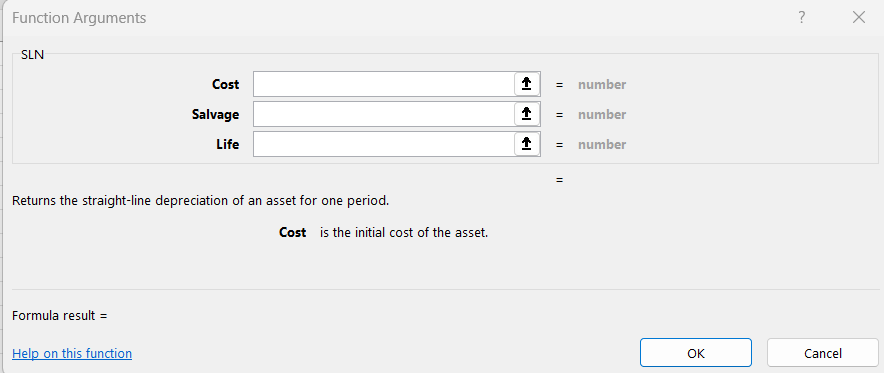
Cost: This is the initial investment or purchase price of the asset.Salvage: It is the expected value of the asset at the end of its useful life.Life: This is the asset’s useful lifespan in years.
Using SLN in Real-World Scenarios
Depreciating Office Equipment
Imagine a company has invested $7,500 in new office computers with an expected useful life of five years and a salvage value of $500. You can use the SLN function to calculate the annual depreciation:
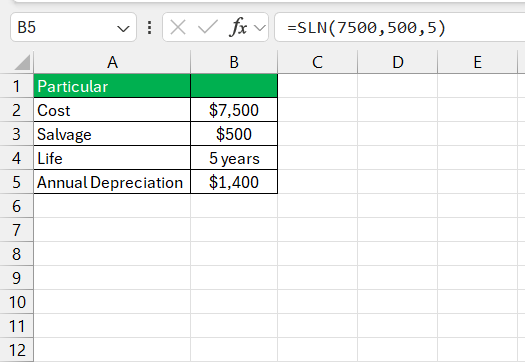
The output reveals that the yearly depreciation expense for the computers is $1,400.
Tips and Tricks
Why Use the SLN Function?
- The SLN method is easy to understand and implement.
- It provides a consistent expense every period.
- It is a standard method of depreciation accepted by many accounting practices.
Limitations of the SLN Function
- The SLN method does not consider the time value of money. It doesn’t account for the fact that a dollar today is worth more than a dollar in the future.
- The SLN method may not be appropriate for assets that have variable depreciation patterns.
- For assets with complex depreciation patterns, other methods like Declining Balance or Units of Production may be more appropriate.
Troubleshoot Common Errors
While the SLN function is straightforward, users might encounter typical pitfalls.
One common error arises from incorrect input values, leading to inaccurate depreciation calculations.
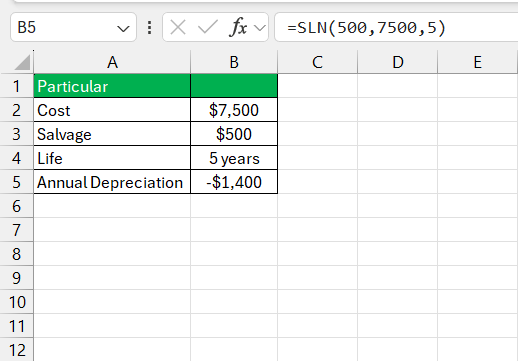
Another issue is the inconsistency in the units of measurement for the asset’s life. Some might mistakenly input months instead of years and skew the results.
Furthermore, assuming the salvage value to be zero by default may result in overstated depreciation expenses. Similarly, overly optimistic or pessimistic figures of useful lifespan can lead to financial misrepresentation.
Tips & Tricks
- Verify that the cost, salvage value, and useful life are correctly entered and correspond to the same asset.
- Check that you are using consistent units across all parameters.
- Document assumptions regarding the salvage value and useful life to maintain transparency.
- Use named ranges or tables in Excel for better readability.
- Test the SLN function with known values to confirm that it operates as expected.
FAQs

John Michaloudis is a former accountant and finance analyst at General Electric, a Microsoft MVP since 2020, an Amazon #1 bestselling author of 4 Microsoft Excel books and teacher of Microsoft Excel & Office over at his flagship MyExcelOnline Academy Online Course.

 30 Days - Full Access









