 Free Practice Workbook
Key Takeaways:
- AVEDEV function calculates the average of absolute deviations from the mean.
- It helps to measure how widely data points are spread in the dataset.
- Proper syntax and accurate data formatting are essential for AVEDEV to work correctly.
- Advanced applications include analyzing multiple ranges and conditional subsets.
- Real-world use cases span finance, business, and strategy optimization through variability analysis.
Table of Contents
Understand Average Deviation
It is important to measure variability in data sets for various reasons:
- It offers a better understanding of the dataset.
- It can check if the numbers are tightly clustered or spread out.
- It gives a better perspective on the expected results.
- It can be useful in decision-making and forecasting.
The AVEDEV function is a useful tool that can calculate the average deviation of a set of values. This function calculates the mean difference between each data point and the overall average. Unlike variance and standard deviation functions, AVEDEV uses the absolute values instead of squaring the deviations. It thus maintains the scale of the original data.
This function requires just the data ranges. It’s perfect for analyzing consistency in data sets where the average is the point of comparison.
AVEDEV Function
Syntax
The AVEDEV function in Excel can be used to measure the average of absolute deviation. The syntax is:
=AVEDEV(number1, [number2], …)
Excel allows you to add upto 255 arguments. At least one argument is compulsory.
Examples
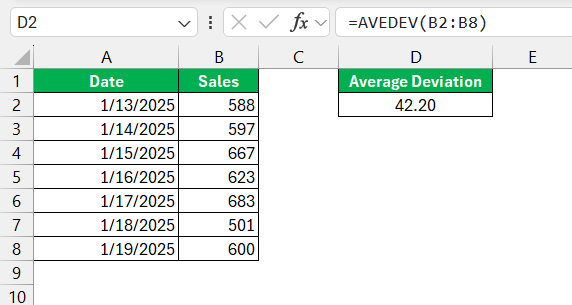
Suppose you are analyzing the daily sales data of a company. The AVEDEV function can be used to calculate the average deviation.
Advanced Techniques
Multiple Ranges
The AVEDEV formula can be used even when the data is distributed across the worksheet. You can use a comma to separate the ranges in the formula.
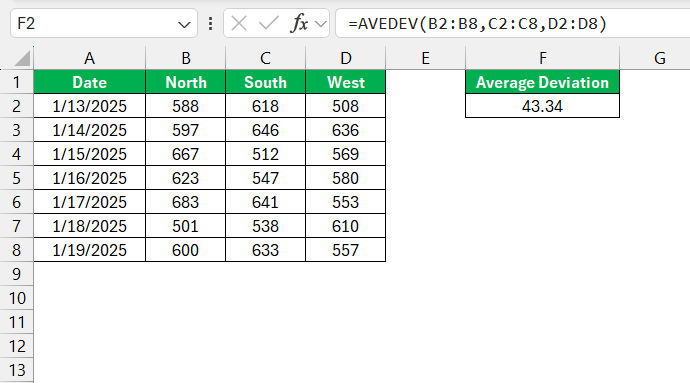
Excel will treat these multiple ranges as a single continuous range and calculate the average deviation of this single dataset.
Conditional Averaging
You can use the AVEDEV function with the IF function to calculate conditional averaging. This will calculate the average deviation of the dataset that meets a specific criterion.
Suppose you are analyzing monthly sales data that you want to include dataset that exceeded a certain threshold.
=AVEDEV(IF(B2:B8>600, B2:B8))
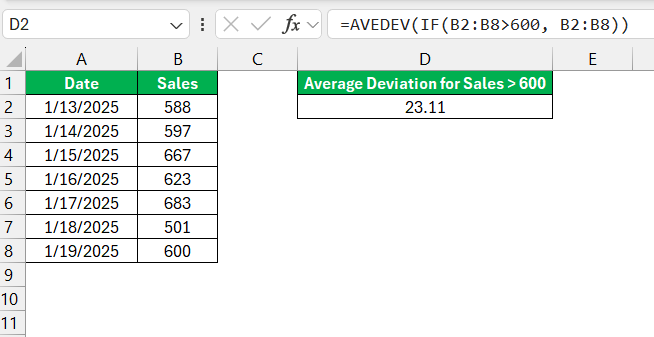
This function will calculate the average deviation of only those months where sales exceeded 600 units.
FAQs
What is the average deviation?
The average deviation is the mean of the absolute differences between each number in the dataset. It measures the dispersion of the values from a central data point.
How to calculate weighted average deviation using AVEDEV function?
The AVEDEV function in Excel does not support calculations for weighted average deviation. It calculates the unweighted mean of absolute deviations from the average of a data set.
What is the difference between AVEDEV and STDEV?
AVEDEV calculates the average of the absolute deviations from the mean, while STDEV computes the standard deviation, indicating how much data points differ from the mean squared. AVEDEV isn’t influenced by extreme values as much as STDEV.
Which sd is used?
In Excel, use STDEV.S for a sample and STDEV.P when you have the entire population of data. STDEV.S estimates standard deviation while STDEV.P calculates it precisely.
Why is standard deviation important?
Standard deviation is important as it measures how widely data points are spread in the dataset. It is useful in risk assessment and decision-making.

John Michaloudis is a former accountant and finance analyst at General Electric, a Microsoft MVP since 2020, an Amazon #1 bestselling author of 4 Microsoft Excel books and teacher of Microsoft Excel & Office over at his flagship MyExcelOnline Academy Online Course.

 30 Days - Full Access









