 Free Practice Workbook
Key Takeaways:
-
- MAPE translates forecast errors into easy-to-understand percentages, making comparisons across datasets straightforward.
- Make sure there are no zeroes or errors in your dataset to avoid misleading results in MAPE calculations.
- Use formulas like
=AVERAGE(ABS((actual - forecast) / actual) * 100)for quick and reliable calculations. - Businesses leverage MAPE to improve inventory management, refine demand planning, and boost client satisfaction.
- Exclude non-recurring outliers from your data to maintain reliability.
Table of Contents
How to Calculate MAPE
Prepare Data
The first step should be to organise the data efficiently. You need to create three columns for months, actual sales, and forecasted sales amounts.
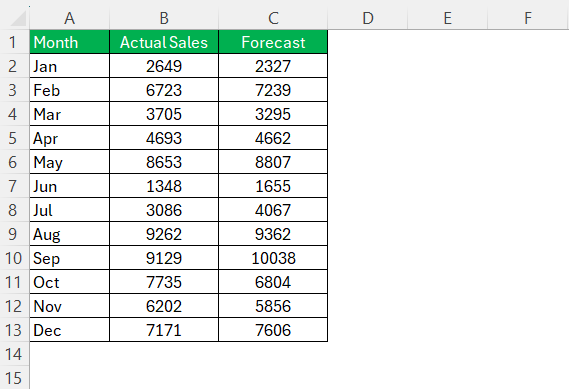
Try to include long historical data, as it gives a strong base for assessing the accuracy of the forecasts. But, if that is not possible, you can use the most recent data as well.
Formula Breakdown
When calculating MAPE, it is important to know the components of this formula.
-
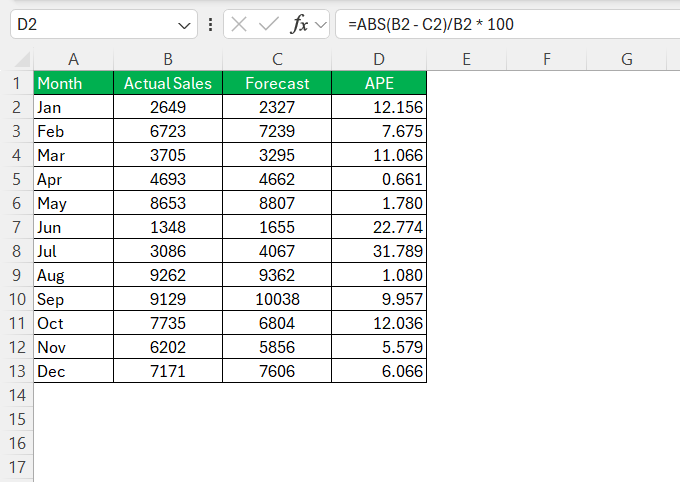
- Compute the Absolute Percentage Error (APE)
- First, you need to get the absolute difference between the actual and forecasted values.
- Then, divide the difference by the actual value
- Multiply it by 100
- Compute the Absolute Percentage Error (APE)
=ABS(actual - forecast)/actual * 100
-
- Derive the MAPE – Calculate the average of all the APEs
=AVERAGE(range of APEs)
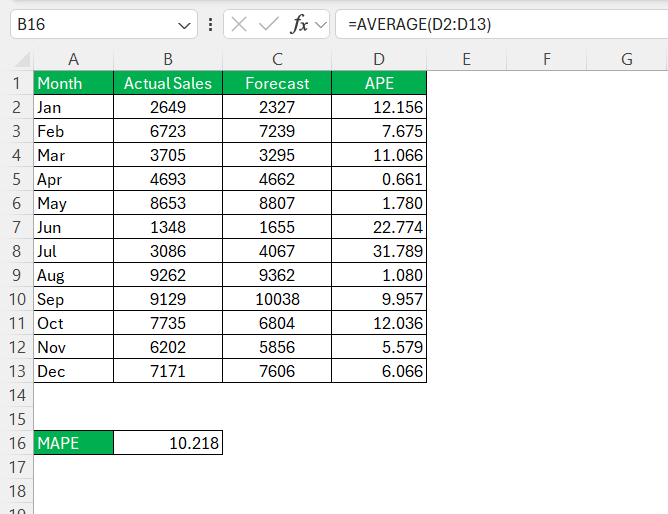
The final result will be a percentage figure and will tell us the average deviation of the forecasts from the actual values.
Tips & Tricks
Automate the Process
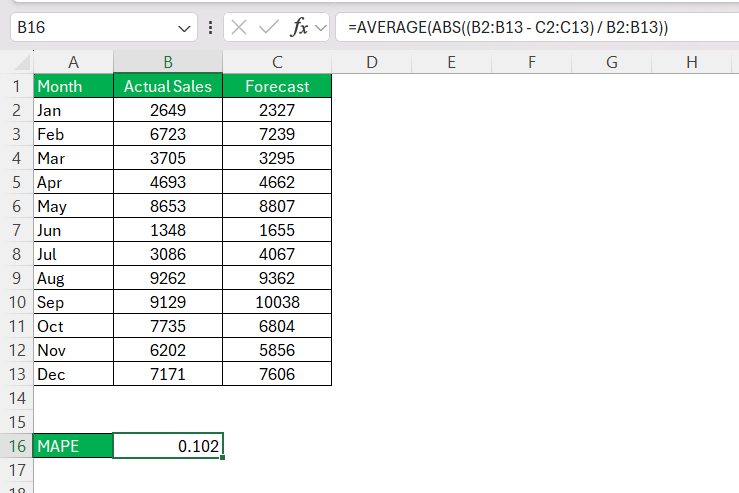
Instead of multiple steps, you can also use an array function to get MAPE in a single step.
STEP 1: Use this formula:
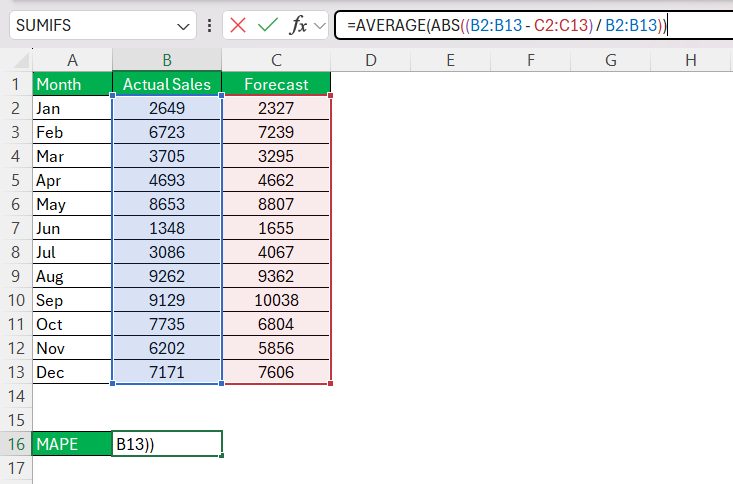
STEP 2: Press Enter.
FAQs
What is MAPE?
MAPE stands for Mean Absolute Percentage Error. It’s a measure used to determine the accuracy of forecast models by calculating the average percentage error between the forecasted and actual values. The lower the MAPE, the more accurate the model’s predictions are.
How to calculate MAPE formula?
You can calculate MAPE by following the steps below:
-
- Subtract the forecasted value from the actual value
- Get the absolute value by removing any negative sign
- Divide by the actual value
- Multiply by 100
- Average of all MAPEs
What Is the Limitation of MAPE in Excel?
The main limitation of working with MAPE is that the data should have zeros in the actual value. Dividing any number by 0 will cause errors.
How to automate the calculation of MAPE in Excel?
For large datasets, you can automate the calculation of MAPE by writing custom functions in Excel.

John Michaloudis is a former accountant and finance analyst at General Electric, a Microsoft MVP since 2020, an Amazon #1 bestselling author of 4 Microsoft Excel books and teacher of Microsoft Excel & Office over at his flagship MyExcelOnline Academy Online Course.

 30 Days - Full Access









