 Free Practice Workbook
Table of Contents
Markup Calculations
Markup Percentage
Markup percentage is a straightforward yet important concept that involves calculating the proportion of cost that is added to a product or service to determine its selling price. It reflects how much more I’m charging compared to cost, i.e., representing the profit margin on each sale.
Here is the breakdown of markup percentage:
- The cost price of an item is $20.
- Decide on a markup of 50%. The markup amount will be 50% of $20, i.e., $10.
- Selling price will be $20 + $10, i.e., $30.
Markup Formulas in Excel
- First, you need to create a table with the following columns: Cost Price, Selling Price, and Markup Percentage.
- Enter the cost and selling price in cells A2 and B2, respectively.
- Enter the markup formula in cell C2: =((B2-A2)/A2) * 100.
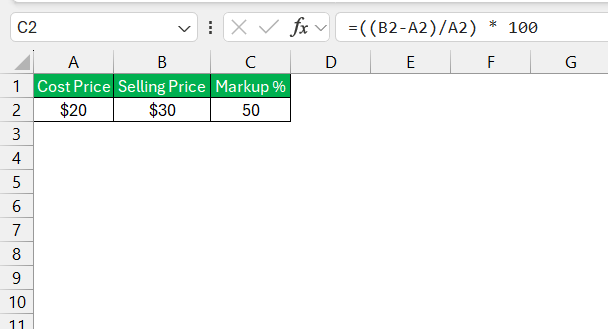
This formula will:
- Find the difference between the selling price and the cost
- Divide this difference by the cost
- Multiply the result by 100
Advanced Techniques
Finding Optimal Sales Price
If you know the cost price of a product and you can identify a desired markup percentage, you can easily use these values to get the optimal sales price.
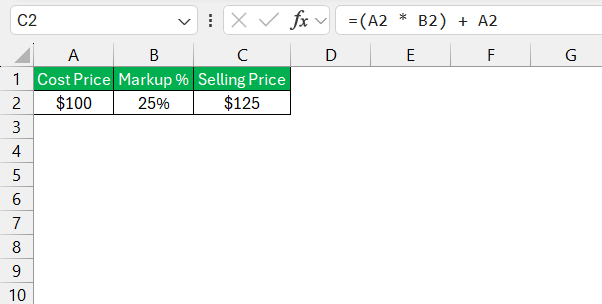
The formula to find the optimal sales price will be:
=(Cost * Markup Percentage) + Cost
For example: Let’s say that the cost price of a product is $100 and you want to add a markup pf 25%. Then, the optimal sales price will be:
=(100 * 0.25) + 100
=125
Initial Markup vs. Maintained Markup
For an optimal pricing strategy, it is important to know the difference between initial markup and maintained markup.
Initial markup is the markup that was originally set for the product. It takes into account the cost price and profit percentage to get the selling price. Maintained markup is the actual profit that you realize after subtracting the discounts, allowance, and other markdowns.
Real-World Applications
Impact of Accurate Markup on Business Growth
A case study that shows the importance of accurate markup involves a medium-sized retail company, which faced slow growth and declining profits. By reviewing the markup strategies through Excel, the company was able to re-evaluate its pricing, factoring in all potential costs and setting realistic markups that optimized profits while remaining competitive.
This real-world application underscores how precision in pricing can have a tangible effect on a company’s growth trajectory and financial health. Excel helped the company align its pricing decisions with business goals, resulting in steady and long-term growth.
Alternate Product Function
Going beyond the basics, Excel offers an alternate product function that can significantly simplify the process of applying markups. This particularly comes in handy when I need to quickly apply the same markup percentage across numerous items. For instance, using the formula =PRODUCT(A2, 1 + 0.25) in Excel can instantly calculate the selling price by multiplying the cost in A2 by the total of one plus the markup percentage, in this case, 25%.
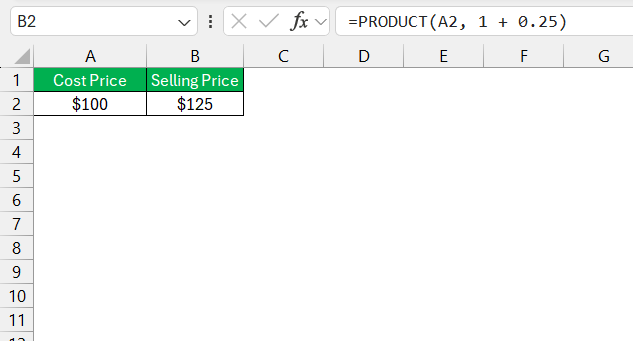
This approach will quickly adjust the price without doing any manual calculations.
Expanding my Excel capability with these techniques means that I can focus less on manual entry and more on strategic pricing analysis, leading to improved accuracy and productivity.
FAQs
How to calculate markup in Excel?
To calculate markup in Excel, input the cost price in one cell and the selling price in an adjacent cell. In a third cell, use the formula =((Selling Price - Cost Price)/Cost Price) * 100. This formula gives the markup percentage. If I want the dollar value of the markup, I simply calculate Selling Price - Cost Price.
How to Calculate 20% Markup in Excel?
To calculate a 20% markup in Excel, I first input the cost price of the product in a cell. In the next cell, I use the formula =Cost Price * 1.20 that adds a 20% markup to the cost. This formula multiplies the cost by 120% to give me the selling price, including markup.
By utilizing these precise formulas, I can maintain consistency in my markup strategies so that my pricing aligns with business objectives.
What is the Difference Between Markup and Margin in Excel?
Markup and Margin both are used to calculate profit, but their approach are different. Markup is based on the cost price, whereas margin is based on the selling price.
Markup = (Selling Price – Cost Price)/Cost Price * 100
Margin = (Selling Price – Cost Price)/Selling Price * 100
I want to add 20% margin to my prices, how can it be done in Excel?
You can use a simple mathematical operator in Excel to add 20% to the cost price. The formula that can be used is
=Cost Price / (1-20%)
This formula will divide the cost price by 100% – 20% i.e. 80% and provide you with a selling price.

John Michaloudis is a former accountant and finance analyst at General Electric, a Microsoft MVP since 2020, an Amazon #1 bestselling author of 4 Microsoft Excel books and teacher of Microsoft Excel & Office over at his flagship MyExcelOnline Academy Online Course.

 30 Days - Full Access









