 Free Practice Workbook
The date and time calculations in Excel is a straightforward process. It stores a date as a number, allowing you to perform arithmetic operations on it. Each number represents a day, starting from January 1, 1990. It increases by 1 for each new day. Now that you understand how Excel handles dates, you can proceed to check the different methods that can be used to calculate the number of weeks between two dates.
Table of Contents
Methods to Calculate How Many Weeks Between Two Dates
Method 1: Using the DATEDIF Function
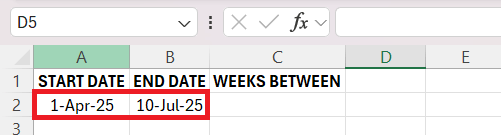
The DATEDIF function can be used to calculate the difference between two dates in different units, like days or weeks. It is useful for tasks like event planning, tracking employee tenure, and financial planning. For example, there is a project that starts on April 1, 2025, and ends on July 10, 2025. The DATEDIF function can be used to calculate the difference between these two dates in weeks. Follow the steps below to know how:
STEP 1: Select your cells and enter the start date in A2 and the end date in B2.
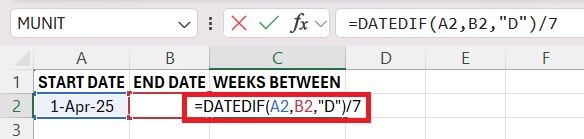
STEP 2: Enter the Formula by clicking on the result cell and type:
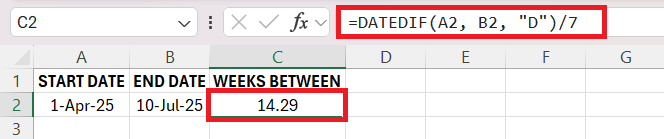
=DATEDIF(A2, B2, “D”)/7
STEP 3: Press Enter, and if necessary, format the result as a number.
Method 2: Using INT function
You can use the INT function when you want to know the full weeks that have passed between two dates. This is useful for calculating full payroll weeks or eligibility periods for benefits. Let us look at an example:
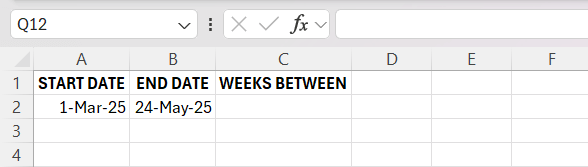
STEP 1: Enter the start date and end date in columns A and B, respectively.
STEP 2: Click on the result cell and enter the formula:
=INT((B2 – A2)/7)
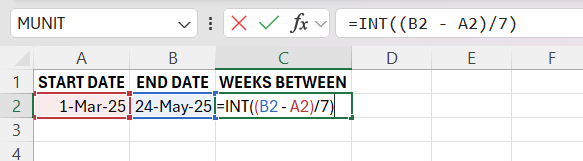
STEP 3: Press Enter to see the number of complete weeks between the dates.
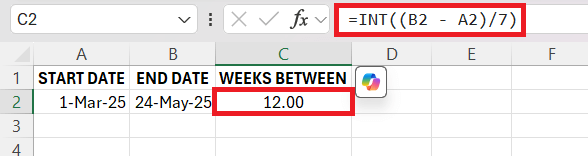
The Integer Division method using the INT function is perfect for scenarios where only full weeks matter, such as payroll or benefits eligibility. In this example, an employee joining on March 1, 2025, would complete their 12-week probation period on May 24, 2025. The formula efficiently excludes partial weeks, so that the calculation reflects only complete weeks, providing a precise and easy way for determining full periods.
Method 3: Calculating Fractional Weeks
For a more precise calculation that includes both whole and partial weeks, I use this formula. This method is particularly useful for billing clients on a weekly basis when projects do not align perfectly with full weeks. If a consultant works on a project from February 10 to March 28 and charges on a weekly basis, this method helps calculate the total billable weeks, making sure that the invoice is accurate. Let’s follow these steps:
STEP 1: Input the start date in A2 and the end date in B2.
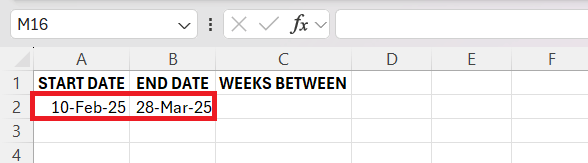
STEP 2: Click on the result cell and type the formula:
=(B2 – A2)/7
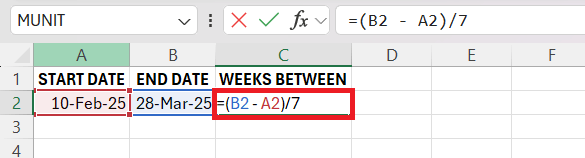
STEP 3: Press Enter.
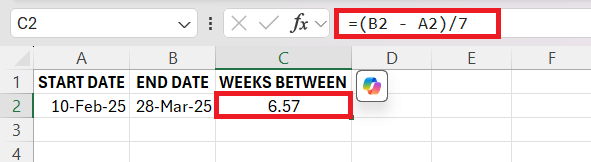
The number of weeks spent between February 10 and March 28 is 6.57 weeks. This method calculates full and partial weeks between two dates. It is a perfect method when you need to know the exact time spent on the project.
Real-World Scenarios
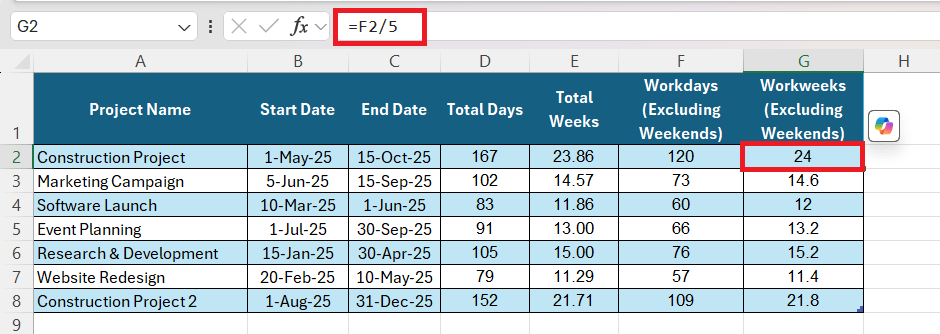
Calculating time spans is an important task for project managers. It helps them allocate resources efficiently and meet deadlines. You can use the NETWROKDAYS function to determine the number of working days between two dates. For example, there is a construction project that begins on May 1 and is expected to be completed by October 15. You can calculate the following –
- Total Days – Subtract End Date from Start Date.
- Total Weeks – Divide Total Days by 7.
- Workdays – Use NETWORKDAYS function to get the number of work days between these two dates.
- Workweeks – Divide Workdays by 5.
Advanced Tips
Combine Different Functions
You can use the IF function to create dynamic reports in Excel. Let’s say you are managing a sales team and want to track the progress of various projects. The first step would be to calculate the number of days that have passed since the start of the project. This can be done using the DATEDIF function as seen above.
Next, you can use IF functions to check if follow up is required or not based on the number of days passed.
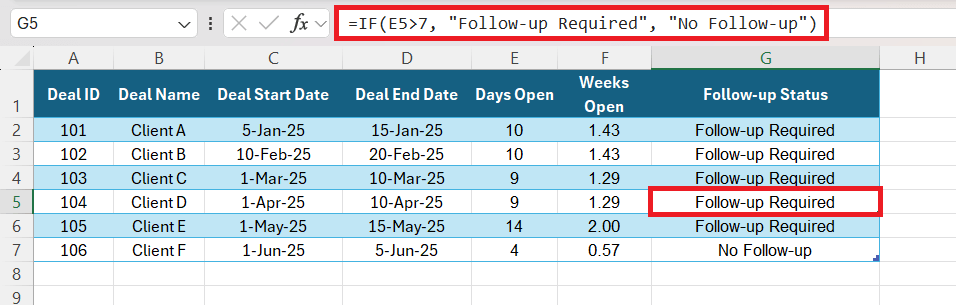
This method can be used to monitor the project’s timeline and cycle duration and provide valuable information.
FAQs
How to calculate weeks between two dates in Excel?
You can subtract the end date from the start date and then divide the result by 7. The formula will be:
=(end_date – start_date)/7
What is the DATEDIF Function in Excel?
The DATEDIF function in Excel is a “date difference” function that calculates the time difference between two dates, providing the result in years, months, or days. It’s especially useful for tracking periods such as age or tenure. Despite its power, it’s a hidden function not documented in Excel’s help resources.
How Do I Calculate Exact Duration Between Two Dates, Including Days?
To calculate the exact duration between two dates, including days, use the DATEDIF function: =DATEDIF(start_date, end_date, “y”) & ” years, ” & DATEDIF(start_date, end_date, “ym”) & ” months, ” & DATEDIF(start_date, end_date, “md”) & ” days”, replacing start_date and end_date with your specific date cells.
How could you calculate the hours between two times after midnight in Excel correctly?
To calculate the hours between two times after midnight in Excel correctly, subtract the start time from the end time and then multiply the result by 24. Use the formula =(end_time – start_time) * 24, so that both cells are formatted as ‘Time’. If the time spans over midnight, Excel automatically considers the date change.
How many weeks in a year?
There are typically 52 weeks in a year. However, because a year is actually slightly longer than 52 weeks – 52 weeks and 1 day, or 52 weeks and 2 days in leap years – some years have 53 weeks. The 53rd week is included in years where January 1st or December 31st falls on a weekday.

John Michaloudis is a former accountant and finance analyst at General Electric, a Microsoft MVP since 2020, an Amazon #1 bestselling author of 4 Microsoft Excel books and teacher of Microsoft Excel & Office over at his flagship MyExcelOnline Academy Online Course.

 30 Days - Full Access









