Profit margins are a critical component of any successful business strategy. They reveal the percentage of revenue that remains after costs are accounted for, guiding me to make smart financial decisions. Using Excel, I can harness its powerful formulas and tools to calculate, analyze, and optimize profit margins.
Let me walk you through the basics and some advanced strategies to calculate the margin formula in Excel effectively.
Key Takeaways:
- Profit margins reflect financial health and efficiency.
- Basic formulas like =(C5-D5)/C5*100 are essential for quick information.
- Gross and net profit margins highlight production and operational efficiencies.
- Markup and margin are distinct but complementary in pricing strategy.
- Excel’s advanced tools unlock deeper analysis and trend tracking.
Table of Contents
Profit Margin Calculation in Excel
Basic Formula
It is important to know how to calculate profit percentage as it can help you in making quick and smart decisions.
Profit Margin = (Selling Price – Cost Price)/Selling Price * 100
This formula:
- Subtract the cost price from the selling price
- Divide the result by the selling price
- Multiply it by 100
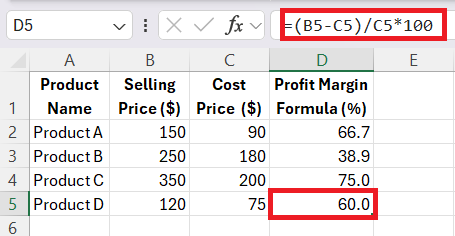
You can use this formula to either assess the performance of individual products or the overall financial health of the company.
Sales Price, Markup, and Margin Formulas
For accurate pricing strategies, you need to know the connection between sales price, markup, and margin.
You can use this formula to add a margin to a cost price and get the sales price.
Sales Price = [1 + (Markup/100) * Cost]
In the table below, the cost price and markup percentages are mentioned in columns B and C, respectively. So, you can use this formula to get the sales price:
= [1 + (C2/100)]*B2
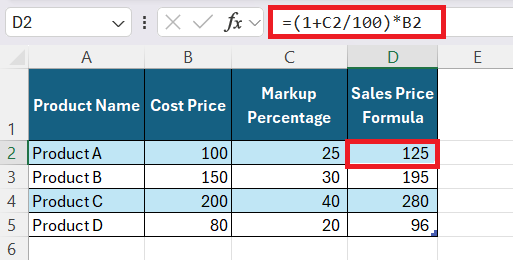
The formula below can be used to get the sales price based on the profit margin and the cost price provided.
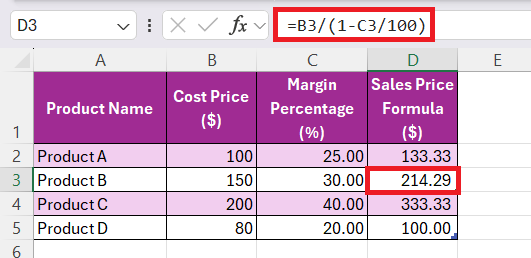
Sales Price = Cost Price / [1 – (Margin Percentage/100)]
In the example below, the cost price and margin percentage are mentioned in columns B and C, respectively. You can use this formula to get the sales price:
Advanced Profit Analysis
Net and Gross Profit Margin
Gross Profit Margin is calculated by dividing the gross profit by total revenue. This metric is important as it tells you how efficiently you can manage cost as compared to sales.
Whereas, Net Profit Margin is calculated by dividing the net profit by total revenue. It tells you how much you are earning on each dollar of revenue after deducting all expenses, taxes, and interests.
Variable Margin
Variable profit margin tell syou the profit you have earned on individual units. It takes into account costs like direct material and labour and ignores fixed costs in its calculations. The formula for variable margin will be:
=(Sales Revenue - Variable Costs)/Total Units Sold.
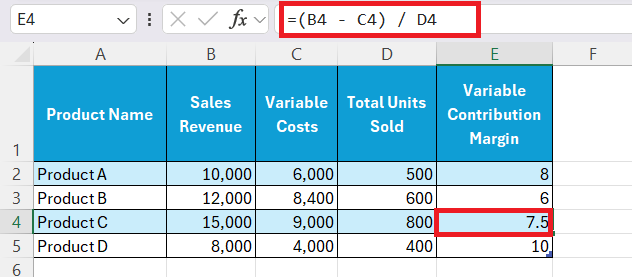
It helps me find which products or services provide the highest margin to cover fixed costs.
Comprehensive Profit Tracking
Gross and Net Profit
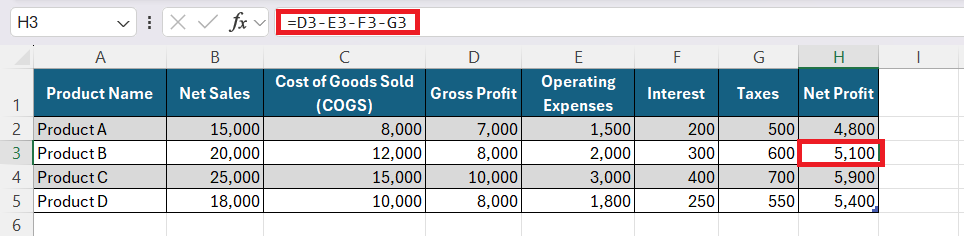
Gross and Net profits are metrics used to determine the financial health of a company. Gross Profit is the amount earned after deducting the direct expenses of a company. It gives me the raw profitability from sales, which reflects the efficiency of the production process.
Gross Profit = (Net Sales – Cost of Goods Sold)
Net profit can be calculated by subtracting operating expenses, interest, and taxes from Gross Profit.
= (Gross Profit – Operating Expenses – Interest – Taxes)
Net Profit shows the actual profit earned by the business after meeting all financial obligations.
Percentage Increase
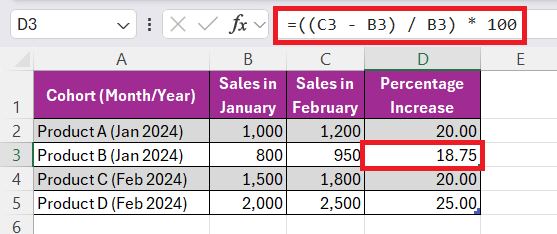
Cohort analysis and percentage increase tools in Excel are powerful allies in tracking progress and trends over time. By organizing data into related groups, or cohorts, such as customers by acquisition date or products by launch date, I can scrutinize patterns and behaviors more effectively.
I also employ the formula =((End Value - Start Value) / Start Value) * 100 to calculate the percentage increase year-over-year or month-over-month. This kind of analysis, particularly when visualized through Excel’s charting capabilities, is invaluable for making smart choices about where to focus growth efforts and investments.
FAQs
What is the formula for calculating margin?
The formula to calculate profit margin is (Selling Price - Cost) / Selling Price * 100. It yields the margin as a percentage, showing the portion of each sales dollar that represents profit.
What key formulas are important for calculating profit margins in Excel?
- Profit Margin: =(Selling Price – Cost)/Selling Price * 100.
- Gross Margin: =(Total Revenue – Cost of Goods Sold)/Total Revenue * 100.
- Net Margin: = Net Profit/Total Revenue * 100.
- Markup: =(Selling Price – Cost)/Cost * 100.
How to add 5% margin to the cost price?
You can add a margin of 5% to the cost price by using this formula:
Sales Price = Cost * (1 + Margin%)
=Cost * 1.05

John Michaloudis is a former accountant and finance analyst at General Electric, a Microsoft MVP since 2020, an Amazon #1 bestselling author of 4 Microsoft Excel books and teacher of Microsoft Excel & Office over at his flagship MyExcelOnline Academy Online Course.

 30 Days - Full Access









