Pinterest Pixel

Add 15 percentage in Excel: 2 Quick & Easy Methods

John Michaloudis
Adding a percentage to a value in Excel can be a quick and easy process that is useful in updating product prices or doing financial projections.
There are 2 common methods that can be used to add 15 percent to any set of values.

Let's explore the article to understand these methods better.

Percentage in Excel

Understanding Percentages in Excel

When you are working with numbers, the best tool that helps you to input data and get accurate results will always be Excel. Excel lets you calculate the percentage of a number, or even add, subtract, or multiply a percentage to a value. It is very helpful in different tasks like budgeting, planning, and data analysis.

Practical Application of adding a percentage

Adding 15% to a value can be used in numerous situations, like:

  • Increasing product prices to add more profit
  • Increase employees’ salaries
  • Showing growth in sales or investment.

By using Excel formulas, you can quickly convert values, get accurate results, and take action accordingly.


Steps to Add 15 percent in Excel

Method 1: Using Excel Formula

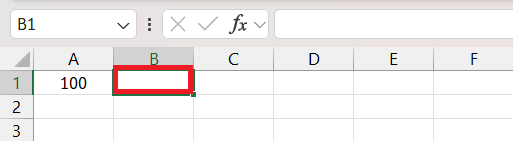
Using an Excel formula for a 15% increase in a value is a straightforward method that provides instant results without any complex calculations. Here’s how you can add a 15% increase to any number in Excel. Suppose you have the original value mentioned in cell A1.

STEP 1: Click on an empty cell where you want the increased price.
add 15 percentage

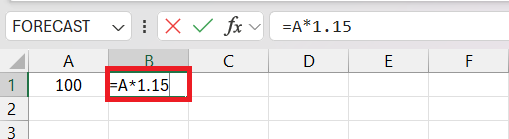
STEP 2: Enter the following formula to calculate a 15% increase: =A*1.15
add 15 percentage

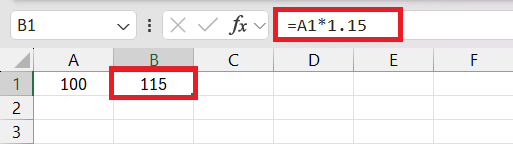
STEP 3: Press Enter.

Excel will show the value after the 15% has been added.
add 15 percentage

This approach is the reason why Excel is a widely used tool for professionals across disciplines.

Method 2: Use Paste Special

Excel’s Paste Special feature is a powerful tool for adding percentages in Excel. You can quickly add a percentage to a range of values in your spreadsheet using this method. This method will provide an accurate result and will require minimal effort. Follow the steps below to get the results:

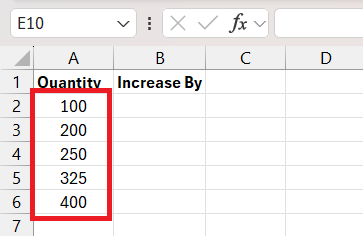
STEP 1: List the original values in one column (e.g., column A).
add 15 percentage

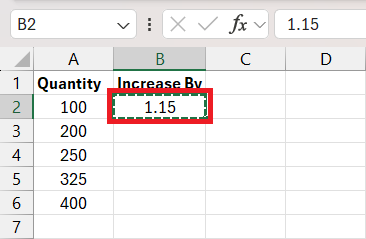
STEP 2: Enter 1.15 in a blank cell. Press Ctrl + C to copy the value.
add 15 percentage

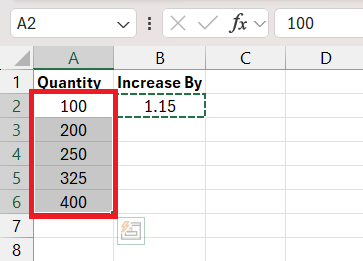
STEP 3: Select the range of cells where you want to add this percentage increase.
add 15 percentage

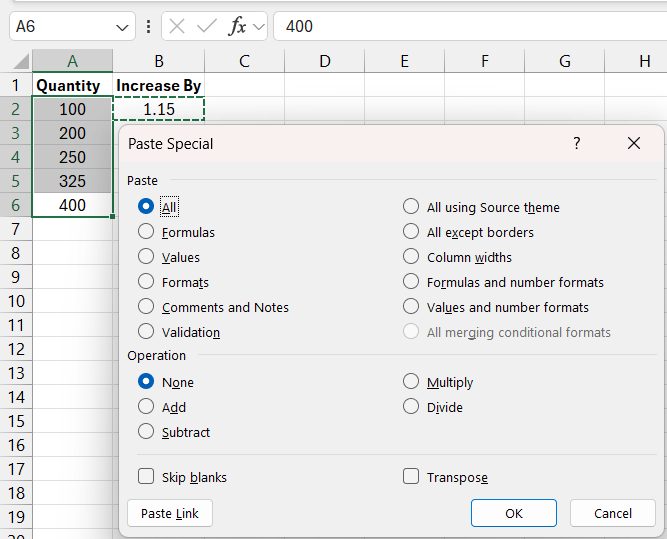
STEP 4: Press Alt + E + S to open the paste special dialog box.
add 15 percentage

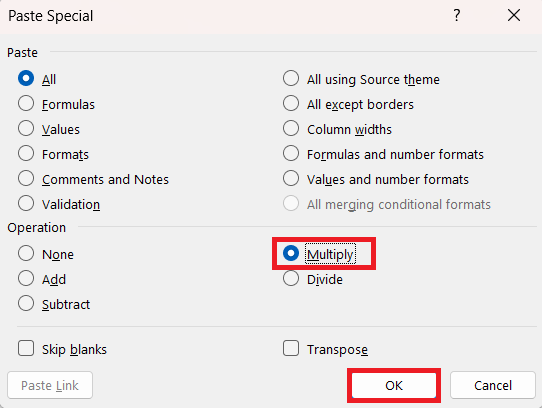
STEP 5: In the Paste Special dialog, select Multiply. Click OK.
add 15 percentage

Excel multiplies each selected value by 1.15, effectively increasing each by 15%. This method prevents the need to create additional columns, thus maintaining a tidy worksheet.

Additionally, Paste Special works not only for adding a specified percentage but also for other mathematical operations such as subtracting, dividing, or adding a value to your selected range of cells. This makes Paste Special a versatile tool suitable for a variety of scenarios.


Tricks and Tips

In this fast-paced world, being able to easily use keyboard shortcuts will be very helpful as it will increase speed and productivity. The following are the Excel shortcuts that can be used:

  • Use Ctrl + Shift + % to convert a number to a percentage.
  • To add 1.15 to an adjacent cell, copy it, select the data range, and then press Alt + E, S, D, followed by Enter
  • For formatting numbers as percentages, press Ctrl + 1 to open the Format Cells dialog, where you can select the Percentage.

Using keyboard shortcuts in Excel will save a significant amount of time compared to navigating through menus with a mouse.


FAQs

What is the formula for a 15% increase in Excel?

The formula to add 15 percent to a value is straightforward. Firstly, convert the percentage increase into decimal form, i.e., convert 15% to 0.15. Then, add 1 to that value and simply multiply it by the original value.

Here’s the formula: =OriginalNumber * (1 + PercentageIncrease)

How to make sure that the result is correct?

To get the correct result, make sure that the percentage increase value is properly formatted as a decimal. For example, to increase the number by 15%, you can multiply the original number by 1.5. Be sure to double-check the formula and validate the result.

How to use Paste Special to add a percentage to a value?

Paste special is a quick and easy way to add a percentage to a value.  Simply, convert the percentage to a decimal format, i.e., 15% to 1.15. Now, copy this value and select the range where you want to add 15%. Press Alt + E + S + M and click OK. The values will be increased by the percentage mentioned.

How to subtract a percentage from a number?

To reduce a value by a specific percentage in Excel, you can use this formula: =OriginalNumber * (1 - PercentageDecrease).The percentage decrease should be expressed in decimal format.

If you like this Excel tip, please share it


Founder & Chief Inspirational Officer

at

John Michaloudis is a former accountant and finance analyst at General Electric, a Microsoft MVP since 2020, an Amazon #1 bestselling author of 4 Microsoft Excel books and teacher of Microsoft Excel & Office over at his flagship MyExcelOnline Academy Online Course.

See also  How to Convert 1/16 Inch to Decimal in Excel

Star 30 Days - Full Access Star

One Dollar Trial

$1 Trial for 30 days!

Access for $1

Cancel Anytime

One Dollar Trial
  • Get FULL ACCESS to all our Excel & Office courses, bonuses, and support for just USD $1 today! Enjoy 30 days of learning and expert help.
  • You can CANCEL ANYTIME — no strings attached! Even if it’s on day 29, you won’t be charged again.
  • You'll get to keep all our downloadable Excel E-Books, Workbooks, Templates, and Cheat Sheets - yours to enjoy FOREVER!
  • Practice Workbooks
  • Certificates of Completion
  • 5 Amazing Bonuses
Satisfaction Guaranteed
Accepted paymend methods
Secure checkout

Get Video Training

Advance your Microsoft Excel & Office Skills with the MyExcelOnline Academy!

Dramatically Reduce Repetition, Stress, and Overtime!
Exponentially Increase Your Chances of a Promotion, Pay Raise or New Job!

Learn in as little as 5 minutes a day or on your schedule.

Learn More!

Share to...









