 Free Practice Workbook
The ATAN2 function is used to calculate the angle between a point and the x-axis. It is a great tool when working with coordinates and angles in Excel. In this article, you will learn how to use the ATAN2 function in Excel.
Key Takeaways:
- Unlike ATAN, ATAN2 considers both x and y coordinates.
- It is useful for determining angles in all four quadrants.
- ATAN2 is widely used in navigation, robotics, game development, and physics.
Table of Contents
Introduction to ATAN2
What is the ATAN2 Function?
The ATAN2 function is used for calculating the angle between two points, specified by their coordinates. It calculates the angle between the positive x-axis and a point. The syntax of ATAN2 function is:
=ATAN2(x_num, y_num)
- x_num – X-coordinate (horizontal value).
- y_num – Y-coordinate (vertical value).
The function returns an angle in radians. It ranges from -π to π.
ATAN vs ATAN2
- The ATAN function accepts only one argument, but the ATAN2 function accepts two arguments.
- ATAN calculates the arctangent of a single value, whereas ATAN2 calculates the angle of a point relative to the x-axis.
- ATAN2 can identify all four quadrants, but the ATAN function cannot.
- ATAN is useful for trigonometric calculations.
- ATAN2 is useful for coordinate-based and directional calculations.
How to Use the ATAN2 Function
1. Basic Example
Suppose I have a point on a Cartesian plane, i.e., (3, 4). I want to calculate the angle it makes with the x-axis.
I can use this formula:
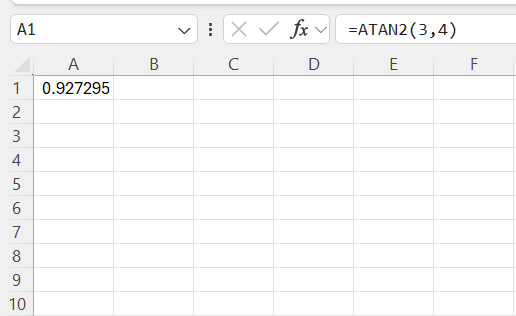
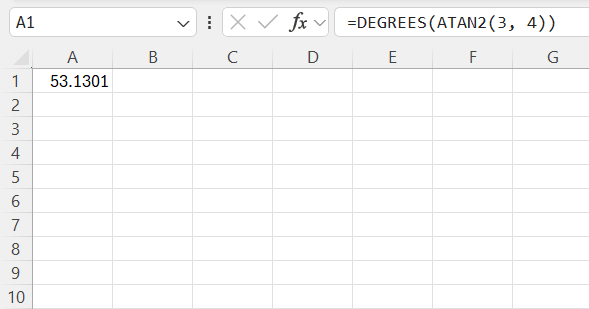
The result is in radians. I can use the DEGREES function to convert it to degrees.
2. Understand Quadrants
- In Quadrant I, both X and Y are positive, so the angle is between 0° and 90°.
In Quadrant II, X is negative and Y is positive, so the angle is between 90° and 180°.
In Quadrant III, both X and Y are negative, so the angle is between -180° and -90°.
In Quadrant IV, X is positive and Y is negative, so the angle is between -90° and 0°.
For example:
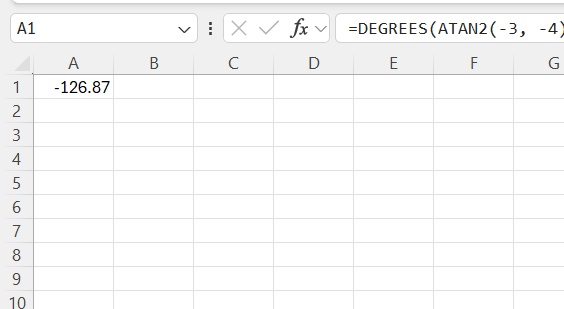
This returns -126.87°, placing the point in the third quadrant.
3. Using ATAN2 for Directional Calculations
In navigation and GIS (Geographic Information Systems), I often use ATAN2 to find the bearing angle between two points. If I have two coordinates (X1, Y1) and (X2, Y2), the direction from one to the other is given by:
=DEGREES(ATAN2(X2 – X1, Y2 – Y1))
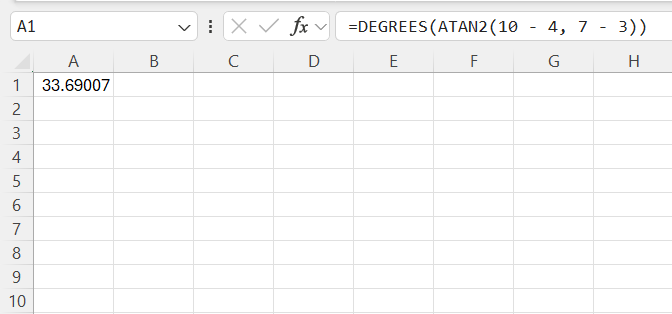
This formula calculates the correct angle for movement from one point to another, which is crucial in mapping and route optimization.
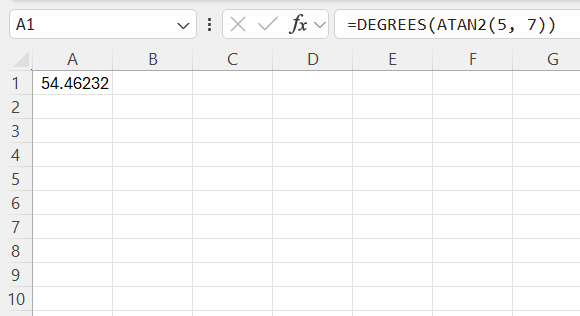
4. Converting Radians to Degrees
I can use the DEGREES function to convert radians to degrees:
Common Errors to Avoid
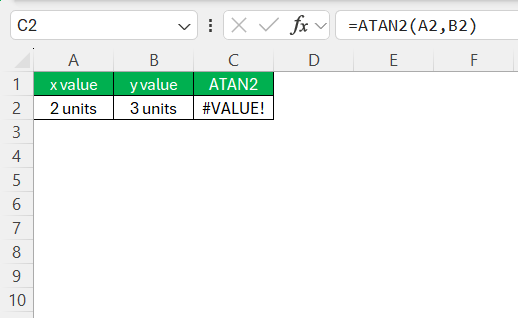
The #VALUE! error happens if non-numeric values are used as arguments.
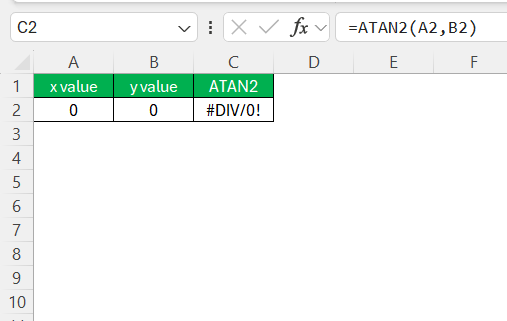
If both X and Y are zero, Excel returns #DIV/0!.
Tips & Tricks
- Use the DEGREES function to convert the ATAN2 result from radians to degrees for easier interpretation.
- Make sure that both the x and y values are numeric, as non-numeric inputs can cause errors.
- Keep in mind that the ATAN2 function returns results in radians by default.
- Use ATAN2 whenever accurate quadrant identification is important for your calculations.
- Combine ATAN2 with coordinate-based formulas to perform advanced directional and geometric calculations in Excel.
FAQs
How to calculate atan in Excel?
To calculate ATAN in Excel, you can use the ATAN function.
=ATAN(number)
What does the ATAN2 function do in Excel?
ATAN2 calculates the angle between a point and the x-axis using x and y coordinates.
What is the syntax of the ATAN2 function?
The syntax is:
=ATAN2(x_num, y_num).
Does ATAN2 return the result in degrees?
No, ATAN2 returns the angle in radians. You can use the DEGREES function to convert it to degrees.
How is ATAN2 different from ATAN?
ATAN2 uses both x and y coordinates and can determine angles in all four quadrants.

John Michaloudis is a former accountant and finance analyst at General Electric, a Microsoft MVP since 2020, an Amazon #1 bestselling author of 4 Microsoft Excel books and teacher of Microsoft Excel & Office over at his flagship MyExcelOnline Academy Online Course.

 30 Days - Full Access









