 Free Practice Workbook
When I first started diving into financial calculations in Excel, one important concept was the continuously compounded interest formula. It is a great formula used in finance and investing, and Excel has simple ways to compute. In this article, you will learn how to use continuously compound interest formula in Excel.
Key Takeaways:
- Continuous compounding grows money faster over time.
- Excel formulas can be used to calculate compound interest.
- The formula for continuously compounding is A = Pe^(rt).
- If the interest rate or time period increases, the returns will be higher.
Table of Contents
What is Continuous Compounding?
Continuous compounding is a method where interest is added to the principal amount constantly instead of at fixed intervals. This will help your money grow faster over time. It is commonly used in finance because it shows the maximum possible growth of an investment.
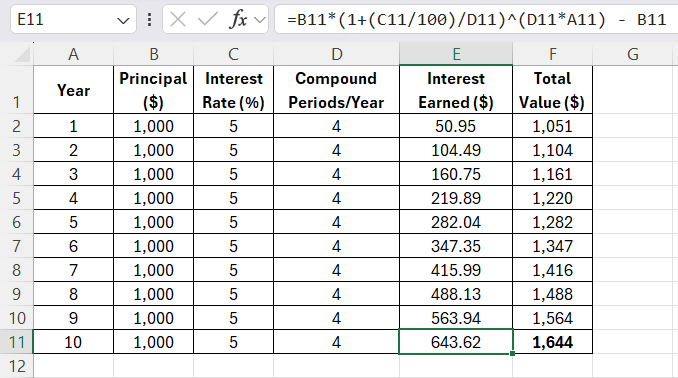
After 10 years, your $1,000 investment at 5% annual interest, compounded quarterly, would grow to $1,643.63, which means you’ve earned $643.63 in interest over that period.
The longer the money stays invested, the more powerful the growth becomes.
How to use the Continuous Compounding Formula
Syntax
The formula for continuously compounding is:
A = Pe^(rt),
where,
- ‘A’ is the final amount of money.
- ‘P’ is the principal amount.
- ‘e’ is Euler’s number. It is approximately 2.71828.
- ‘r’ is the annual interest rate.
- ‘t’ is the time in years.
Step-by-Step Guide
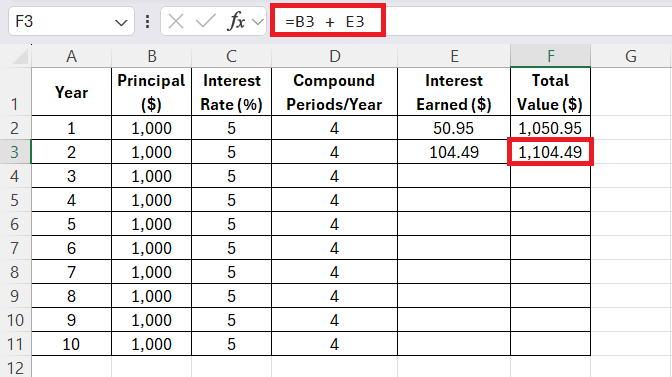
STEP 1: Now that I understood the formula, I wanted to see how my $1,000 investment would grow over 10 years in an easy-to-read format. So, I set up an Excel spreadsheet with the following columns:
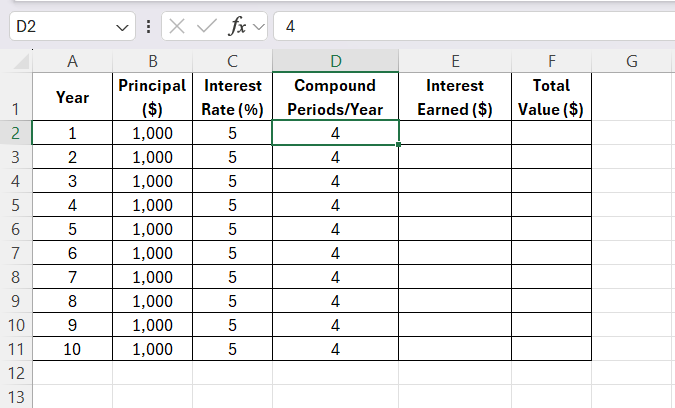
Here’s how I populated the columns:
- Year: I entered the years from 1 to 10.
- Principal: For each year, I set the principal amount to $1,000 (since I’m not adding additional money during this period).
- Interest Rate: I entered 5% for the interest rate.
- Compound Periods/Year: I entered 4 because the interest compounds quarterly.
- Interest Earned and Total Value: These columns would be calculated using the compound interest formula.
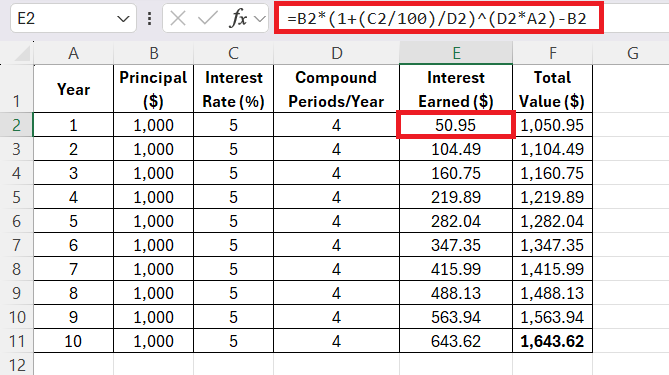
STEP 2: Enter the formula for interest rate:
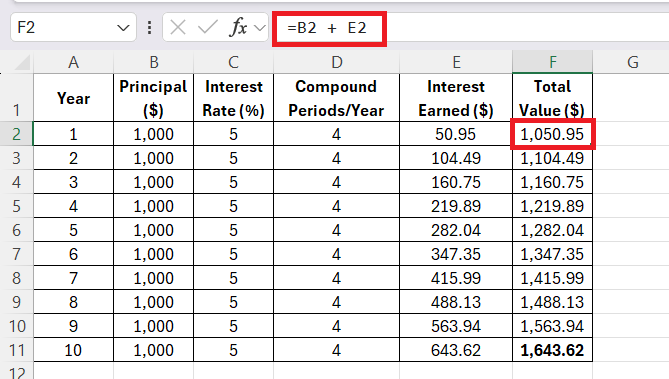
STEP 3: Add the interest earned to the Principal to get the Total Value.
STEP 4:
Once I had calculated the first year’s values, I copied the same formulas down the columns for the remaining years. This allowed Excel to automatically calculate the Interest Earned and Total Value for each subsequent year, based on the same interest rate and compounding frequency.
STEP 5:
I continued this process for all 10 years, allowing the power of compound interest to work its magic. By Year 10, my $1,000 investment had grown to:
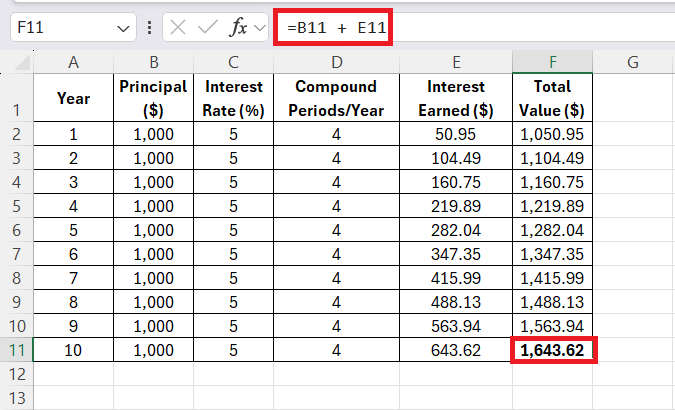
Over the 10 years, the total value of your initial $1,000 investment grows to $1,643.62, with a total interest earned of $643.62.
Automate continuous compounding
In continuous compounding, the interest accrues nonstop, growing more rapidly than in periodic compounding. Interest is calculated continuously and applied to the growing total at every infinitesimal moment.
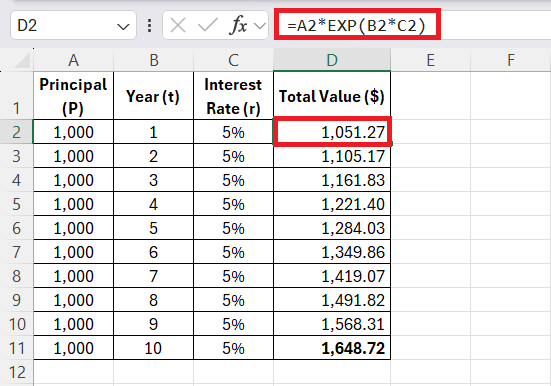
For continuous compounding, I use the formula:
=PEXP(rt)
where
- p is the principal amount
- r is the interest rate
- t is the time in years
Tips & Tricks
- Make sure that you enter the interest rate in decimal form.
- You should use absolute cell references when you want to copy formulas.
- Use charts to see how investments grow over time.
- Keep your formulas simple and organized.
- You should test different interest rates to compare investment results.
- Save your Excel sheet so you can reuse the formula later.
FAQs
What is continuous compounding?
Continuous compounding is a method where interest is added continuously. It does not add interest amount at fixed periods.
What is the formula for continuous compounding?
The formula for continuous compounding is:
A = Pe^(rt)
What does “e” mean in the formula?
“e” is Euler’s number. Its approximate value is 2.71828.
Can Excel calculate continuous compound interest?
Yes, Excel can calculate it using the EXP function.
Why is continuous compounding important?
Continuous compounding is important as it shows the maximum possible growth of an investment over time.

John Michaloudis is a former accountant and finance analyst at General Electric, a Microsoft MVP since 2020, an Amazon #1 bestselling author of 4 Microsoft Excel books and teacher of Microsoft Excel & Office over at his flagship MyExcelOnline Academy Online Course.

Aditi Lundia

 30 Days - Full Access









