 Free Practice Workbook
When you need to convert minutes to seconds, Excel gives you multiple ways to perform this. Whether you want a quick one-off conversion or something you can reuse across a whole sheet.
Key Takeaways:
- For simple cases, basic multiplication is usually all you need. For more flexible unit conversions, Excel also has options like the CONVERT function.
-
Functions such as HOUR, MINUTE, and SECOND let you break down time values and rebuild them in the format you actually need.
Table of Contents
Quick Methods to Convert Minutes to Seconds
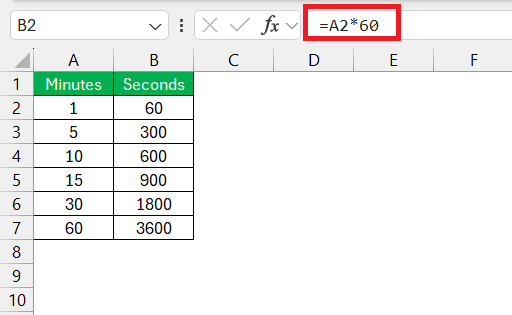
The straightforward way is to multiply the minutes by 60, and you have your result in seconds.
Using the CONVERT Function
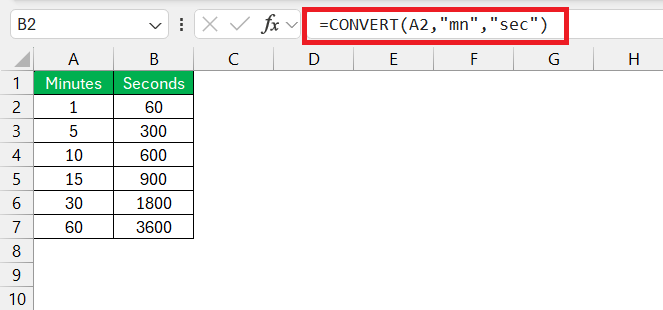
With the CONVERT function, you put in the number to be converted, add the source unit, and the target unit.
To convert 15 minutes into seconds – =CONVERT(15, “mn”, “sec”)
Other Excel Functions: HOUR, MINUTE, and SECOND
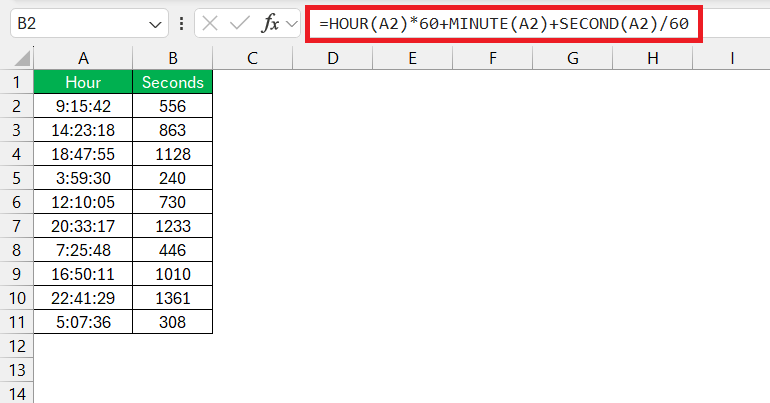
With HOUR, MINUTE, and SECOND functions, you can get each component of a time value, and then transform it into your desired format.
To convert the time into minutes, use the formula =HOUR(A2)*60 + MINUTE(A2) + SECOND(A2)/60
FAQs on Converting Minutes to Seconds in Excel
What’s the formula for converting minutes to seconds?
Use this formula: seconds = minutes × 60.
So if your minutes are in cell A1, use:
=A1*60
Can I convert different time formats in bulk?
Yes. Depending on what your data looks like, you can combine Excel’s time functions (like HOUR, MINUTE, and SECOND) with Paste Special → Multiply to apply a conversion factor across a whole range—useful when you don’t want to convert each cell one-by-one.
How do I convert hh:mm:ss into total seconds?
If your time value is in A1, use:
=(HOUR(A1)*3600)+(MINUTE(A1)*60)+SECOND(A1)
That formula pulls out each part of the time and adds it up as one total in seconds.

John Michaloudis is a former accountant and finance analyst at General Electric, a Microsoft MVP since 2020, an Amazon #1 bestselling author of 4 Microsoft Excel books and teacher of Microsoft Excel & Office over at his flagship MyExcelOnline Academy Online Course.

 30 Days - Full Access









