 Free Practice Workbook
When working with data in Excel, it is important to understand how two sets of values are related. Covariance helps you see how they move together. In this article, you will learn how to use the covariance formula in Excel.
Key Takeaways:
- Covariance shows how two variables move together.
- The COVARIANCE.P function is for entire populations, whereas COVARIANCE.S is for samples.
- A positive covariance means variables increase together.
- A negative covariance means they move oppositely.
- A near-zero indicates little or no correlation.
Table of Contents
Introduction to Excel Covariance
Definition
Covariance is a metric that helps you understand how two sets of data move together.
- Positive covariance means that both variables move in the same direction
- Negative covariance means that both variables move in opposite directions
Syntax
COVARIANCE.S calculates the sample covariance. Whereas, COVARIANCE.P calculates the population covariance
Arguments:
- array1 – The first set of numeric data.
- array2 – The second set of numeric data, corresponding to array1.
How to use the Covariance Formula in Excel
STEP 1: Check that my data is structured correctly. Each dataset should be in its own column.
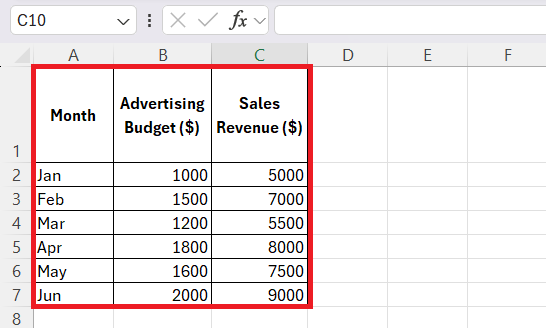
STEP 2: Once my data is organized, I choose the appropriate function:
To calculate the sample covariance, I enter the following formula:
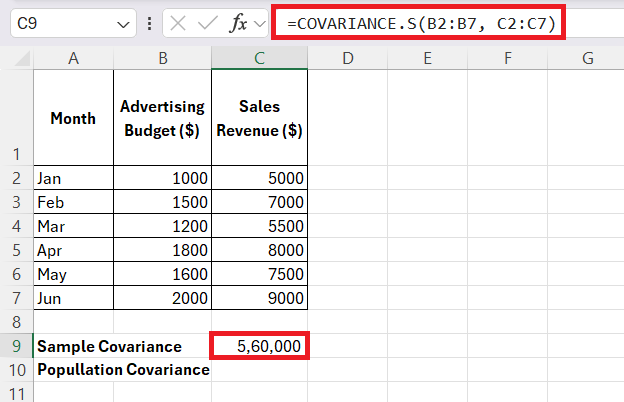
If I were analyzing the entire population, I would use the formula:
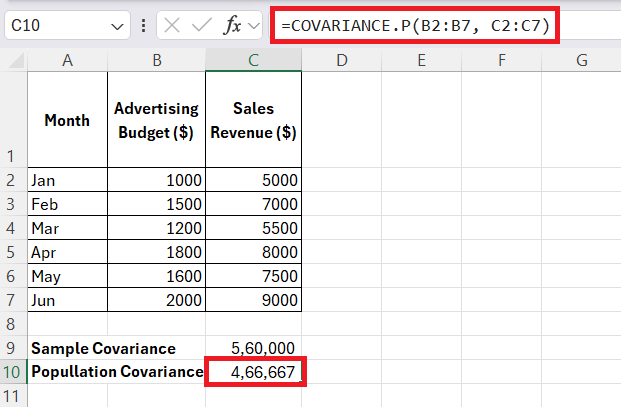
- If the result is positive, it indicates that higher advertising spend is associated with higher sales.
- If the result is negative, it suggests that higher advertising spend leads to lower sales.
- If the result is close to zero, it means there’s little to no relationship between ad spend and sales.
Covariance in Excel is a great tool that helps me understand the relationship between variables.
Practical Usage
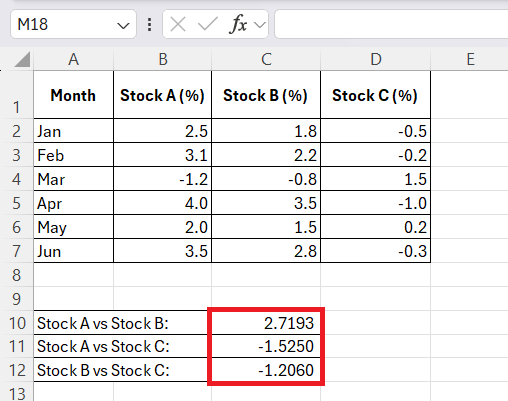
- If covariance is positive, both values move in the same direction. This indicates that there is a high risk if the market declines.
- If it is negative, one goes up while the other goes down. It provides a potential hedge against losses.
In science, covariance helps researchers understand how temperature changes affect plant growth.
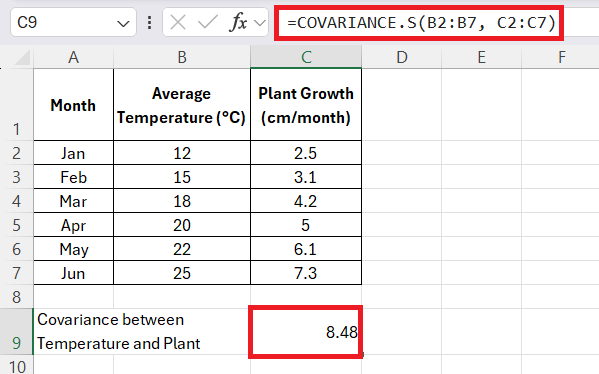
If the result is positive, it confirms that higher temperatures lead to faster plant growth.
In market research, it helps businesses determine whether advertising exposure influences customer purchase frequency.
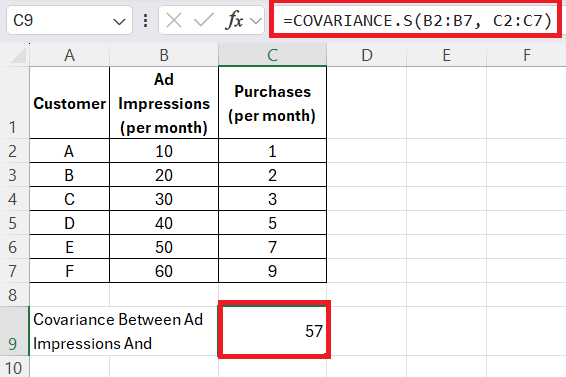
Positive covariance means more ad impressions lead to more purchases.
Tips & Tricks
Positive and Negative Covariance Values
- Positive covariance means both values increase together.
- Negative covariance means one increases while the other decreases.
- Zero covariance means there is no relationship between them.
Covariance vs Correlation
Covariance is the preferred measure when the aim is to determine the direction of a relationship between two variables. However, when the goal shifts to quantifying the strength of the relationship on a standard scale, correlation should be chosen.
FAQs
How to calculate covariance in Excel?
You can calculate covariance in Excel using the COVARIANCE function.
=COVARIANCE.P(range1, range2)
How to choose between COVARIANCE.P and COVARIANCE.S?
- Use COVARIANCE.P when your data includes the entire population.
- Use COVARIANCE.S when your data is only a sample of the population.
What Are Some Common Mistakes to Avoid When Using Excel Covariance Functions?
The common mistakes that you would face when using the covariance function are:
- Mixing population and sample data without adjusting the function accordingly
- Verify that data sets are of equal length
- Outliers that can skew results.
Why use covar?
The COVAR function determines the strength and direction of the relationship between two variables.

John Michaloudis is a former accountant and finance analyst at General Electric, a Microsoft MVP since 2020, an Amazon #1 bestselling author of 4 Microsoft Excel books and teacher of Microsoft Excel & Office over at his flagship MyExcelOnline Academy Online Course.

 30 Days - Full Access









