 Free Practice Workbook
When it comes to financial planning, understanding the future value of annuities is very important. It is useful to create a Future Value Annuity calculator when you are saving for retirement, planning for a big purchase, or want growth in an investment.
In this guide, I will show you how to set up a Future Value Annuity calculator in Excel.
Key Takeaways:
- The future value of an annuity is important for financial planning.
- It helps us predict the growth of investments.
- Annuities offer a steady income stream.
- Annuities are ideal for retirement or large purchases.
- The FV function can be used to calculate future annuity values.
Table of Contents
Understanding the Future Value of an Annuity
What is an annuity?
An annuity is an investment that can provide you with a steady income stream. It is typically used for retirement purposes as it can provide revenue over time as people age. It is a financial product that you purchase or invest in with a lump sum or through periodic payments.
What is Future Value?
Future value is the amount an investment will be worth at a specified time in the future, given a certain rate of return or interest rate. This financial metric is useful for knowing how much we might accumulate over time from savings or for determining the ultimate payoff of an investment.
It works on the principle of the time value of money. It tells you that a dollar today is worth more than a dollar tomorrow because of its potential earning capacity. When we understand the future value, we can better plan for goals like retirement or big purchases by forecasting the growth of our assets.
FV Function in Excel
Syntax
The syntax of FV function is:
FV(rate, nper, pmt, [pv], [type])
Here’s a breakdown:
rate: This is the interest rate per period.nper: This stands for the total number of payment periods in an annuity.pmt: This represents the constant payment made in each period.[pv]: It’s the present value or the total amount that a series of future payments is currently worth.[type]: This tells Excel when the payments are due—0 for end of the period or 1 for the beginning.
Applying the FV Formula
To apply the FV formula effectively for periodic payments, it’s crucial that we correctly identify and input each argument based on our annuity setup. In our hypothetical example, with yearly payments of $1,000, a 10-year term, and a 6% annual interest rate, the FV formula is executed as follows:
=FV(rate, nper, pmt)
We input the annual interest rate into ‘rate’, the number of years into ‘nper’, and since payments are money out, ‘pmt’ is input as a negative number:
=FV(6%, 10, -1000)
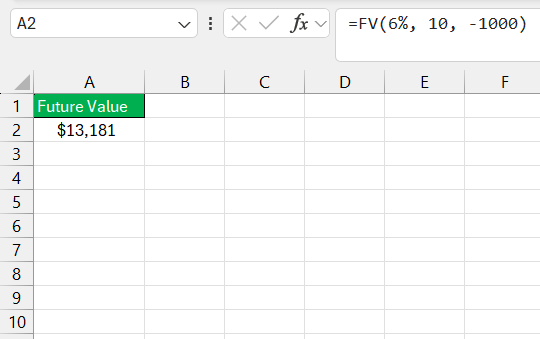
This calculation tells us how much we’ll have saved at the end of 10 years, considering the specified payments and interest rate. However, it’s important to ensure that the rate corresponds with the payment period. If we make monthly contributions, the rate must be divided by 12, and the periods must be multiplied by 12 accordingly.
Advanced Tips
Annuity Types: Ordinary Annuity vs. Annuity Due
An Ordinary Annuity involves payments made at the end of each period, such as the end of the month or the end of the year. This type of annuity is common for investments like retirement savings, where deposits are typically made after income is earned for that period.
In contrast, an Annuity Due requires payments at the beginning of each period. This structure is often used for expenses like rent, where payment is needed at the start of the month or period. The timing difference between these two types of annuities affects the total amount accumulated, with annuities due typically accumulating slightly more interest over time due to the earlier payment schedule.
Suppose I want to save $1,000 each month for 5 years with an interest rate of 6% compounded monthly. Let’s look at how much I would have with each type of annuity.
Ordinary Annuity Calculation: =FV(6%/12, 5*12, -1000, 0, 0)
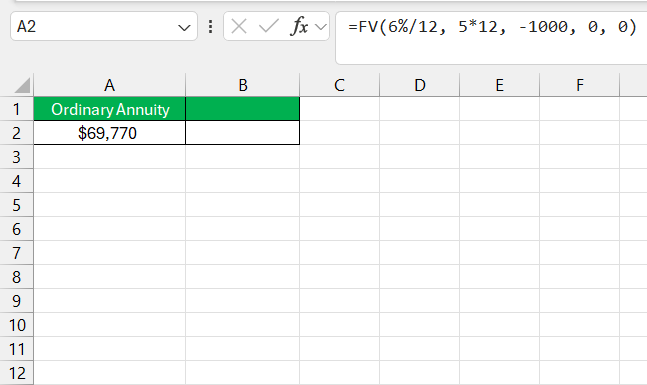
Here, the type argument is 0, which specifies that payments are made at the end of each period.
Annuity Due Calculation: =FV(6%/12, 5*12, -1000, 0, 1)
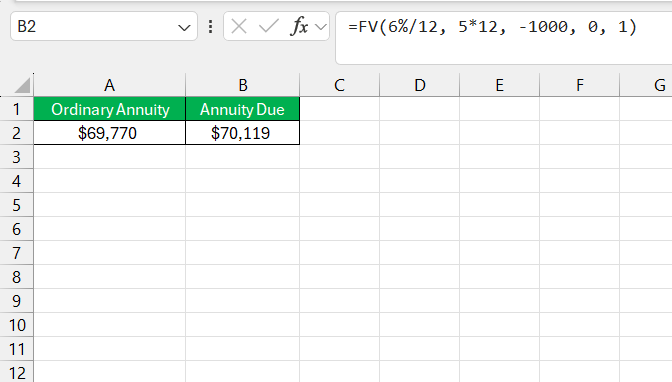
Here, the type argument is 1, indicating payments are made at the beginning of each period.
Because the Annuity Due allows each payment to earn interest for an additional period, it results in a higher future value. In this case, the Annuity Due yields around $3,339 more than the Ordinary Annuity after 5 years.
Solving for Payment Amount, Interest Rate, and Number of Periods
Solving for different variables in an annuity scenario can be a bit tricky, but Excel’s financial functions simplify this process greatly. Let me walk you through how each component can be determined:
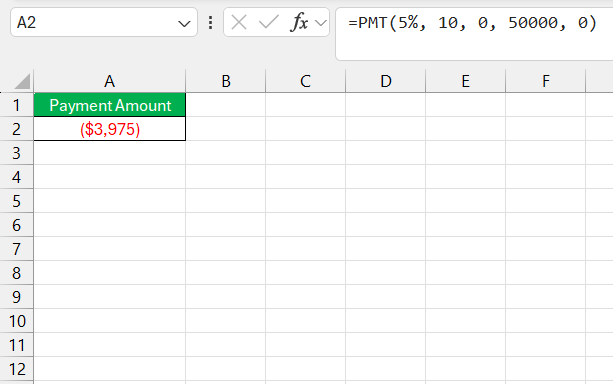
- Payment Amount (PMT): If we want to know how much to contribute to reach a target amount, we leverage the PMT function. For example, if we aim for $50,000 over 10 years at a 5% interest rate, the PMT function can calculate the annual payment.
=PMT(rate, nper, pv, fv)
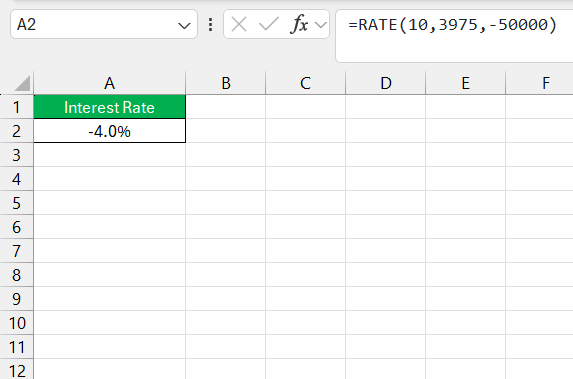
- Interest Rate (RATE): To solve for the interest rate, we use the RATE function. Given an investment’s present and future values, along with the payment and term, the RATE function can find the interest rate required to achieve the future value.
=RATE(nper, pmt, pv, fv)
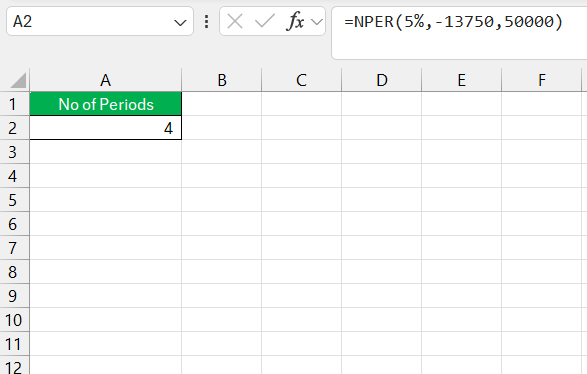
- Number of Periods (NPER): Finding out how long it will take to reach a future value is a job for the NPER function. With known payments, interest rate, present, and future value, the NPER function can reveal the number of periods needed.
=NPER(rate, pmt, pv, fv)
For any of these calculations, it’s critical to ensure all the rates and periods are consistent. Monthly rates must be accompanied by monthly periods, and vice versa for annual values.
FAQs
What is the future value of an annuity?
It is the total amount your investment will grow to in the future.
Can Excel Calculate the Future Value of an Annuity with Irregular Payments?
Yes, Excel can handle calculations for the future value of an annuity with irregular payments by using functions like XNPV or XIRR.
What’s the present value of an annuity?
The present value of an annuity is the total amount that a series of future fixed payments is worth today.
What’s the difference between the present value and future value?
The present value is the current worth of a future sum of money given a specified rate of return. The future value measures what this sum will grow to in the future.

John Michaloudis is a former accountant and finance analyst at General Electric, a Microsoft MVP since 2020, an Amazon #1 bestselling author of 4 Microsoft Excel books and teacher of Microsoft Excel & Office over at his flagship MyExcelOnline Academy Online Course.

 30 Days - Full Access









