 Free Practice Workbook
In this article, we will cover a detailed guide on how to show Hong Kong time now in Microsoft Excel.
Key Takeaways:
- Typing =NOW() into a cell displays the current date and time.
- Adjust times accurately in spreadsheets by adding or subtracting the time difference (e.g., adding 8 hours for HKT).
- Show Hong Kong time now with =NOW() + (8/24).
- Ensure Excel’s automatic recalculation is on (Formulas > Calculation Options > Automatic) and correct cell formatting. Use F9 to manually recalculate if needed.
- Manually adjust formulas for DST changes. Hong Kong does not observe DST
Table of Contents
Step-by-Step Guide to Convert Time to Hong Kong Time Zone
Example 1: Using NOW() Function for Hong Kong Time
To have the NOW function display Hong Kong time, you’ll tweak it to consider the time difference between UTC and HKT, which is 8 hours ahead. So, the formula becomes =NOW() + (8/24).
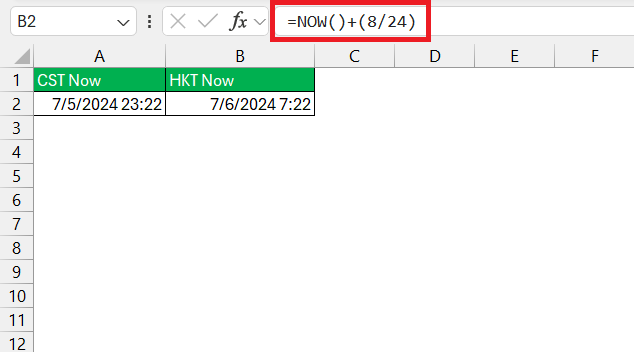
This takes the current UTC time provided by the NOW function and adds the 8-hour offset, converting it to Hong Kong time now. Make sure to format the cell to a date and time format that suits your preference.
Example 2: Convert a Specific Time to Hong Kong Time
To convert a given time to Hong Kong Time, you would use the same principle of adding the 8-hour time difference. If your provided time is in cell A2, the formula would be =A2 + (8/24).
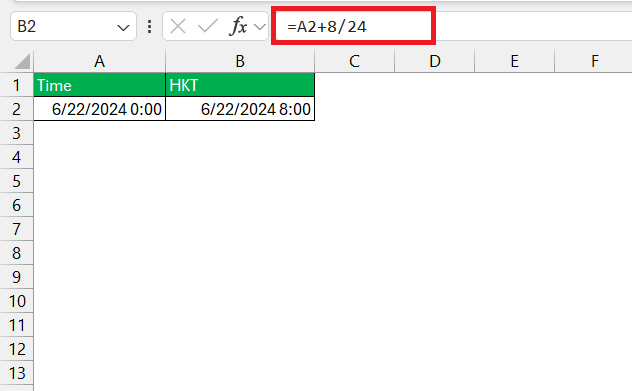
This adjustment ensures that you have the time reflected in HKT.
Troubleshooting Time Function Errors
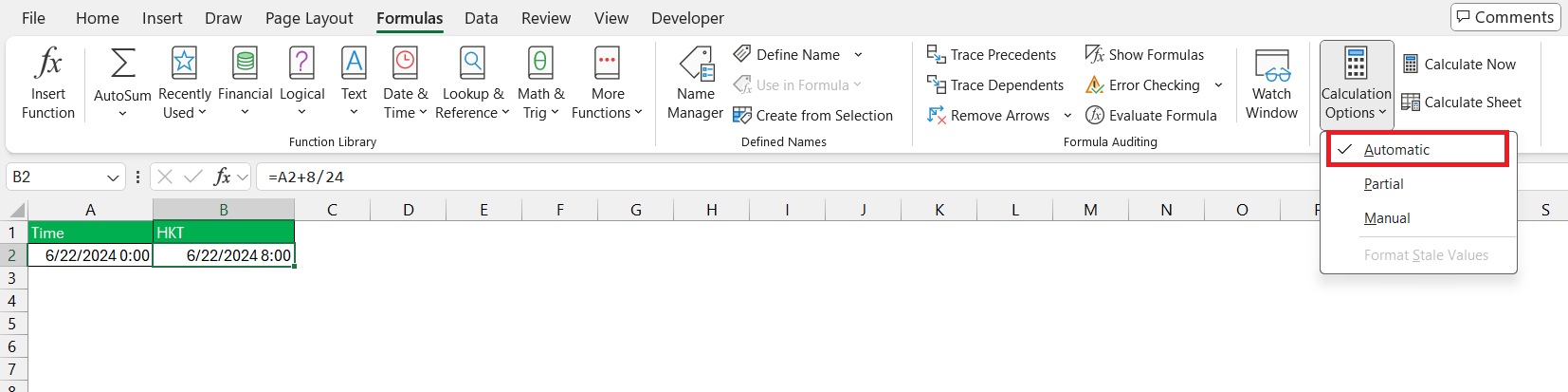
If the NOW function isn’t working as expected, don’t worry, they’ve got this covered. First, check that Excel’s automatic recalculation feature is on: this ensures that the NOW function updates with every change or refresh. Head over to “Formulas”, click on “Calculation Options”, and select “Automatic”.
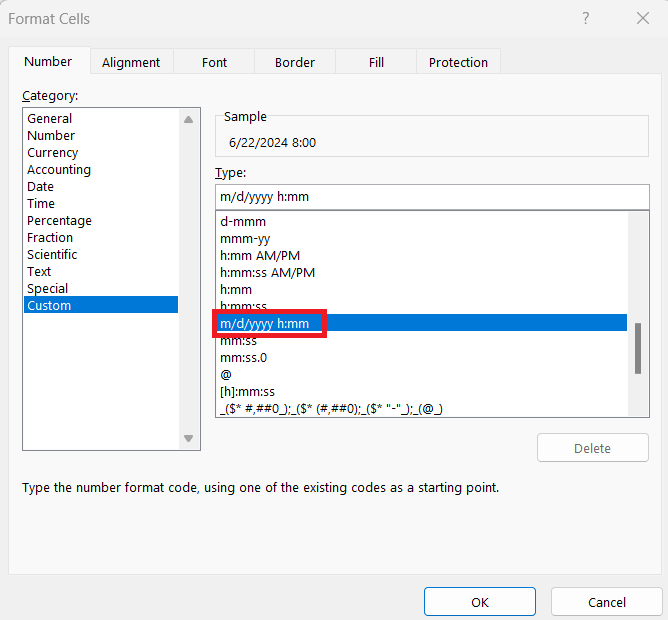
Also, check the cell formatting—is it showing a weird serial number? Change it to a date and time format.
FAQ Section
How do I format international time in Excel?
Right-click the cell with your time, select ‘Format Cells’, then under ‘Category’, choose ‘Time’. You’ll see a variety of international time formats. If they need a custom format, select ‘Custom’ and set it up in the format code box.
How do I automatically insert the current date and time for Hong Kong in Excel?
To automatically insert the current date and time for Hong Kong in Excel, type =NOW() + (8/24) in a cell, which adds 8 hours to the current UTC time provided by the NOW function. Remember to format your cell for the date and time.
How to do time zone conversion in Excel?
To do time zone conversion in Excel, determine the time difference between the zones. Then, use a formula like =YourCell + (TimeDifference/24) to convert to the target time zone. Use - instead of + if you’re converting to an earlier time zone. Ensure the cell to display the date and time appropriately.

John Michaloudis is a former accountant and finance analyst at General Electric, a Microsoft MVP since 2020, an Amazon #1 bestselling author of 4 Microsoft Excel books and teacher of Microsoft Excel & Office over at his flagship MyExcelOnline Academy Online Course.

 30 Days - Full Access









