 Free Practice Workbook
Whether you’re managing data for work or personal projects, knowing how to convert a fraction to a percentage is a key skill. In this article, we’ll guide you through the simple steps on how to turn a Fraction into a Percent in Excel.
Key Takeaways:
- Excel has built-in features to convert a fraction to a percentage.
- Format cells to display a fraction as a percentage.
- Apply formulas for direct fraction-to-percentage conversion.
- Use Excel shortcuts can speed up workflows.
- Excel can handle mixed numbers and large datasets for percentage calculations.
Table of Contents
Introduction to Converting Fractions to Percentages
Understanding how to transform fractions into percentages is a key skill when comparing rates or interpreting statistical data. Percent translates to “per hundred,” so converting a fraction to a percentage means determining how many parts out of a hundred it represents.
Excel has various fraction-to-percentage conversion processes. By using Excel, we save time and reduce the potential for human error. It is a go-to tool for financial analysts, statisticians, and anyone needing to manipulate numerical data effectively.
Set up Your Excel Spreadsheet
- Select the cell
- Input the numerator
- Type a forward slash
- Input the denominator
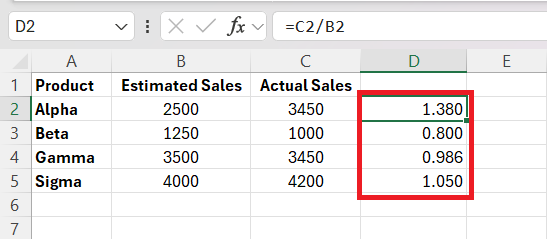
Format Cells
Method 1: Excel Ribbon
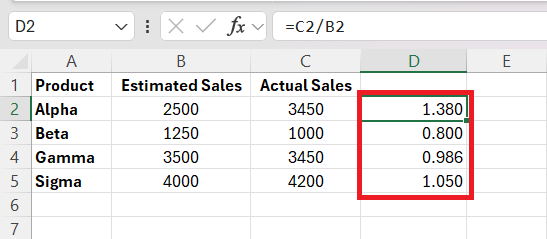
STEP 1: Select the cells where you want to convert fractions to percentages.
STEP 2: Located under the Home tab in the Number group, you can find the number format dropdown.
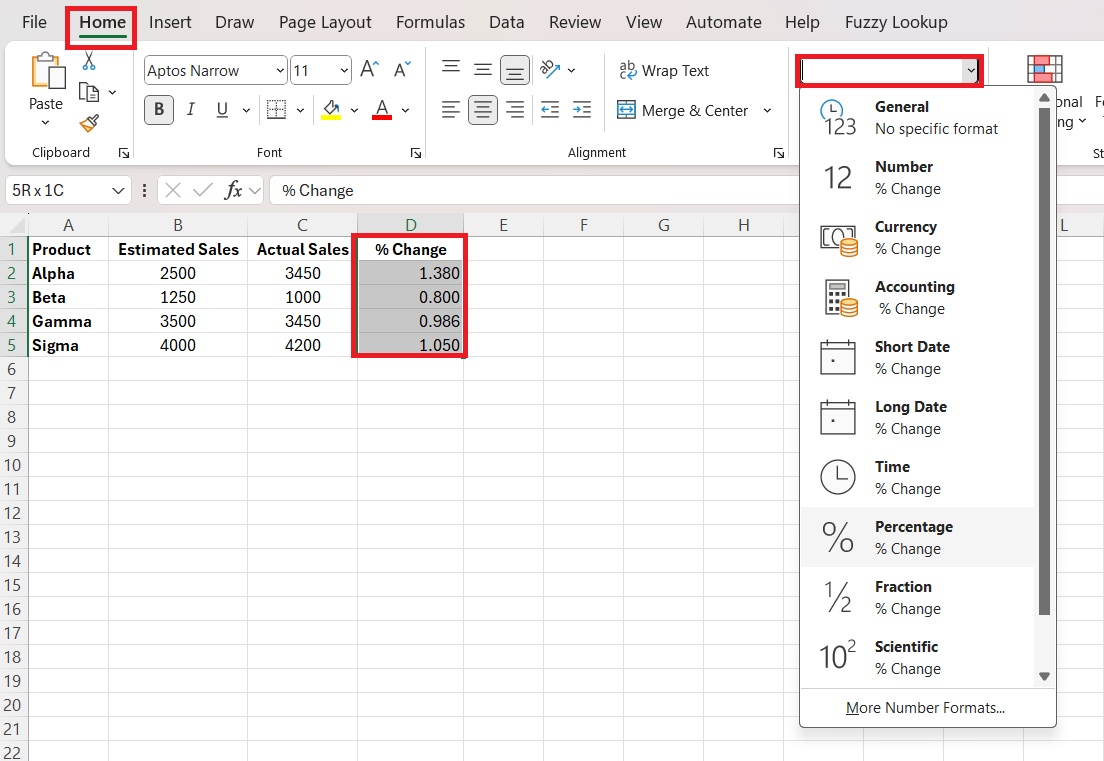
STEP 3: Click on “Percentage” to convert all numbers into fractions and decimals in percentages.
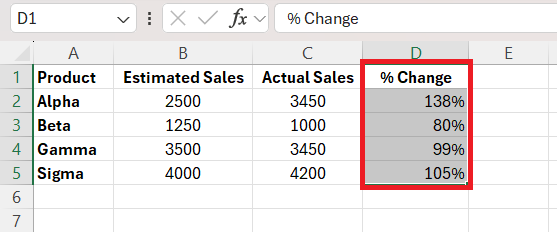
Method 2: Format Cells
By clicking on the small icon next to Number or by pressing Ctrl+1, the Format Cells dialog box appears. From here, we choose ‘Percentage’ from the Category list, and Excel offers several common fraction formats to choose from.
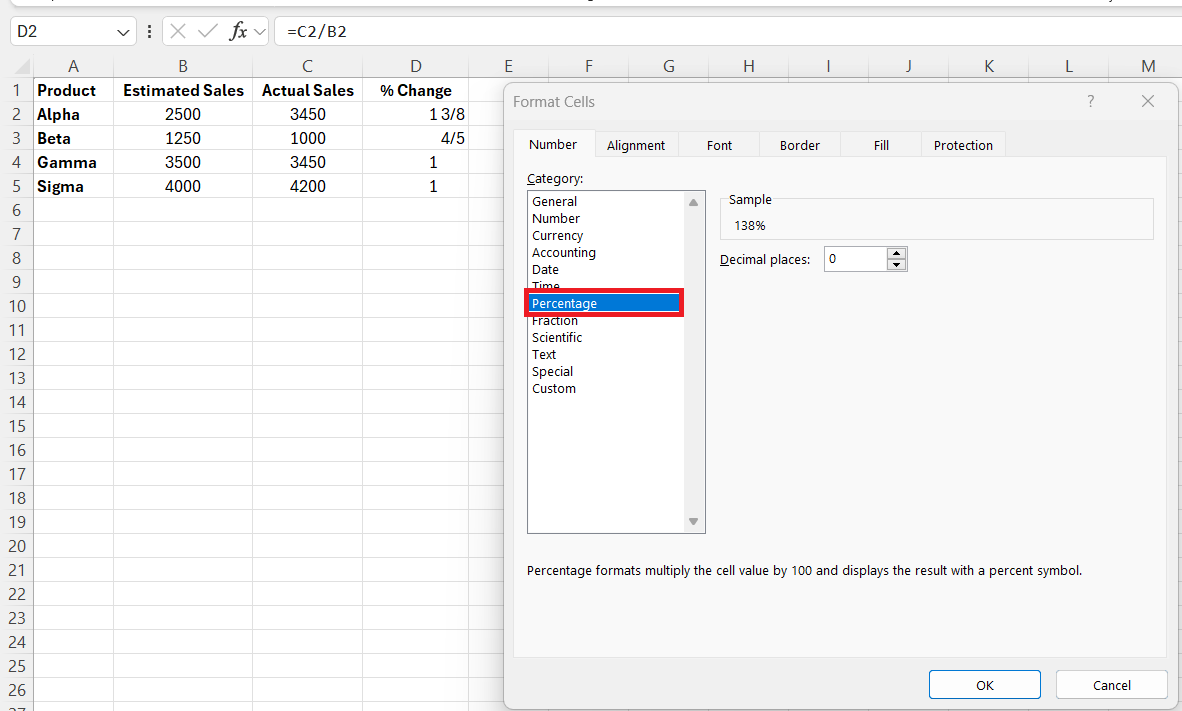
After inputting the cells as fractions, we can then easily transform them into percentages.
Advanced Excel Tips
Applying Formulas for Direct Conversion
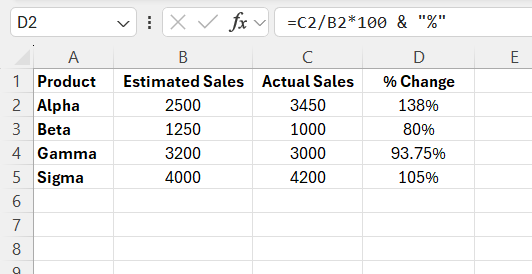
When it comes to applying formulas for direct conversion from fractions to percentages in Excel, I make good use of cell referencing and arithmetic capabilities. For instance, if I have the fraction in cell A1, I could enter =C2/B2*100 & “%” in an adjacent cell. This will do two things:
- It multiplies the fraction by 100
- Using the ampersand with the percentage symbol, it creates a text string that displays the result as a percentage.
Excel Shortcuts
- Ctrl+Shift+%: Apply percentage format to the selected cells.
- Ctrl+1: Opens the ‘Format Cells’ dialog.
- Ctrl+R: Copies a formula or formatting to the right.
- Ctrl+D: Copies a formula or formatting below.
- Alt+E, S, F: This will paste only the formula of the copied cell.
FAQs
How to convert a fraction into a percent?
To convert a fraction into a percent,
- Divide the numerator by the denominator to get a decimal
- Multiply by 100
- Add a percentage sign to indicate the result is a percent.
How do I change a row of fractions to percentages in Excel?
In Excel, select the row of fractions, go to the ‘Home’ tab, click on the ‘Percentage Style’ button to format them as percentages, or use the ‘Format Cells’ dialog (Ctrl+1), choose ‘Percentage’, and set the number of decimal places. Excel will convert and display the fractions as percentages.
How to convert mixed numbers to percentages?
Enter the mixed number as a formula, for example, ‘1 1/2’ as ‘1+1/2’
- Right-click on the cell
- Select Format Cells
- In the dialog box, select percentage
How to apply the percentage formula in Excel?
To calculate 20% of 50,
- Input 50 in A1
- 0.20 in B1
- Enter the formula in C1: =A1*B1
- Format C1 as a percentage

John Michaloudis is a former accountant and finance analyst at General Electric, a Microsoft MVP since 2020, an Amazon #1 bestselling author of 4 Microsoft Excel books and teacher of Microsoft Excel & Office over at his flagship MyExcelOnline Academy Online Course.

 30 Days - Full Access









