 Free Practice Workbook
Table of Contents
Introduction to Small Caps
What is Small Caps?
Small Caps is a typography style where all letters appear as capital letters. Unlike regular capital letters, small caps maintain the vertical size of lowercase characters with the consistent shape and seriousness of uppercase.
- All Caps: Every letter is the same size.
- Small Caps: The first letter of each word stays full-size, while the remaining letters become smaller capital letters.
When to Use Small Caps in Excel
Small caps can improve the appearance of worksheets when you want text to look clean and professional without using full uppercase.
Some common uses include:
- Dashboard titles and headings
- Report cover pages
- Company names and logos
- Certificates and templates
- Labels for charts and tables
- Presentation worksheets
How to Create Small Caps Font in Excel
Manual Method with Font Sizes
- Type your text
- Use the UPPER function to convert all text to uppercase.
- Press Ctrl + C to copy the formula.
- Press Alt + E + S + V to convert it to value.
- Highlight all letters except the first letter.
- Go to the Home tab and reduce the font size.

Using VBA for Small Caps
- Go to Developer > Code > Visual Basic
- Paste the code

- Select Save.
- Close the window afterwards.
- Select your data.
- Go to Developer > Code > Macros.
- Select the macro and press Run.

The small caps text will appear.

Text Box
- Go to the Insert tab.
- Select Text Box.

- Type the text in uppercase.
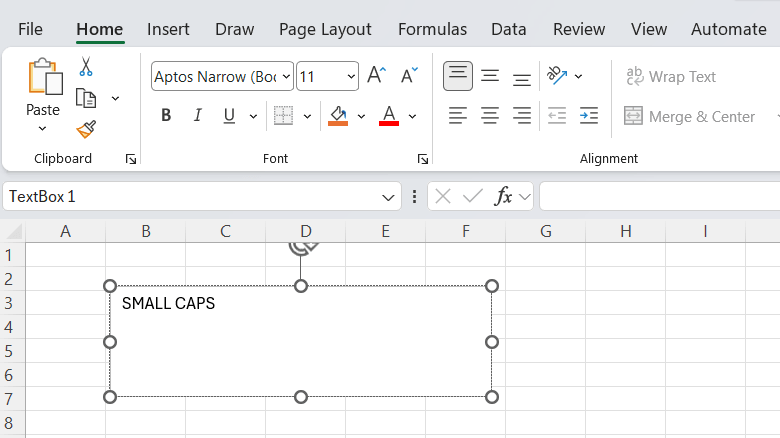
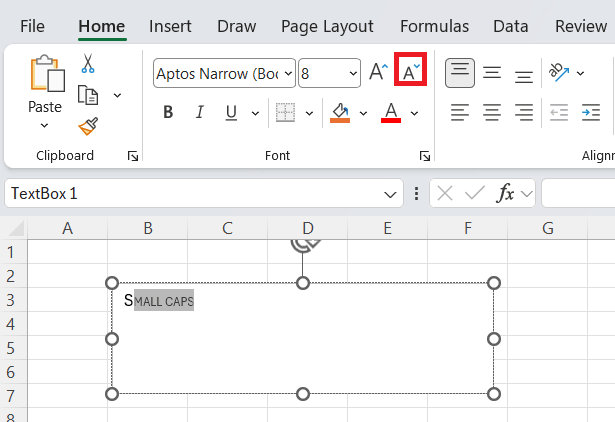
- Highlight all letters except the first letter.
- Reduce the font size of the selected letters.
FAQ
Does Excel have a small caps font option?
No, Excel does not include small caps formatting. You need to create it using uppercase and reducing font sizes.
Are there any fonts in Excel that provide small caps automatically?
No, by default there are no fonts that support small caps.
Is it possible to convert a font to Small Caps without VBA?
Yes, you can convert text to small caps without using VBA.
- Convert text to uppercase.
- Select all letters except the first letter.
- Reduce font size.
Does the Small Caps effect work in all Excel versions?
Yes. The manual and VBA methods can work in all versions.
Can I apply the Small Caps effect to many cells at once?
Yes, you can use a VBA macro to format multiple selected cells automatically.

John Michaloudis is a former accountant and finance analyst at General Electric, a Microsoft MVP since 2020, an Amazon #1 bestselling author of 4 Microsoft Excel books and teacher of Microsoft Excel & Office over at his flagship MyExcelOnline Academy Online Course.

 30 Days - Full Access









