 Free Practice Workbook
The Omega symbol (Ω), the final letter of the Greek alphabet, is widely used in Microsoft Excel for mathematical, scientific, and engineering purposes, such as denoting ohms or the last element in a set.
Key Takeaways:
- Insert the Omega symbol by going to the ‘Insert’ tab, selecting ‘Symbol,’ and choosing the ‘Greek and Coptic’ subset.
- Quickly insert the Omega symbol by holding ALT and typing 234 on the numeric keypad with Num Lock on.
- Copy the Omega symbol (Ω) from another source and paste it into Excel for a quick insertion method.
- Use the =UNICHAR(937) formula to dynamically insert the Omega symbol in your Excel worksheet.
Table of Contents
The Basics of Inserting Symbols in Excel
Accessing the Symbol Menu
STEP 1: Go to the ‘Insert’ tab and click on ‘Symbol’

STEP 2: Choose the ‘Greek and Coptic’ subset.
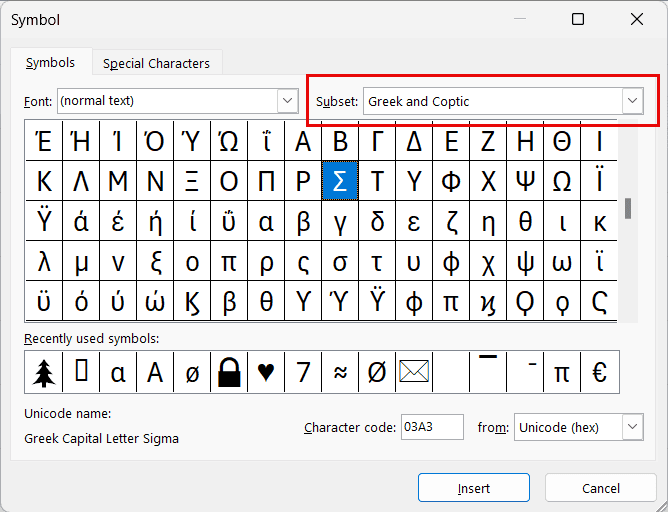
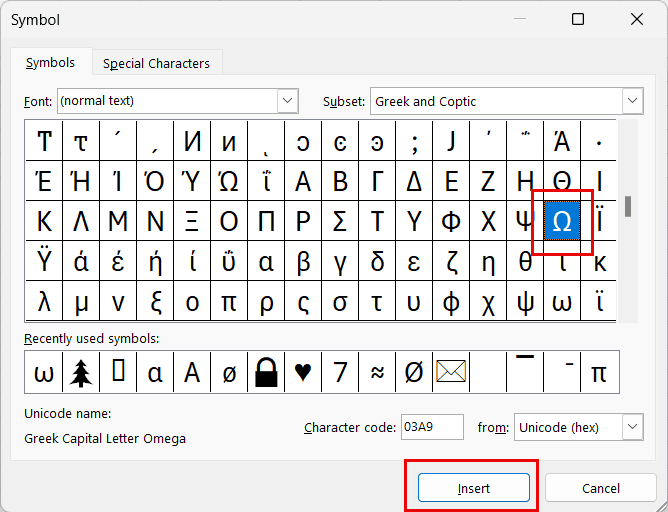
STEP 3: Click on the Omega symbol, then Insert.
Keyboard Shortcuts
If your keyboard has a numeric keypad, just hold down ALT and type 234. The Omega symbol appears as soon as you release the ALT key.
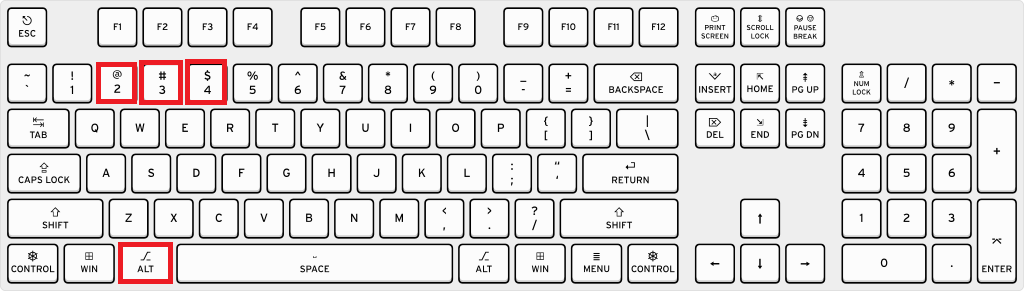
Be sure your Num Lock is on to ensure this happens. For those of you without a numeric keypad, some laptops allow the function (Fn) key to access a secondary set of numbers at the top of your keyboard – check if that’s an option for you.
Utilize the formula to insert Omega
For capital Omega, the formula is “=UNICHAR(937)“.
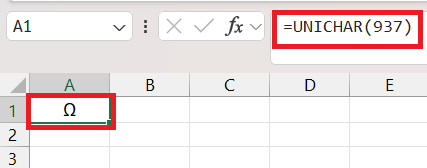
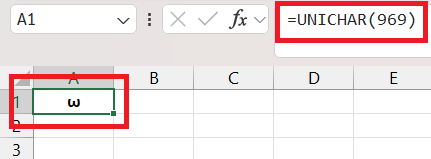
For small Omega use the following formula ” use formula “=UNICHAR(969)“.
FAQ Section
Where to find the omega symbol in Excel?
To find the Omega symbol in Excel, go to the ‘Insert’ tab, click on ‘Symbol,’ and look for the Omega sign (Ω) in the ‘Greek and Coptic’ subset or type the Character Code ’03A9′ in the provided field. It’s a quick and easy process to bring Ω into your worksheet.
How do you type Ω?
To type Ω, you can use the ALT code method by pressing and holding the ALT key while typing 234 on the numeric keypad, then releasing the ALT key. On laptops without a numeric keypad, consider using the Symbol menu in Excel or copy-pasting Ω from another source.
What is the ALT code for the Omega symbol in Excel?
The ALT code for the Omega symbol in Excel is ALT+937 for uppercase Ω or ALT+234 for the lowercase ω. Remember to use the numeric keypad for typing the numbers.
How can I insert the Omega symbol if I don’t have a number pad on my keyboard?
If you don’t have a number pad, you can insert the Omega symbol by accessing the Symbol menu in Excel under the ‘Insert’ tab or by copying and pasting Ω from another source, such as a web page or a character map tool.
What is the ALT code for omega?
The ALT code for the uppercase Omega symbol (Ω) is ALT+937, and for the lowercase omega symbol (ω) it is ALT+234. Just make sure Num Lock is on if you’re using the numeric keypad to enter these codes.

John Michaloudis is a former accountant and finance analyst at General Electric, a Microsoft MVP since 2020, an Amazon #1 bestselling author of 4 Microsoft Excel books and teacher of Microsoft Excel & Office over at his flagship MyExcelOnline Academy Online Course.

 30 Days - Full Access









