 Free Practice Workbook
The sum of squares is a statistical analysis tool that is used to help analyze variability in datasets. It is useful for regression analysis, variance calculations, and other statistical applications. In this article, I will show you how to calculate the sum of squares in Excel.
Key Takeaways:
- The sum of squares can be used to measure data variability.
- It is important for statistical analysis in Excel.
- It can be calculated manually by squaring deviations from the mean.
- You can use the SUMSQ function to calcultae sum of squares.
- The SUMXMY2 function computes the sum of squared differences between two datasets.
Table of Contents
Understand Sum of Squares
The sum of squares is used to check how spread out the data is from its average. To calculate this value, I will have to square the individual values and then add them. This is a key statistical tool that is used in variance and regression analysis. It helps you analyze data and understand patterns.
Sum of Squares = ∑xi^2
Here, xi represents each value in the dataset.
Squaring this number will remove the negative sign and make the variation calculation easier.
How to Calculate the Sum of Squares
Manual Calculation Using Formulas
To calculate the sum of squares in Excel, follow these steps:
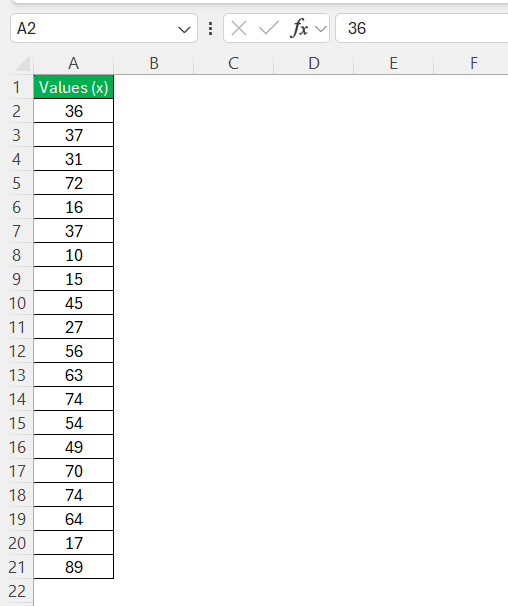
STEP 1: List the values in column A.
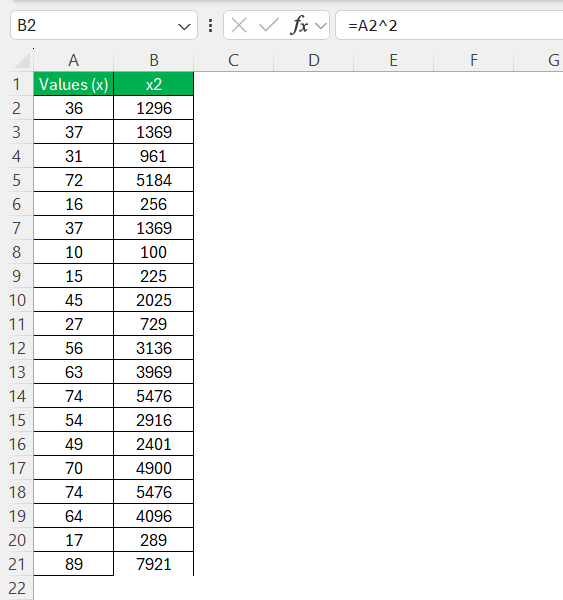
STEP 2: In Column B, use the formula below to square the values.
=A2^2
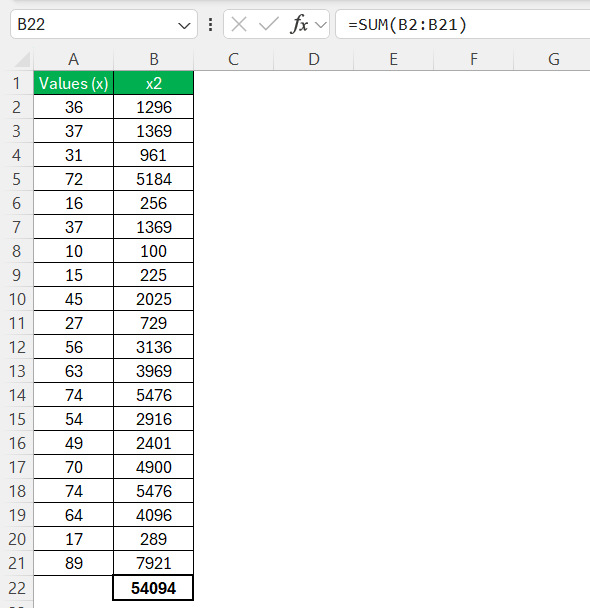
STEP 3: Finally, sum all the squared values using =SUM(B2:B21).
SUMSQ Function
The SUMSQ function can be used to calculate the sum of the squares of the numbers. To calculate this value, I need to insert the range or numbers as an argument of this function.
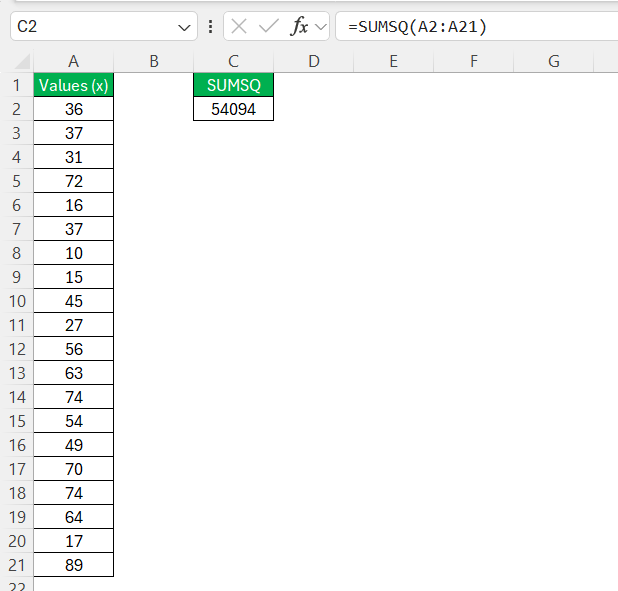
This function removes the need to individually square each value and then sum them.
SUMXMY2 function
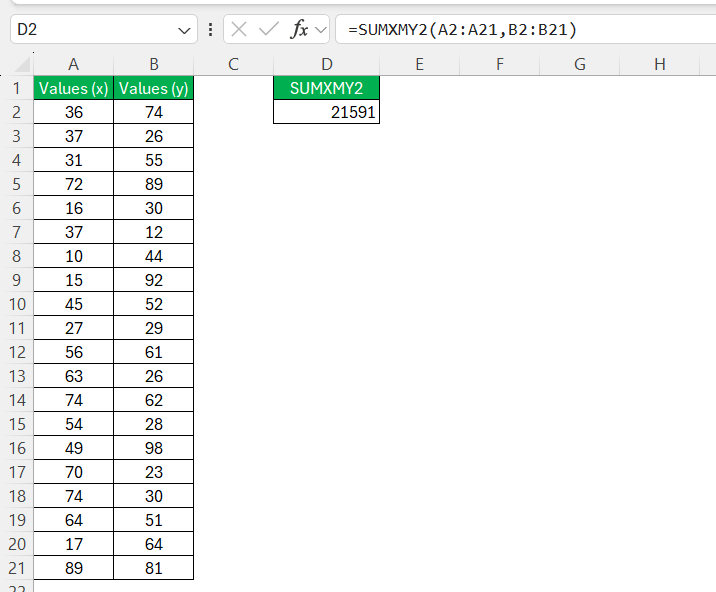
The SUMXMY2 function in Excel calculates the sum of squares of differences between two arrays of numbers. This means it first finds the difference between corresponding values in two arrays, squares each difference, and then sums up the squared values.
Syntax:
SUMXMY2(array1, array2)
Each value in array1 is subtracted from the corresponding value in array2, squared, and then summed.
Tips & Tricks
- Make sure that absolute cell references are used to prevent unwanted changes when copying formulas.
- Double-check that data ranges do not contain missing or extra cells.
- Update formulas to reflect any changes in my dataset.
- Choose simplicity and avoid overcomplicating the process.
FAQs
What does the sum of squares measure?
The sum of squares measures how spread out the data is from its mean.
How to calculate the sum of squares manually in Excel?
Follow the steps below to manually calculate the sum of squares:
- Square each value using =A2^2
- Add the results with the SUM function.
How to apply conditions when calculating Sum of Squares?
To apply conditions when calculating the sum of squares, I use the SUMIFS function with the SUMSQ function.
=SUM((B1:B10 * (A1:A10="North"))^2)
This function will calculate the sum of squares for sales in the “North” region.
What is the SUMXMY2 function?
The SUMXMY2 function calculates the sum of squared differences between two sets of numbers.

John Michaloudis is a former accountant and finance analyst at General Electric, a Microsoft MVP since 2020, an Amazon #1 bestselling author of 4 Microsoft Excel books and teacher of Microsoft Excel & Office over at his flagship MyExcelOnline Academy Online Course.

 30 Days - Full Access









