 Free Practice Workbook
Table of Contents
What Is an Arbitrage Calculator?
An arbitrage calculator helps you check whether odds from different bookmakers create a possible arbitrage opportunity The calculator converts the odds for each outcome into implied probabilities. It then adds these probabilities together.
If the combined implied probability is less than 100%, the odds may offer an arbitrage opportunity.
How to Build an Arbitrage Calculator in Excel
Step 1: Input Raw Data
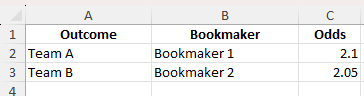
Input the event outcomes, bookmaker names, and their corresponding odds.
| Outcome | Bookmaker   | Odds |
|---------|-------------|------|
| Team A  | Bookmaker 1 | 2.10 |
| Team B  | Bookmaker 2 | 2.05 |
Step 2: Calculate Implied Probabilities
Use the formula to calculate implied probabilities:
=1 / [Odds]
In Excel, assuming odds are in cell C2 and C3:
=1/C2

Step 3: Calculate Stake Allocation
Assuming a total stake of $100, calculate the amount to bet on each outcome:
Team A Stake = 100 * (Implied Probability of A) / (Sum of both probabilities)
Team B Stake = 100 * (Implied Probability of B) / (Sum of both probabilities)
In Excel:
=100*D2/(D2+D3)
=100*D3/(D2+D3)

Step 4: Calculate Payouts
Calculate the potential return for each outcome:
=Stake * Odds
Example:
=B2*C2

Step 5: Review Profit
If the return is the same (or very close) for each outcome and greater than $100, you have a guaranteed profit.

Common Mistakes and Tips
- Make sure you reference cells properly and avoid circular references.
- This calculator works with decimal odds. Convert fractional or American odds before inputting.
- Use absolute references where needed (e.g., $C$2) to avoid errors during copying.
- Real arbitrage may be reduced or negated by fees. Adjust calculations accordingly.
- You may not be able to place the required bet sizes due to limits or restrictions.
Frequently Asked Questions
What is an arbitrage calculator?
An arbitrage calculator checks different odds and calculates if a guaranteed profit is possible.
How do I find an arbitrage opportunity?
Add the implied probabilities of all outcomes. If the total is below 100%, an arbitrage opportunity exists.
Can Excel calculate arbitrage bets?
Yes. Excel formulas can calculate implied probability, stake allocation, payouts, and profit.
Does this calculator work with American odds?
The calculator uses decimal odds. You need to convert American odds to decimal odds first.
Is arbitrage betting always profitable?
No. Fees, betting limits, and changing odds can reduce or remove the expected profit.

John Michaloudis is a former accountant and finance analyst at General Electric, a Microsoft MVP since 2020, an Amazon #1 bestselling author of 4 Microsoft Excel books and teacher of Microsoft Excel & Office over at his flagship MyExcelOnline Academy Online Course.

 30 Days - Full Access









