 Free Practice Workbook
Table of Contents
Understand Fractions and Decimals
Fractions and decimals are two different ways to represent part of a whole.
- A fraction represents a part of a whole.
- A decimal is another way to represent a fraction using a decimal point.
Excel treats fractions either as text or as numerical values depending on how you enter them. If you type 1/5 into a cell, Excel might interpret it as a date unless you format the cell as a fraction first. However, if you enter it as a formula (=1/5), Excel calculates it as a division problem and returns the decimal result of 0.2.
How to Convert 1/5 to a Decimal
Method 1: Formula
Click on an empty cell (e.g., A1).
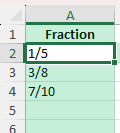
Type =1/5.
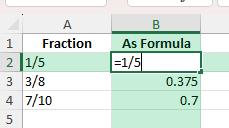
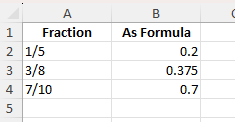
Press Enter. The result will be 0.2.
Method 2: Cell References
If 1 is in cell A1 and 5 is in cell B1, enter:
=A1/B1
Common Mistakes or Tips
Excel reading as a date: Typing 1/5 without formatting might result in January 5 being displayed. Use =1/5 or format as a fraction first.
Extra decimal places: If you see 0.200000, adjust the number of decimal places in Format Cells.
Text values: Fractions stored as text cannot be used in calculations until converted with VALUE().
Bonus Tips
Convert multiple fractions at once: Select the range, then apply the Number format.
Power Query: Load fraction data and use a column transform to perform the division for all rows.
VBA Macro: You can use a macro to loop through cells and replace fractions with decimals.
Handle Repeating Decimals
You can use the ROUND function to control the number of decimal places that you want to include.
=ROUND(1/3,2)
This will round the result to 2 decimal places.
Prevent Errors
- Check the cell format
- Keep decimal formatting consistent
- Use data validation to prevent data entry errors
FAQ
What is 1/5 as a decimal?
The decimal format of 1/5 is 0.2.
Why does Excel turn my fraction into a date?
Excel may convert a fraction to a date because it detects a pattern such as “1/5” and assumes it represents January 5. You need to change the cell format or enter it as a formula.
Can I keep fractions and decimals in the same column?
Yes, you can keep both fractions and decimals in the same column. But for consistency, you should use one format for calculations.
What if I want more decimal places?
To increase decimal places,
- Right-click on the value
- Select Format Cells
- Select Number
- Increase decimal places
What is a fraction?
A fraction represents a part of a whole. For example, 1/5 is a fraction. Excel treats fractions either as text or as numerical values.

John Michaloudis is a former accountant and finance analyst at General Electric, a Microsoft MVP since 2020, an Amazon #1 bestselling author of 4 Microsoft Excel books and teacher of Microsoft Excel & Office over at his flagship MyExcelOnline Academy Online Course.

 30 Days - Full Access









