 Free Practice Workbook
When working with colleagues or clients across different time zones, adjusting times correctly is important. In this article, you will learn how to convert PST time to EST time in Excel.
Key Takeaways
- PST is 3 hours behind EST
- Convert PST to EST by adding 3 hours.
- The
TIMEfunction lets you add hours and minutes to a time value. - Cell formatting is important to display the correct date and time.
- VBA macros can automate the conversion for repeated use.
Table of Contents
Understand PST and EST
What are PST and EST?
PST is applicable to California, Washington, and parts of Canada, and EST applies to New York, Florida, and Ontario. The time difference between these zones is 3 hours.
For example, if the time in PST is 9:00 AM, the time in EST will be 12:00 PM.
Daylight Saving Time
Daylight Saving Time (DST) affects both PST and EST by moving clocks forward in the spring and falling back in autumn. It is generally observed from March to November. During this DST period, the time difference between the two zones remains three hours; however, PST shifts to UTC-7 and EST to UTC-4.
How to Convert PST time to EST time
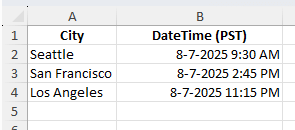
STEP 1: Make sure that the data is in a recognized date/time format. For example:
STEP 2: In a new column, add 3 hours to the PST value:
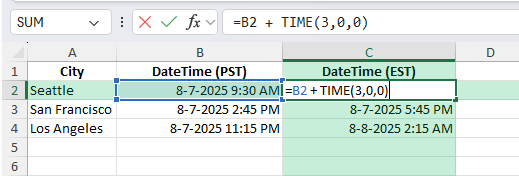
STEP 3: Set the cell format to m/d/yyyy h:mm AM/PM so both date and time display correctly.
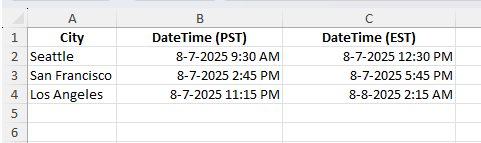
STEP 4: Copy the formula for all rows.
STEP 5: Copy the EST column and paste as values.
Common Mistakes to Avoid
- If results appear as numbers, change the cell format to Date/Time.
- Converting PST to EST means adding 3 hours, not subtracting.
- If times are stored as text, use
DATEVALUEandTIMEVALUEto convert them before adding hours. - Adding hours may push times into the next day. Excel handles this automatically if formatted correctly.
Bonus Tips and Advanced Options
Daylight Saving Time Logic
Use an IF function with a date check to adjust for daylight saving time periods if your dataset spans multiple months:
=B2 + IF(AND(B2 >= DATE(2025,3,9), B2 < DATE(2025,11,2)), TIME(3,0,0), TIME(3,0,0))
Power Query Method
Load the table into Power Query, add a Custom Column with =[DateTime PST] + #duration(0,3,0,0), and load the result back to Excel.
VBA Automation
For frequent conversions, use this macro:
Sub ConvertPSTtoEST()
    Dim rng As Range
    For Each rng In Selection
        If IsDate(rng.Value) Then
            rng.Offset(0, 1).Value = rng.Value + TimeSerial(3, 0, 0)
        End If
    Next rng
End Sub
This takes the selected PST times and writes the EST times in the next column.
FAQs
How many hours ahead is EST compared to PST?
EST is always 3 hours ahead of PST.
Will the formula work for dates as well as times?
Yes, Excel preserves the date while adjusting the time.
How to handle text-based times?
Convert them to Excel date/time format using DATEVALUE and TIMEVALUE before applying the formula.
How to convert EST to PST?
You can subtract 3 hours from EST to convert the time in PST.
How to do multiple zone conversions?
You can use Power Query or VBA to convert multiple zones in one process.

John Michaloudis is a former accountant and finance analyst at General Electric, a Microsoft MVP since 2020, an Amazon #1 bestselling author of 4 Microsoft Excel books and teacher of Microsoft Excel & Office over at his flagship MyExcelOnline Academy Online Course.

 30 Days - Full Access









