 Free Practice Workbook
When working with schedules, payroll, project timelines, or employee attendance, you often need to know how many workdays exist in a year. Excel provides a simple way to calculate the number of days excluding weekends. In this guide, you will learn how to calculate how many days in a year without weekends in Excel.
Key Takeaways
- Use the
NETWORKDAYSfunction to count weekdays only. - You can include holidays in the calculation using a holiday range.
- Leap years automatically adjust the total number of days.
- Excel handles start and end dates that are not aligned with the calendar year.
- You can automate this logic using VBA for advanced scenarios.
Table of Contents
What is NETWORKDAYS?
The NETWORKDAYS function is used to return the number of working days between two dates. It excludes Saturdays and Sundays by default. You can also provide a list of holidays to exclude.
The NETWORKDAYS function in Excel is a great tool designed to simplify the calculation of the number of working days between two specified dates, automatically excluding weekends. This can be useful in various scenarios where you need to know the exact number of working days.
How to Count How Many Days in a Year Without Weekends
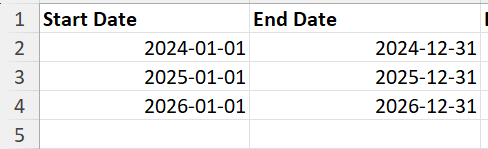
Step 1: Enter Start and End Dates
In your worksheet, create columns for start dates and end dates:
Step 2: Apply NETWORKDAYS Formula
In cell C2, enter the following formula:

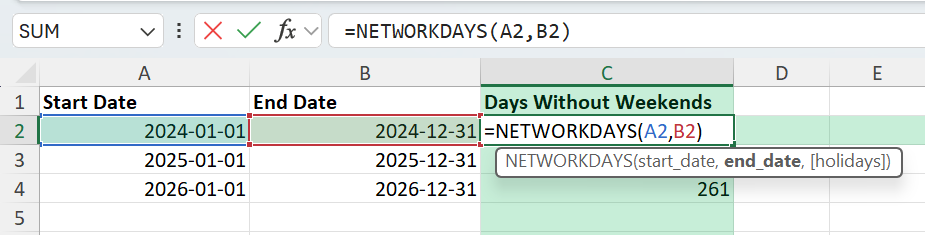
This will return the total number of workdays between January 1 and December 31, excluding weekends.
Common Mistakes or Tips
- Make sure that the cells are formatted as dates, not text.
- If the start date is after the end date in the formula, it will return a negative number.
- If you do not provide a holiday range, Excel will ignore it.
- It is important to remove any extra spaces or text entries in the date range.
- If you are sharing the data across regions, you should use the ISO format for dates.
Bonus Tips
- If your weekends are not Saturday-Sunday, you can use
NETWORKDAYS.INTLwith a weekend code. - If you want to keep the end date dynamic, you can use the TODAY function.
- You can add a simple macro to update and count workdays for any year input by the user.
FAQ
How many working days are there in a year without weekends?
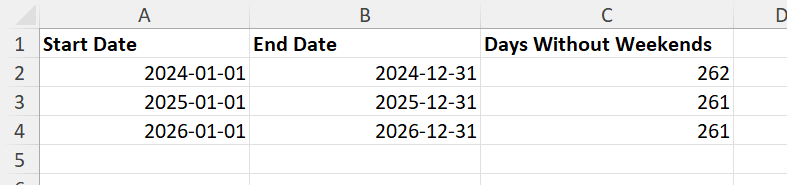
In a non-leap year, there are 261 working days. In a leap year like 2024, there are 262 working days. This assumes no holidays are excluded.
What’s the difference between NETWORKDAYS and NETWORKDAYS.INTL?
NETWORKDAYS assumes weekends are Saturday and Sunday. NETWORKDAYS.INTL lets you customize which days are considered weekends using a numeric code.
Can I calculate working days across multiple years?
Yes. Just enter the correct start and end dates that span multiple years. Excel will calculate accordingly.
What happens if my holiday range has text instead of dates?
Excel will ignore non-date values, but it’s a good practice to clean the list using Data Validation or error checking.
Can I exclude only Sundays but keep Saturdays?
Yes. Use NETWORKDAYS.INTL with the weekend code “11”, which treats Sunday only as a weekend day.

John Michaloudis is a former accountant and finance analyst at General Electric, a Microsoft MVP since 2020, an Amazon #1 bestselling author of 4 Microsoft Excel books and teacher of Microsoft Excel & Office over at his flagship MyExcelOnline Academy Online Course.

 30 Days - Full Access









