 Free Practice Workbook
Return on Sales is a financial metric that can evaluate a company’s profitability. It is important to compare profitability across different periods or companies to help spot trends. In this article, you will learn how to calculate return on sales in Excel.
Key Takeaways:
- It can be used to compare profitability across different periods.
- A good ROS ratio generally ranges from 5-20%.
Table of Contents
Introduction to Return on Sales
What is ROS?
Return on Sales is a key financial metric that provides information on your company’s efficiency. It shows how much profit your business makes from its sales. It helps you understand how efficiently your company turns revenue into profit.
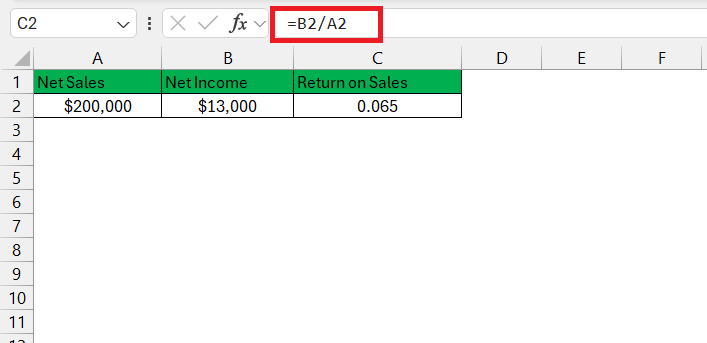
It can be calculated by dividing the net income by net sales.
= Net Income/Net Sales
Why Return on Sales Is Important
Return on Sales is useful because it shows how much profit a company earns from every dollar of sales. It helps business owners, managers, and investors evaluate how efficiently a company is operating.
A higher ROS indicates that a larger portion of revenue is being converted into profit. This can be a sign of effective cost management and strong business performance. Tracking ROS over time can help identify trends in profitability.
- If the ratio increases, it may indicate improved efficiency.
- If it decreases, it could signal rising costs or declining profit margins.
How to Calculate Return on Sales Formula
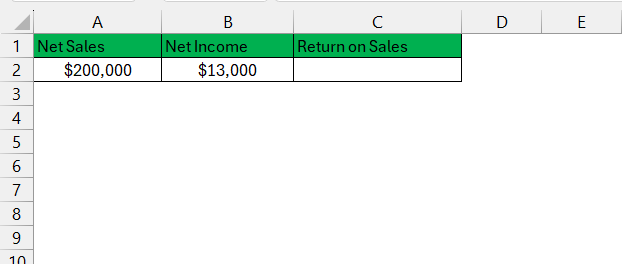
STEP 1: Enter the column headers like Net Sales and Net Income.
STEP 2: Enter the data under the appropriate headings.
STEP 3: Divide Net Income by Net Sales to get the Retun on Sales value.
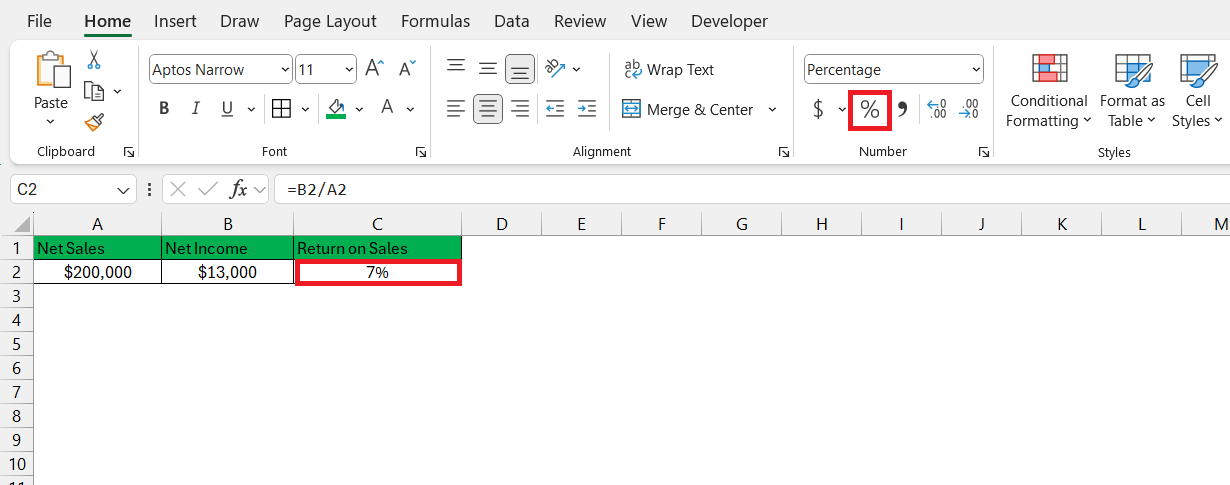
STEP 4: Go to the Home tab and select the % symbol.
STEP 5: Drag the fill handle to copy the formula below.
Tips & Tricks
- Check that the value entered in Excel are coorect.
- Check for typing errors before calculating ROS.
- Make sure formulas reference the correct cells.
- Use Trace Precedents or Trace Dependents to review the formula.

- Avoid adding spaces before formulas.
- Do not place an apostrophe (‘) before the equals sign (=).
Interpret ROS Results
A Return on Sales (ROS) ratio between 5% and 20% is generally considered good for many businesses. However, the ideal ratio can vary depending on the industry. Comparing your ROS with industry benchmarks can provide a better understanding of your company’s performance.
- A higher ROS generally indicates better profitability.
- A lower ROS means the cost is rising or profit margins have lowered.
FAQs
What is ROS?
ROS stands for Return on Sales. It measures how much profit a business is earning from the sales.
How to calculate ROS?
To calculate ROS,
- Enter the Net Income
- Enter the Net Sales
- Divide Net Income by Net Sales
- Format as percentage
What is a good ROS ratio?
A good ROS ratio is generally between 5% and 20%.
Why calculate ROS?
ROS helps measure the profitability of the company.
Can I compare ROS across different periods?
Yes. Comparing ROS over different months, quarters, or years helps identify profitability trends and business performance changes.

John Michaloudis is a former accountant and finance analyst at General Electric, a Microsoft MVP since 2020, an Amazon #1 bestselling author of 4 Microsoft Excel books and teacher of Microsoft Excel & Office over at his flagship MyExcelOnline Academy Online Course.

 30 Days - Full Access









