 Free Practice Workbook
Checking values in Excel allows users to verify data integrity, detect duplicates, and prepare datasets for further examination. In this article, you will learn how to check if a value exists in a range.
Key Takeaways:
- Excel functions allow users to perform searches.
- The LOOKUP function allows for both vertical and horizontal searches.
- Combine INDEX and MATCH functions to improve search accuracy and flexibility.
- Use COUNTIF to verify the existence of specific values within a range.
- Wildcards like * help find partial matches in data.
Table of Contents
Key Functions to Identify Values
LOOKUP Function
The LOOKUP function in Excel lets you search for a value within a row or column and retrieve a corresponding value from another row or column. It is incredibly versatile because you can use it to look up a value both horizontally and vertically.
=LOOKUP(Lookup_Value, Lookup_Vector, Result_Vector)
For instance, if you want to find an employee’s age based on their name, you can use this formula.
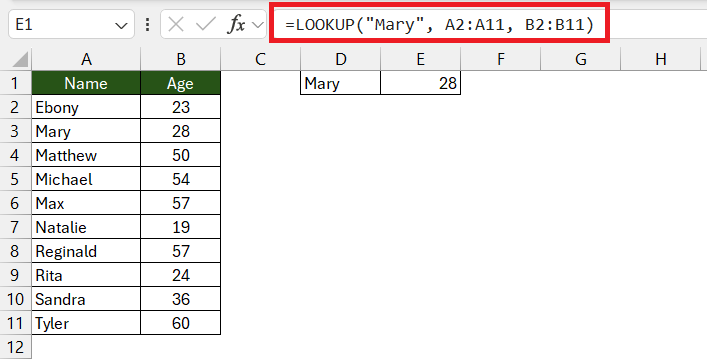
Make sure to sort your data before you use this function.
INDEX() and MATCH()
INDEX() and MATCH() are two of the most powerful functions, and when combined, they can do wonders for range searching.
- The MATCH function locates the position of a lookup value within a row, column, or table.
- The INDEX function then retrieves the value at a given position in a range.
Let’s break it down with syntax and example:
- MATCH:
=MATCH(Lookup_Value, Lookup_Array, [Match_Type]) - INDEX:
=INDEX(Array, Row_Num, [Column_Num])
To find a specific value using INDEX and MATCH:
=INDEX(Table_Array, MATCH(Lookup_Value, Lookup_Array, 0), Column_Index_Number)
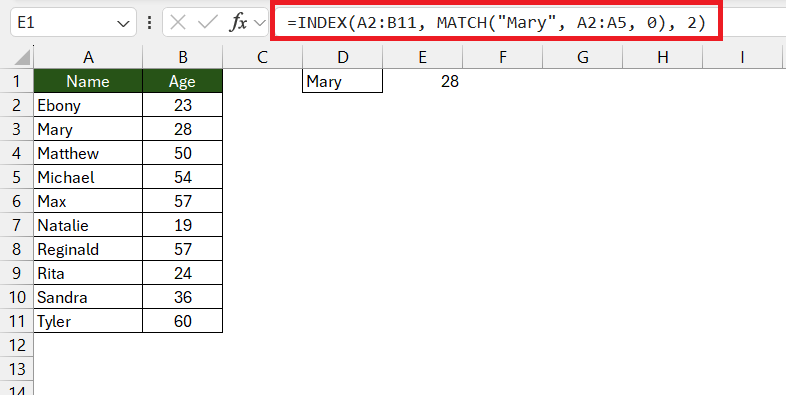
The MATCH function searches for “Mary” in column A and returns her position. The INDEX function then grabs the value from the same row in column B, which contains ages.
Step-by-Step Examples for Common Scenarios
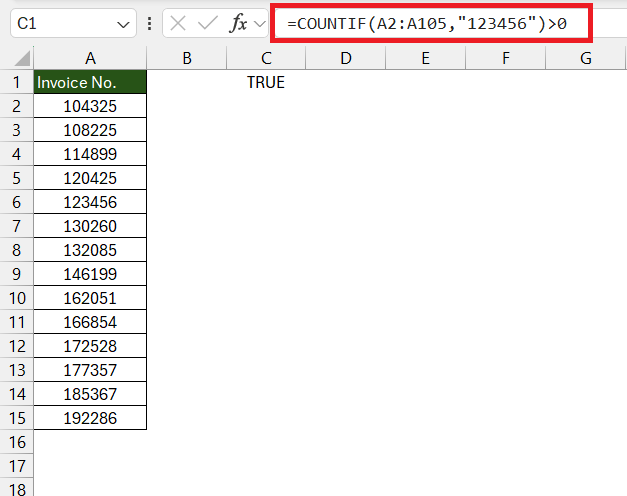
Example 1: Check the Presence of a Value with TRUE or FALSE
STEP 1: Enter the range in a column.
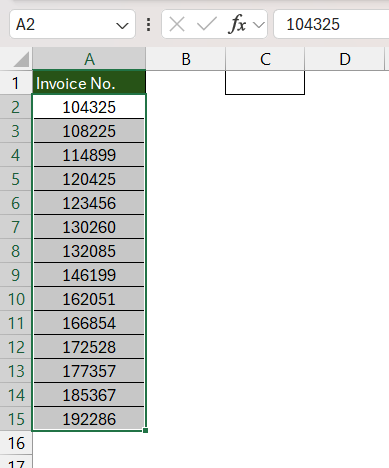
STEP 2: Click the cell where you want the TRUE or FALSE result to appear.
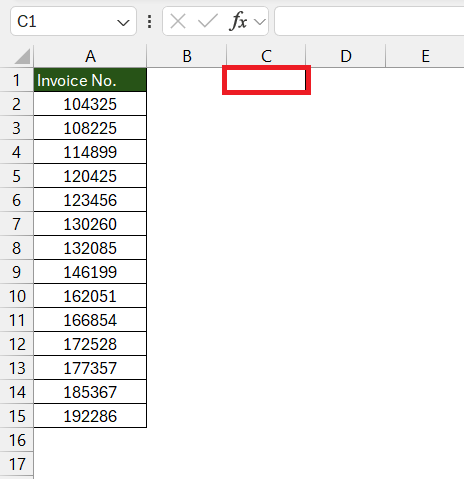
STEP 3: Type the COUNTIF function to determine if the value exists:
- If the return is TRUE, it means that the value exists.
- If not found, it will return FALSE.
Example 2: Partial Matches
If you’re dealing with a scenario where you only have a fragment of the data you need to match, you can use wildcards.
You have a list of team names, and you’re looking for any name that contains the letters “ch”. Here’s the formula you would use:
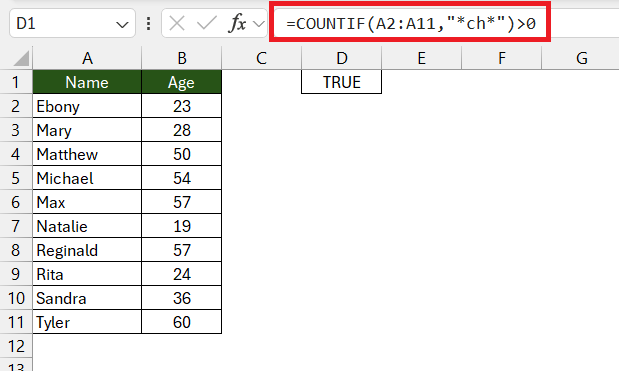
This will return TRUE if any cell within the range A2 through A11 contains the partial match “ch”.
Advanced Techniques
Combining Functions
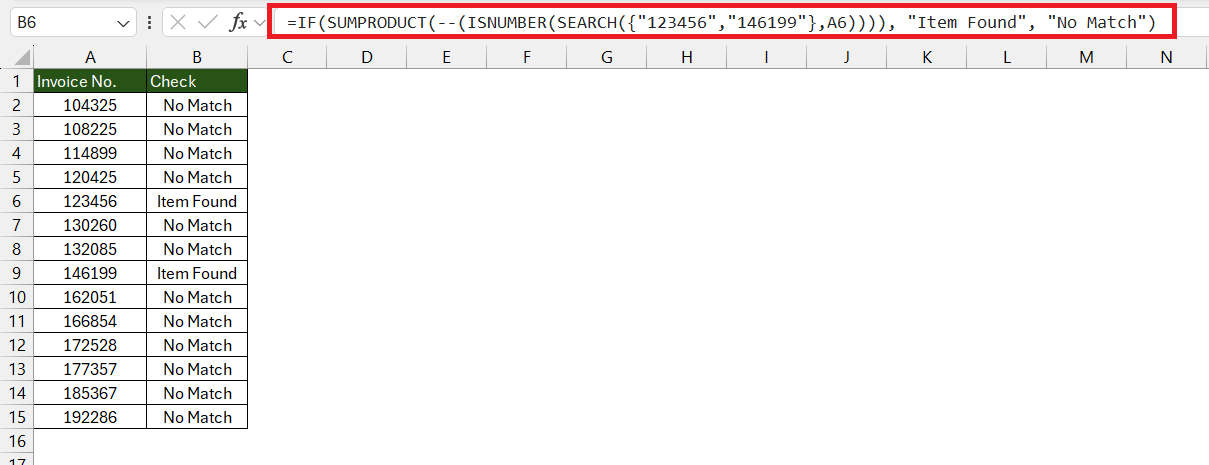
You can use functions like IF, ISNUMBER, SEARCH, and even logical operators like OR to perform advanced searches.
Approximate Matches
When exact matches are not required, you’ll need to tailor your Excel search to handle approximate matches. To perform an approximate match, you can use the VLOOKUP or HLOOKUP functions with the range_lookup argument set to TRUE.
Let’s say you have a pricing tier in which the price reduces as the quantity purchased increases:
- 1-10 items: $10 each
- 11-20 items: $9 each
- 21-50 items: $8 each
If you’re looking to find out how much 15 items cost, you would use:
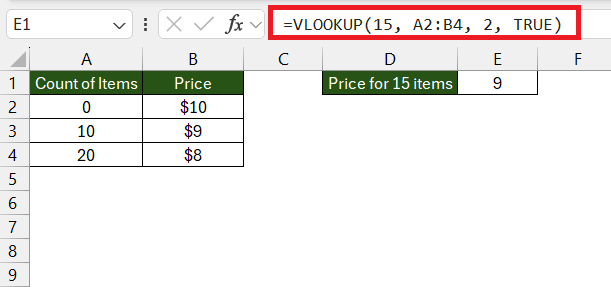
This would return $9 as it finds the closest match without going over the value looked up.
FAQs
Q1: How to check if a value is contained in a range in Excel?
You can use the COUNTIF function to check if a value exists in a range. If the result is greater than 0, the value exists.
Q2: How to check if a cell has a value?
To check if a cell has a value in a spreadsheet, use the ISBLANK function. It returns TRUE if the cell is empty, and FALSE if it contains any data.
Q3: How to find a specific value in a column in Excel?
To find a specific value in a column in Excel, you can use the MATCH function.
- Value exists – The function returns the row position of the value in the column.
- Value does not exist – The function will return an error.
Q4: Can Excel find partial matches?
Yes, you can use wildcards like * with COUNTIF or SEARCH to find partial matches.
Q5: How to use the isnumber function?
You can use the ISNUMBER function in Excel to check if the value in the cell is a number. It will return TRUE if the cell contains a numeric value and FALSE if not.

John Michaloudis is a former accountant and finance analyst at General Electric, a Microsoft MVP since 2020, an Amazon #1 bestselling author of 4 Microsoft Excel books and teacher of Microsoft Excel & Office over at his flagship MyExcelOnline Academy Online Course.

 30 Days - Full Access









