 Free Practice Workbook
Table of Contents
Understanding the QBR Formula
What is QBR?
A QBR calculator tracks a business’s performance over three months. It compares actual results with targets and calculates important metrics like achievement percentage and revenue growth.
The NFL passer rating formula is a weighted calculation using four components:
a = ((Comp/Att - 0.3) * 5)
b = ((Yards/Att - 3) * 0.25)
c = ((TD/Att) * 20)
d = (2.375 - (INT/Att * 25))
The final rating is:
= ((a + b + c + d) / 6) * 100
Each component is capped between 0 and 2.375 to prevent extreme values.
Why use Excel for QBR calculator?
- It is easy to customise.
- You do not need any additional software to do this calculation.
- The formulas will be calculated automatically.
How to Create a QBR Calculator
Enter Raw Data
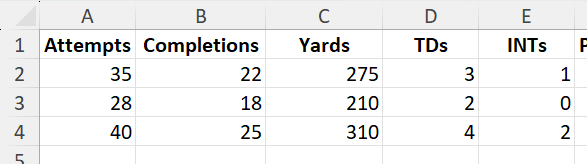
Start with a table of basic quarterback stats:
| Attempts | Completions | Yards | TDs | INTs |
|---|---|---|---|---|
| 35 | 22 | 275 | 3 | 1 |
| 28 | 18 | 210 | 2 | 0 |
| 40 | 25 | 310 | 4 | 2 |
Apply QBR Formula in Excel
In the Passer Rating column, insert the formula:

This automatically calculates the passer rating for each row of stats.
Use Helper Columns
For better understanding, calculate each component (a, b, c, d) separately:
= (B2/A2 - 0.3) * 5

= (C2/A2 - 3) * 0.25

= (D2/A2 * 20)

= 2.375 - (E2/A2 * 25)

This breakdown helps verify the formula and troubleshoot errors.

Tips & Tricks
- Make sure that the number of attempts is not zero. This will avoid any errors.
- You can use MAX and MIN functions to limit each component between 0 and 2.375.
- Double-check the reference that you are using when copying the formula across rows.
- You can create bar charts to compare passer ratings across multiple quarterbacks.
- You can use Power Query to import NFL stat tables from the web.
- You can highlight ratings above 100 in green and below 70 in red for quick analysis.
Create a VBA Function
You can add a custom function to make calculations easier:
Function QBRating(Att As Double, Comp As Double, Yds As Double, TD As Double, INT As Double) As Double
    Dim a As Double, b As Double, c As Double, d As Double
    a = ((Comp / Att) - 0.3) * 5
    b = ((Yds / Att) - 3) * 0.25
    c = (TD / Att) * 20
    d = 2.375 - ((INT / Att) * 25)

    If a < 0 Then a = 0 Else If a > 2.375 Then a = 2.375
    If b < 0 Then b = 0 Else If b > 2.375 Then b = 2.375
    If c < 0 Then c = 0 Else If c > 2.375 Then c = 2.375
    If d < 0 Then d = 0 Else If d > 2.375 Then d = 2.375

    QBRating = ((a + b + c + d) / 6) * 100
End Function
Now you can use =QBRating(A2,B2,C2,D2,E2) in a worksheet just like any built-in function.
FAQ
What is a QBR calculator in Excel?
A QBR calculator is an Excel worksheet that tracks quarterly business performance using KPIs, targets, and actual results.
What is the maximum QBR in the NFL system?
The highest possible rating is 158.3. It is often called a perfect passer rating.
How is QBR different from ESPN’s Total QBR?
The NFL passer rating only uses passing stats, while ESPN’s Total QBR includes rushing, sacks, and game context.
Can you import an NFL stat table in Excel?
You can use Power Query to import NFL stat tables from the web.
How to make my QBR calculator dynamic?
To make the QBR calculator dynamic, you can turn your data into an Excel table. This will allow the formulas to automatically extend to new rows when you add games.

John Michaloudis is a former accountant and finance analyst at General Electric, a Microsoft MVP since 2020, an Amazon #1 bestselling author of 4 Microsoft Excel books and teacher of Microsoft Excel & Office over at his flagship MyExcelOnline Academy Online Course.

 30 Days - Full Access









