 Free Practice Workbook
When working with data analysis, calculating the population mean is one of the common tasks. Excel is a great tool that can be used to calculate the population mean and simplify the process. In this article, you will learn how to find population mean in Excel.
Key Takeaways:
- The population mean is denoted by the Greek symbol ‘μ’.
- It is the average of all values in a population.
- It reflects the central point around which data clusters.
- The population mean includes all data points in a dataset.
- Whereas the sample mean is calculated from a subset of the population.
Table of Contents
Understanding Population Mean
The population mean is denoted by the Greek symbol ‘μ’. It reflects the central point around which a set of number clusters. The population mean is the average value of the entire population. To calculate it, you can use this formula:
μ = (ΣXi)/N
- μ is the population mean.
- Σ is for summation.
- Xi is each value in the dataset.
- N is the total number of values.
The population mean is the average of every single individual in an entire group. Conversely, the sample mean includes only a selected few.
How to Find Population Mean in Excel
For population mean, the formula is quite straightforward:
μ = (ΣXi)/N
Follow the steps below to calculate the population mean in Excel –
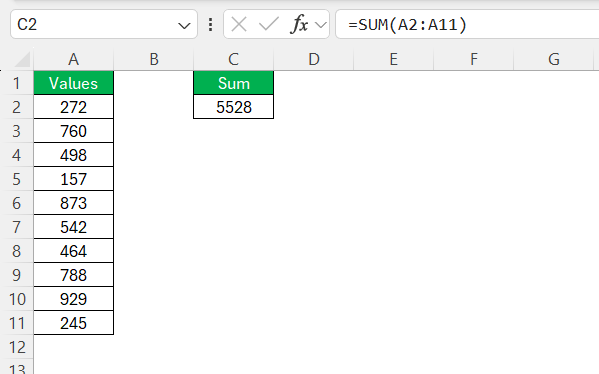
STEP 1: In cell C2, use the SUM function to get the sum of the data points.
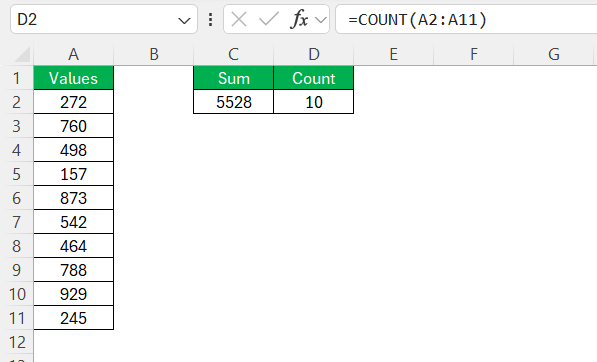
STEP 2: In cell D2, use the COUNT function to get the count of the data points.
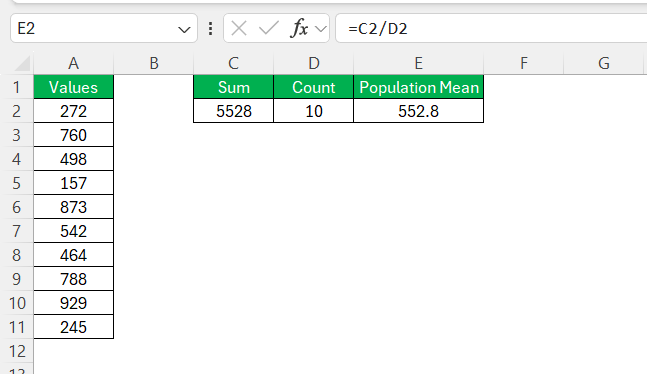
STEP 3: Divide the Sum value by the count value to get population mean.
Common Mistakes
- If you include empty cells or cells with non-numeric data, it can skew your results.
- Typos or incorrect data entries can significantly change the mean value.
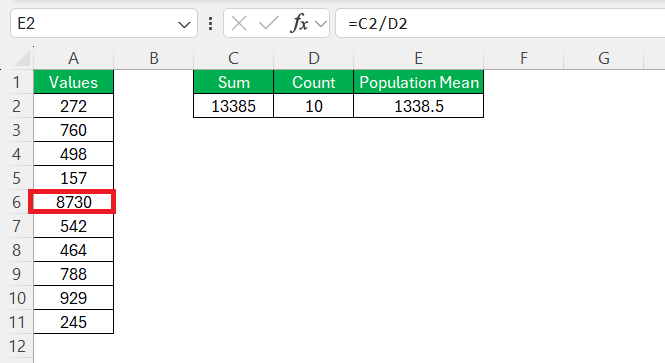
- Outliers can distort the mean.
- Confusing the population mean with the sample mean can lead to incorrect interpretations. The population mean includes all data points, while the sample mean includes a subset.
- Simple mistakes, like missing parentheses or incorrect cell references, can cause errors.
Tips & Tricks
- Use the AVERAGE function for a quicker method to calculate the population mean.
- Always check for blank cells or text values before calculating the mean.
- Convert your data range into an Excel Table for easier calculations.
- Use conditional formatting to identify unusually high or low values in the dataset.
FAQs
What is the formula for the population mean?
The formula for the population mean is:
µ = (ΣXi)/N
When Should I Use the POPULATION.MEAN Function?
I use the POPULATION.MEAN function when I have access to the entirety of the dataset. It is best applied in cases where analyzing every single value is possible and necessary.
What is population mean vs sample mean?
In Excel, the population mean refers to the average of all data points in the entire set. The sample mean, on the other hand, represents the average of a subset of the population.
How to calculate sample population in Excel?
To calculate a sample population in Excel, I simply use the AVERAGE function.
=AVERAGE(range)
How to calculate population mean with the AVERAGE function?
You can use the AVERAGE function to calculate the population mean:
=AVERAGE(A2:A10)

John Michaloudis is a former accountant and finance analyst at General Electric, a Microsoft MVP since 2020, an Amazon #1 bestselling author of 4 Microsoft Excel books and teacher of Microsoft Excel & Office over at his flagship MyExcelOnline Academy Online Course.

 30 Days - Full Access









