 Free Practice Workbook
Counting Mondays in a year using Microsoft Excel can be a practical task for various planning and scheduling needs. Excel’s robust formula capabilities enable users to easily calculate the occurrence of specific weekdays within any date range. This introduction will guide you through a method to determine the number of Mondays in a year, leveraging Excel’s powerful date and time functions.
Key Takeaways
- Tracking Mondays is important for managing weekly commitments, whether in personal schedules, business operations, education, or healthcare.
- Excel’s date management capabilities are powerful, enabling complex date arithmetic, trend analysis, and forecasting.
- Understanding Excel’s formula fundamentals, particularly the WEEKDAY function, facilitates locating specific days like Mondays within a timeframe.
- Excel’s conditional formatting feature enables automatically marking all Mondays in a year.
Download the workbook and follow the blog on How to count all Mondays in a year in Excel – Download excel workbookMondays-in-a-Year-1.xlsx
Table of Contents
How to Find Mondays in a Year
WEEKDAY function
The WEEKDAY function is used to return the day of the week for a given date. It returns a number ranging from 1 to 7.
By default, 1 represents Sunday, and 7 represents Saturday.
You add the second argument to define which numbering system you want. For example, if you use 3 as second argument, it will return 0 for Mondays and 6 for Saturdays.
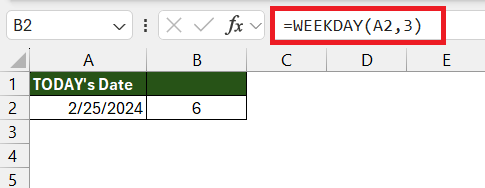
The basic formula to find the date of the Monday of the current week can be expressed as:
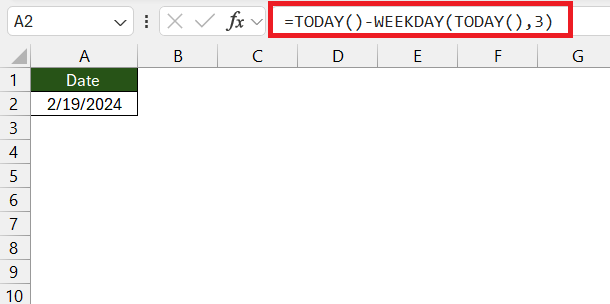
Let’s break down the expression:
- TODAY(): This function returns the current date.
- WEEKDAY(TODAY(),3): This function returns the day of the week for the given date. The second argument, 3, specifies that we want Monday to be considered as the first day of the week. This means the function returns a number from 0 (for Monday) to 6 (for Sunday) representing the day of the week.
- =TODAY()-WEEKDAY(TODAY(),3): Here, we subtract the result of the WEEKDAY function from the current date (TODAY()). This effectively shifts the date to the Monday of the current week.
This formula uses the TODAY function to fetch the current date and harness the WEEKDAY function to determine how many days need to be subtracted from the current date to arrive at the most recent Monday.
A sound comprehension of these Excel formula fundamentals facilitates not just the task of finding Mondays but any day of the week with equal ease.
Step-by-Step Guide to Find Monday
Discovering all Mondays in a year can be straightforward with the right approach. Here’s a step-by-step guide to accomplish your Monday-finding mission using Excel:
You can calculate the number of Mondays in a year in Excel without using specific start and end dates by using the WEEKDAY function. Here’s how you can do it:
STEP 1: In one cell, enter the year you want to calculate the Mondays for, for example, in cell A1, enter 2024.
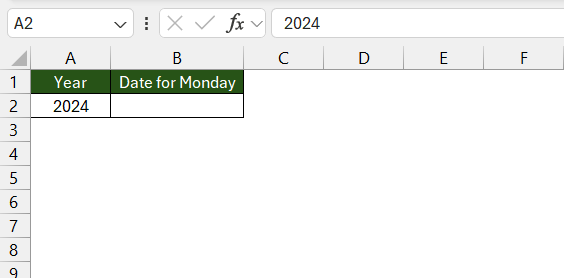
STEP 2: In another cell, enter the following formula to calculate the number of Mondays in the year:
=SUMPRODUCT(–(WEEKDAY(DATE(A2,1,1) + ROW(INDIRECT(“1:365”)) – 1) = 2))
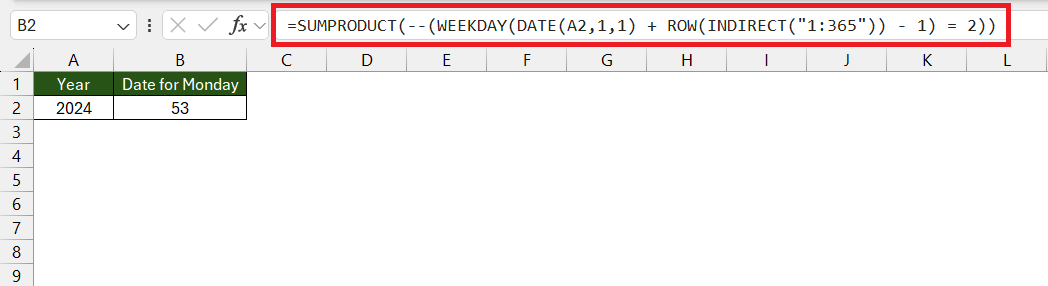
This formula works by generating dates from January 1st to December 31st of the specified year, and then it checks if the day of the week for each date is Monday (represented by 2 in the WEEKDAY function, where Monday is the second day of the week). The SUMPRODUCT function then sums up the occurrences of Mondays.
This formula will dynamically adjust to the number of days in the year and does not require manual input of start and end dates.
Advanced Techniques
Mondays in Any Year
You can customize the formula to get every Monday in a specified year.
STEP 1: Enter the Year.
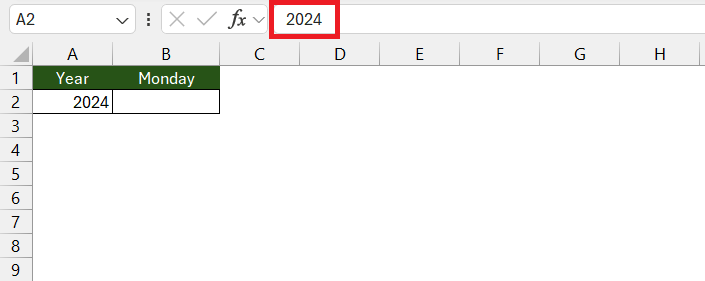
STEP 2: Use this formula to get the first Monday of the year:
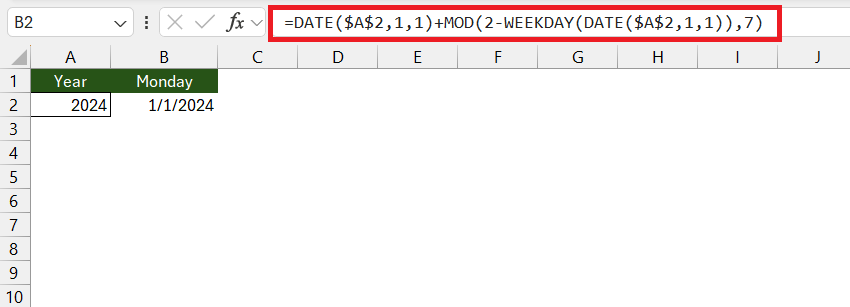
STEP 3: Use this updated formula to get the list of all Mondays:
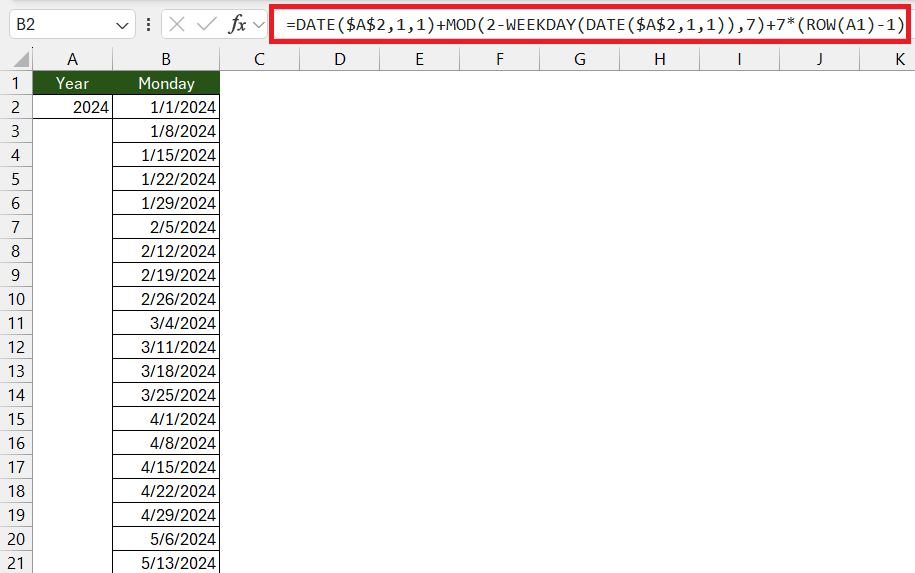
With these adjustments, you can then extract every Monday for any given year, making it a versatile trick for any date-sensitive analysis.
Find Other Day in the Week
Follow the steps below to find any other day in the week:
STEP 1: Determine which day of the week you want to extract. For example, if you want Friday, the index will be 6.
STEP 2: Use this formula:
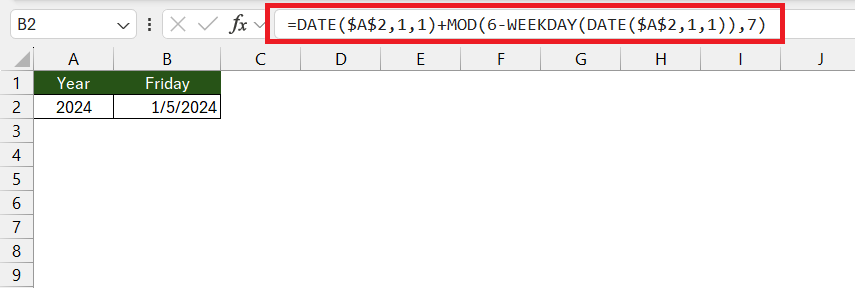
STEP 3: To get the list of all Fridays, use this formula:
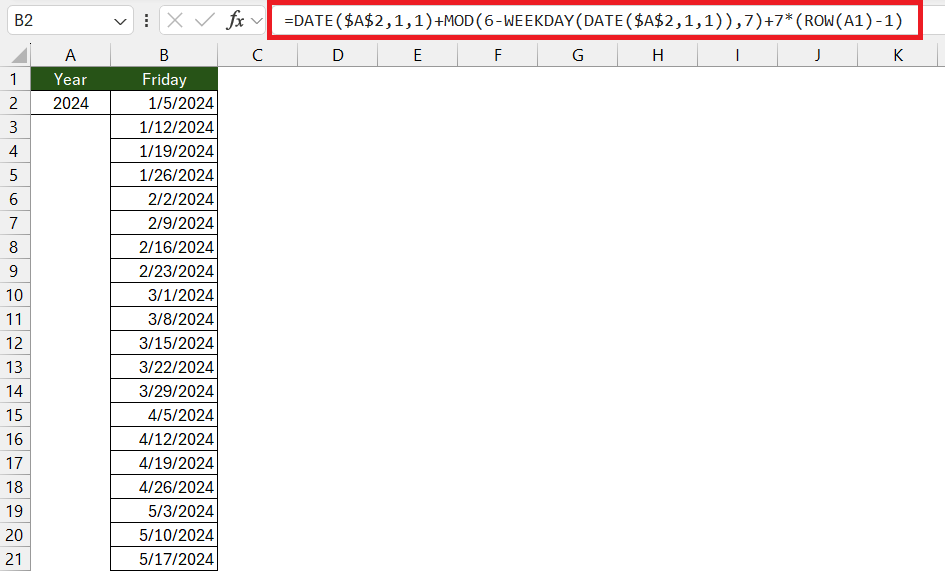
By making these simple changes, you can swiftly produce a list of any specific weekday throughout the year in Excel. Whether it’s for tracking Tuesdays for weekly team check-ins or Thursdays for market analysis deadlines, this formula can be your go-to solution.
Highlight Mondays in a Year
It is possible to automatically highlight all Mondays in an entire year in Excel by using conditional formatting. This feature allows you to apply a specific format to cells that meet certain criteria. Here’s how you can use conditional formatting to highlight all Mondays:
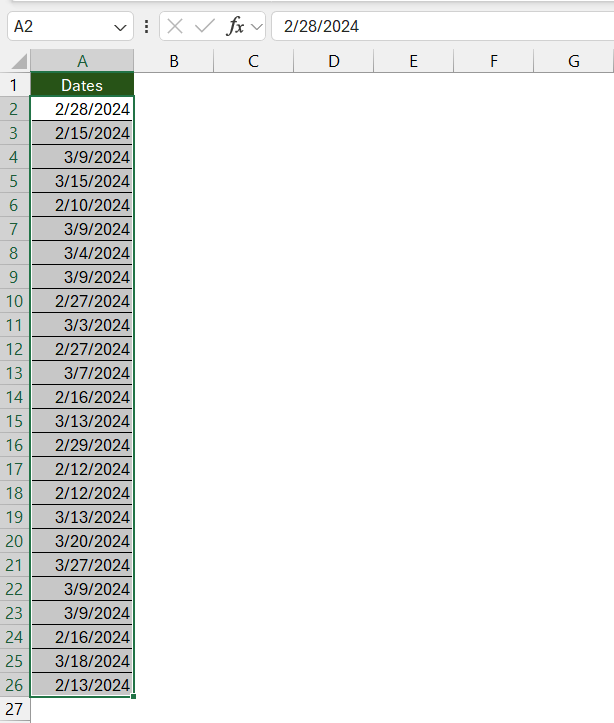
STEP 1: Prepare your Date Range
Enter or generate a list of dates representing the entire year in a column. Click and drag to select all the cells that contain the dates you wish to format.
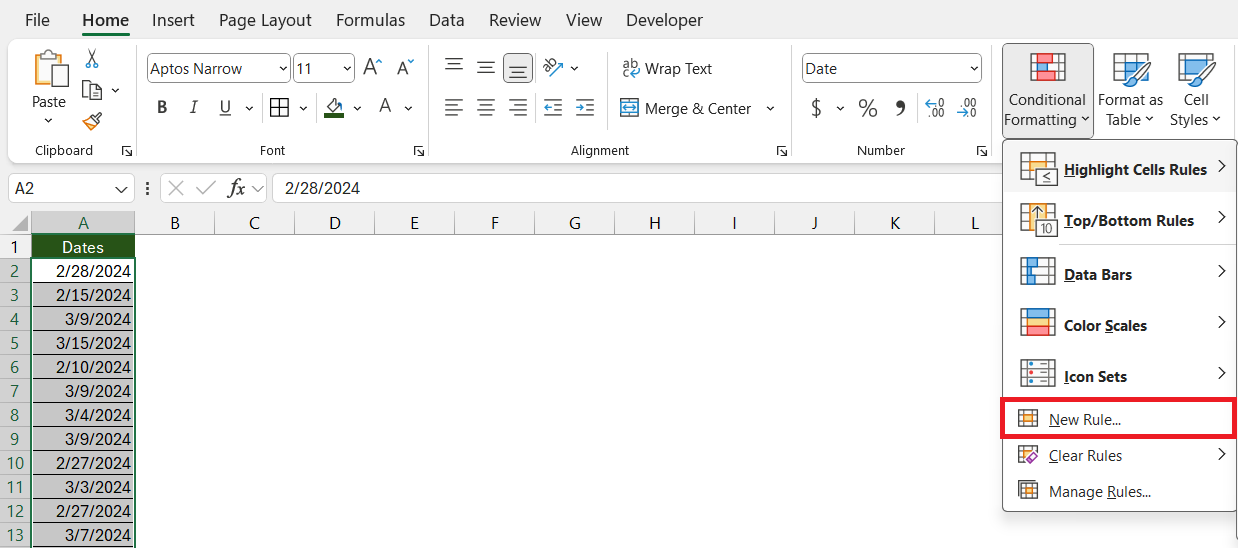
STEP 2: Open Conditional Formatting
Go to the ‘Home’ tab, and in the ‘Styles’ group, click on ‘Conditional Formatting. Hover over ‘New Rule..’.
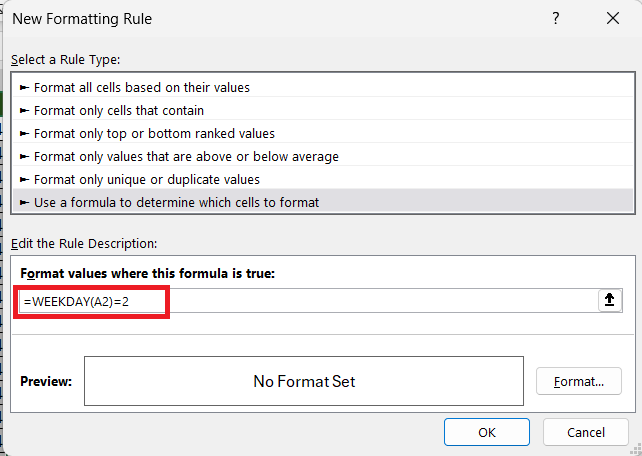
STEP 3: Set the Condition
In the dialog box, choose ‘Use a formula to determine which cells to format’ as the rule type and type the following formula –
=WEEKDAY(A2)=2
STEP 4: Customize the Format
Click on the ‘Format’ button to choose the font, border, and fill options that will be applied to all cells containing Mondays.
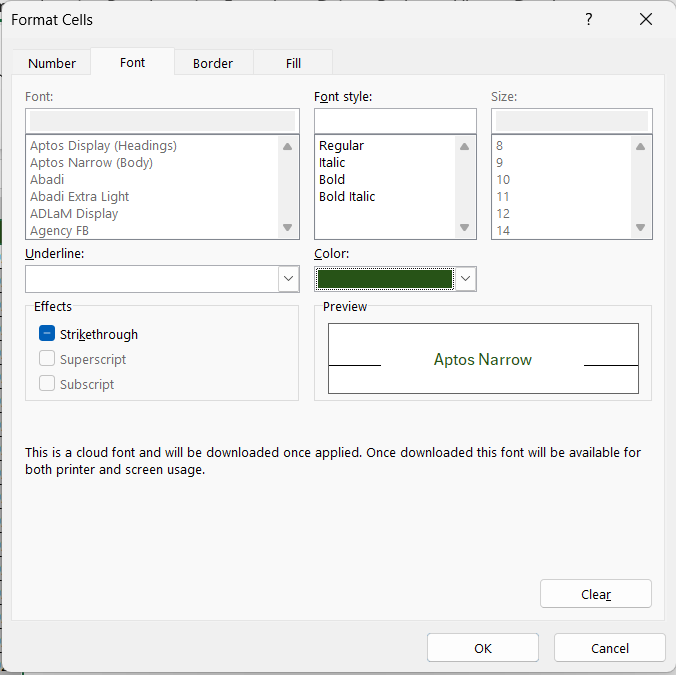
STEP 5: Apply and Save
Click ‘OK’ to apply the conditional formatting.
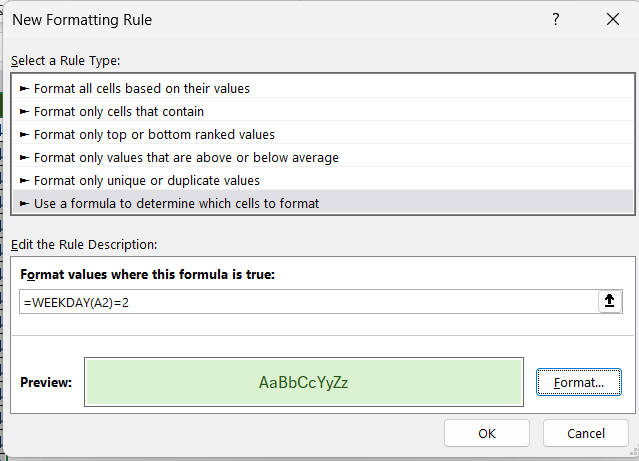
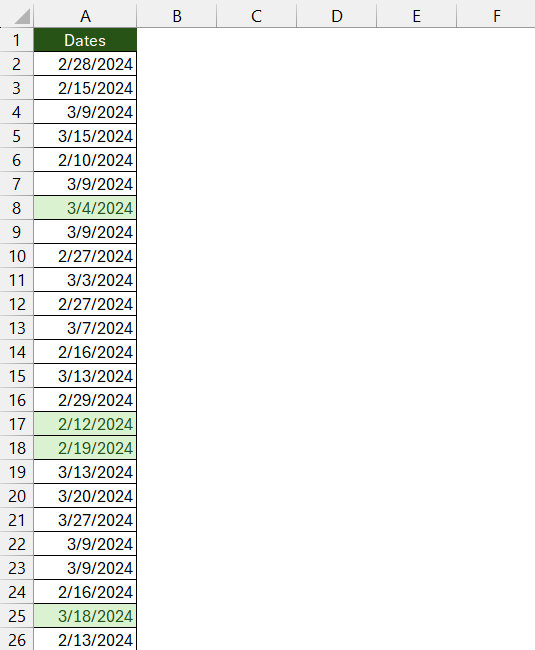
This will mark Mondays in the list.
FAQs
Can this method be used to find specific holidays?
To account for holidays in date calculations, use the NETWORKDAYS function. This function calculates the number of working days between two dates and allows you to exclude weekends and a list of specified holidays:
- Where
start_dateandend_dateare the range of dates you’re working within, andholidaysis the range of cells where you have listed your holidays.
How can I modify this trick to work with Excel’s different date formats?
Regardless of the format displayed, Excel’s date functions like DATE, TODAY, and WEEKDAY work with the serial number representation of dates. As long as you enter dates into the formulae correctly, Excel processes the calculations without error.
How many Mondays in a year?
The number of Mondays in a given year will typically fluctuate between 52 and 53. This varies primarily because a common year consists of 365 days, which is one or two days more than complete weeks (364 days), and a leap year has 366 days, which is two or three days more.

John Michaloudis is a former accountant and finance analyst at General Electric, a Microsoft MVP since 2020, an Amazon #1 bestselling author of 4 Microsoft Excel books and teacher of Microsoft Excel & Office over at his flagship MyExcelOnline Academy Online Course.

 30 Days - Full Access









