 Free Practice Workbook
When calculating budgets, payrolls, payment terms, or deadlines, you may need to calculate the number of weekdays. You can use Excel to calculate the number of weekdays in a year with a single formula. In this article, you will learn how to calculate weekdays in a year and how to exclude holidays.
Key Takeaways:
- NETWORKDAYS counts working days between two dates.
- It excludes Saturday and Sunday by default.
- You can exclude holidays from the calculation.
- NETWORKDAYS.INTL supports custom weekends.
- You can use DATE to calculate weekdays for an entire year.
Table of Contents
Introduction to NETWORKDAYS in Excel
What is NETWORKDAYS function?
NETWORKDAYS is a date function in Excel that is used to return the number of working days between the start and end dates. This function will automatically remove Saturdays and Sundays from its calculation. You can also add a list of holidays that need to be excluded.
The syntax for NETWORKDAYS is:
=NETWORKDAYS(start_date, end_date, [holidays])
- start_date – first date of the period. Required.
- end_date – last date of the period. Required.
- holidays – a range of dates to exclude. Optional.
What is NETWORKDAYS.INTL function?
The NETWORKDAYS.INTL function is used to return the number of working days between the start and end dates. By default, it excludes Saturdays and Sundays, but you can customise the weekend days based on your work schedule.
The syntax for NETWORKDAYS.INTL is:
=NETWORKDAYS.INTL(start_date, end_date, [weekend], [holidays])
- start_date – first date of the period. Required.
- end_date – last date of the period. Required.
- holidays – a range of dates to exclude. Optional.
- weekend – a number code that tells which days are the weekend. Optional.
The number codes are:
- 1 or omitted: Saturday and Sunday
- 2: Sunday and Monday
- 3: Monday and Tuesday
- 7: Friday and Saturday
- 11: Sunday only
- 12: Monday only
- 17: Saturday only
You can also write the number code in text format. The code will be 7 digits long and will start from Monday and end with Sunday.
- Use 0 for a working day
- 1 for a weekend day
How to Calculate Weekdays in Excel
Count Weekdays between a specific range
Follow the steps below to count the number of weekdays between 1 April 2026 and 30 April 2026:
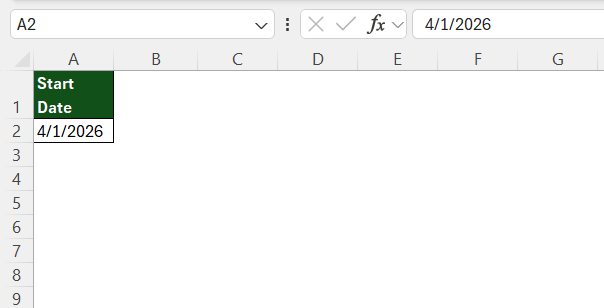
STEP 1: Type the start date in a cell A2.
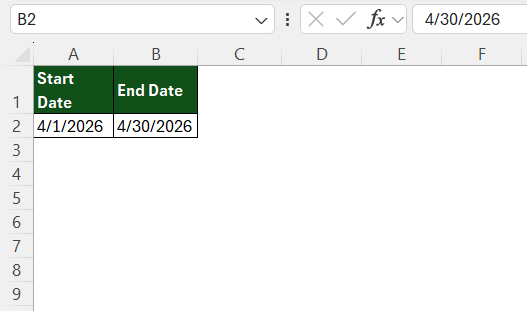
STEP 2: Type the end date in a cell B2.
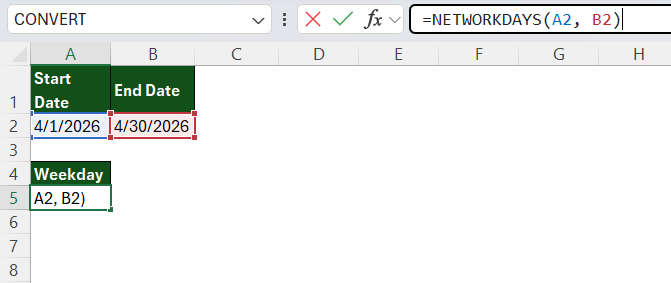
STEP 3: Type the NETWORKDAYS formula in a cell.
=NETWORKDAYS(A2, B2)
STEP 4: Press Enter.
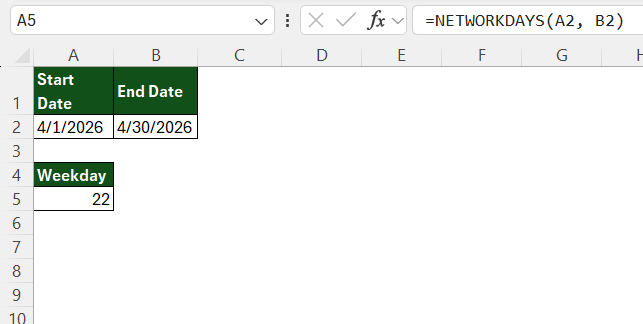
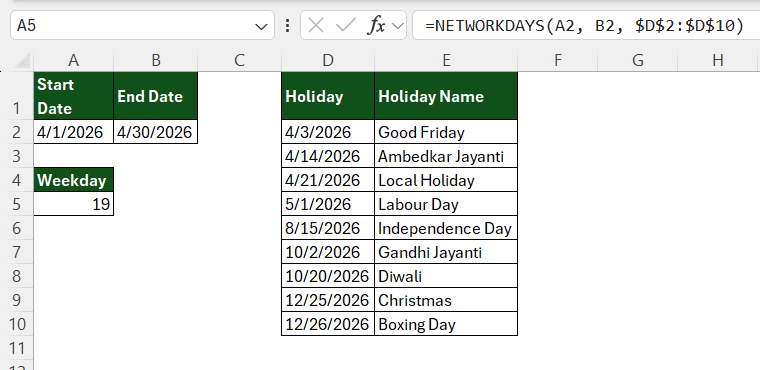
Excel will show that there are 22 weekdays in the specified range.
You can also exclude a custom list of holidays using this formula:
=NETWORKDAYS(A2, B2, $D$2:$D$10)
Use Custom Weekend
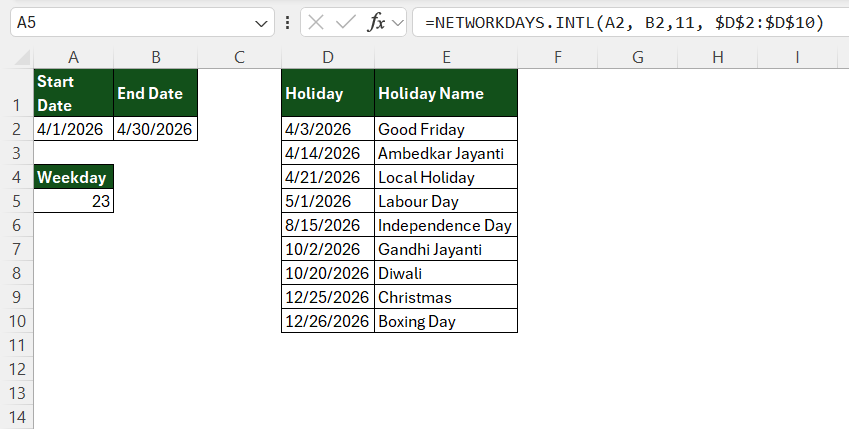
If your business works on a different weekend, you should use the NETWORKDAYS.INTL function. For a Sunday-only weekend, use:
=NETWORKDAYS.INTL(A2, B2, 11, $D$2:$D$10)
Count Specific Weekday
NETWORKDAYS formula counts all five weekdays together. To count just one day of the week, use SUMPRODUCT with WEEKDAY. For example, to count the number of Mondays in a date range:
=SUMPRODUCT(–(WEEKDAY(ROW(INDIRECT(A2&”:”&B2)))=2))
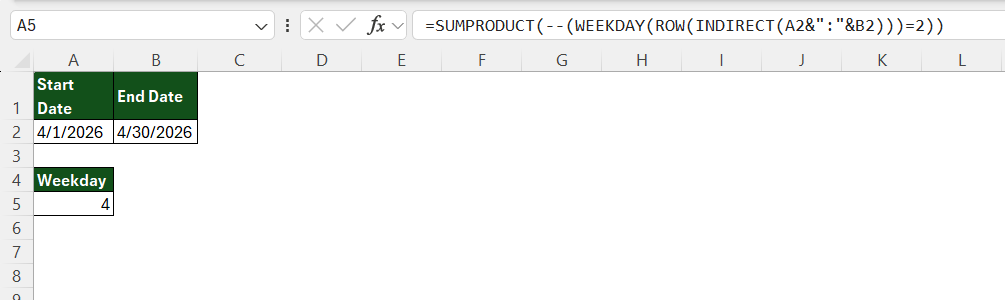
You can change the number 2 in the formula to pick a different day than Monday.
Count Weekdays in a Year
To count the weekdays in a full year, you can use the DATE function to get the first and last date of the year. For example, to calculate the number of weekdays in 2026, use:
=NETWORKDAYS(DATE(A2,1,1), DATE(A2,12,31))
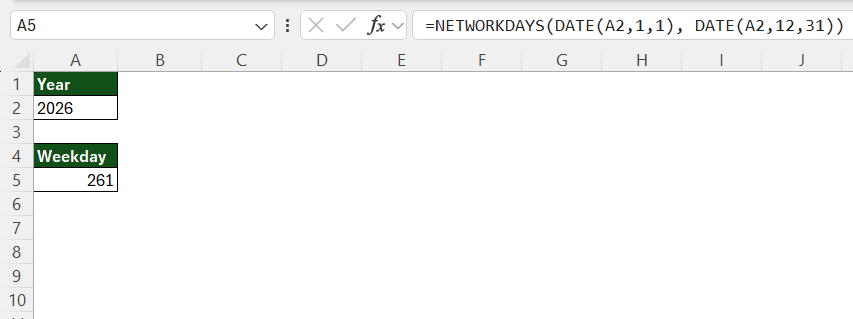
Excel will return the total number of weekdays in 2026, excluding Saturdays and Sundays.
Tips & Tricks
- Use cell references for the year: Instead of hardcoding the year, enter it in a cell and reference that cell in the formula.
- Keep holidays in a separate range: This makes it easier to update the holiday list every year.
- Use absolute references for holidays: Use
$E$2:$E$15when copying the formula to other cells. - Use NETWORKDAYS.INTL for custom schedules: This is useful when your weekend is different from Saturday and Sunday.
- Check holiday dates: Make sure the holiday cells contain valid Excel dates rather than text.
- Use TODAY for automatic updates: If you need the formula to always use the current year, use
YEAR(TODAY()). - Include both start and end dates: NETWORKDAYS includes the start and end dates if they are working days.
FAQs
1. How do I calculate weekdays in a year in Excel?
Use =NETWORKDAYS(DATE(2026,1,1),DATE(2026,12,31)) to calculate the weekdays in 2026.
2. Does NETWORKDAYS exclude holidays?
Yes. You can provide a range of holiday dates as the third argument.
3. How do I calculate weekdays for a year entered in a cell?
If the year is in A2, use =NETWORKDAYS(DATE(A2,1,1),DATE(A2,12,31)).
4. How do I calculate weekdays with a custom weekend?
Use NETWORKDAYS.INTL and specify the appropriate weekend code.
5. Can Excel calculate working days excluding holidays?
Yes. Use NETWORKDAYS or NETWORKDAYS.INTL and provide the holiday range in the formula.

John Michaloudis is a former accountant and finance analyst at General Electric, a Microsoft MVP since 2020, an Amazon #1 bestselling author of 4 Microsoft Excel books and teacher of Microsoft Excel & Office over at his flagship MyExcelOnline Academy Online Course.

 30 Days - Full Access









