 Free Practice Workbook
- MINIFS can return the minimum value based on multiple criteria.
- It was introduced in the Excel 2019 version.
- It can be used to find the minimum sales amount for a specific salesperson in a specific region.
- The size of the criteria range should be the same as that of the min_range.
Table of Contents
What is the MINIFS Function?
The MINIFS function in Excel is used to find the smallest value in a range that meets one or more conditions. It is helpful when you want to get the minimum value based on specific criteria instead of checking the entire dataset.
The syntax will be:
=MINIFS(min_range, criteria_range1, criteria1, [criteria_range2, criteria2], ...).
For example, if you have sales data, you can use MINIFS to find the lowest sales value for a specific region or product. This makes it easier to analyze data without using complex formulas.
The MINIFS function is simple to use and works well with large datasets. It saves time and helps you get accurate results quickly.
How to Use the MINIFS Function
Example 1: Basic Usage
Suppose you have a list of sales data and you want to find the minimum sales amount for a specific salesperson. To find the minimum sales amount for “John,” you would use the following formula: =MINIFS(B2:B5, A2:A5, “John”)
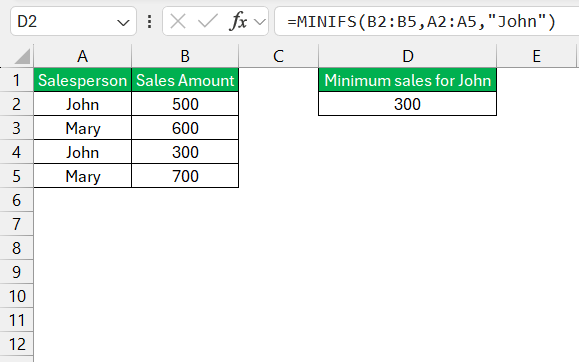
This formula will return 300, which is the minimum sales amount for John.
Example 2: Multiple Criteria
You can get the minimum value in the dataset based on multiple criteria. In this example, we are using the MINIFS function to gte the minimum sales value in John region for the Northern region.
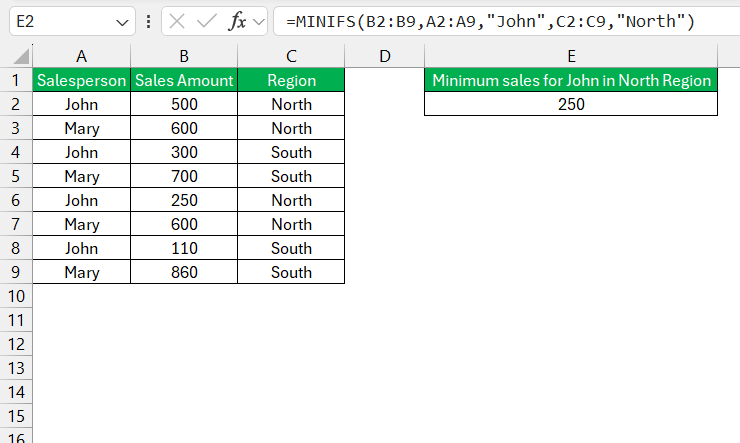
The minimum sales amount for John in the North region is 250.
Tips & Tricks
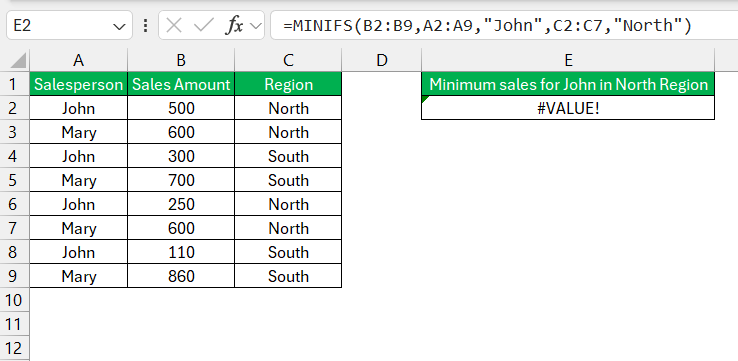
Make sure that all the ranges specified in the criteria arguments are of the same size. If they are not, Excel will return an error.
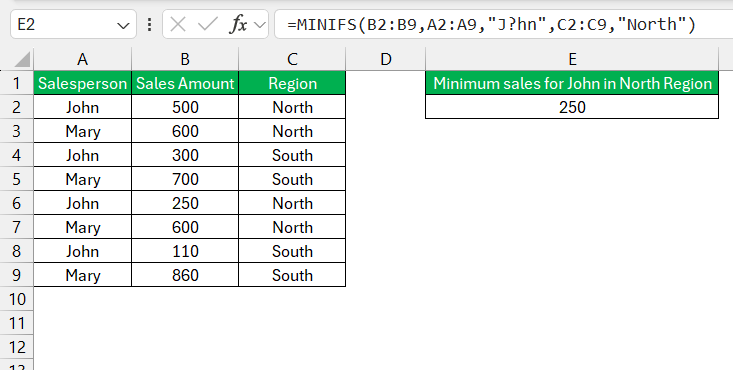
You can use wildcards in criteria.
- Asterisk (*) can represent any sequence of characters
- Question mark (?) can represent any single character.
You can use logical operators in your criteria, such as >, <, >=, <=, =, and <>.
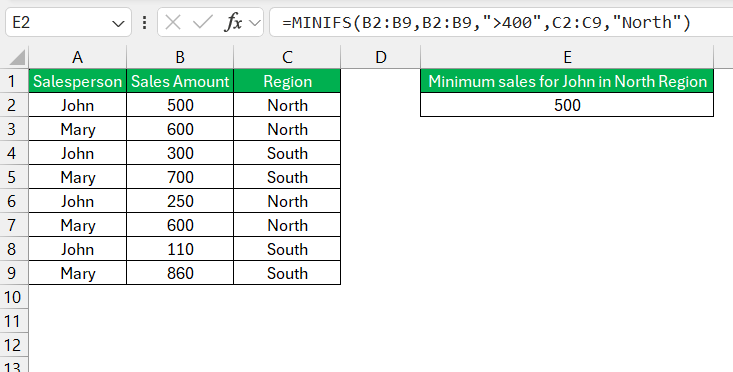
Tips & Tricks
Common Mistakes
- Make sure that your criteria ranges match your ‘min_range’ in size to avoid the #VALUE! messages.
- Proofread your criteria for typos. Even a small slip can lead to big mishaps!
- For large datasets, consider using helper columns to break down complex criteria or computations.
Compatibility
- The MINIFS function was introduced in Excel 2019. So, if you are using Excel 2019 or later, you can use MINIFS.
- For older versions, the MINIFS function is not available. But you can combine the MIN and IFS functions to get the same result.
Other Excel Functions
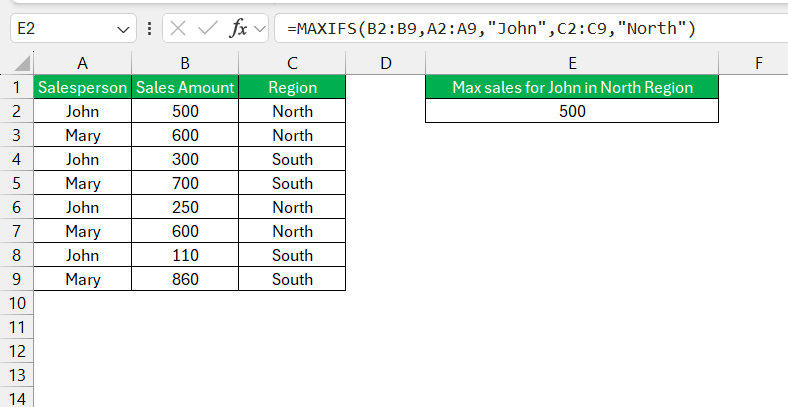
MAXIFS
The MAXIFS function is used to find the highest value in a range that meets one or more conditions.
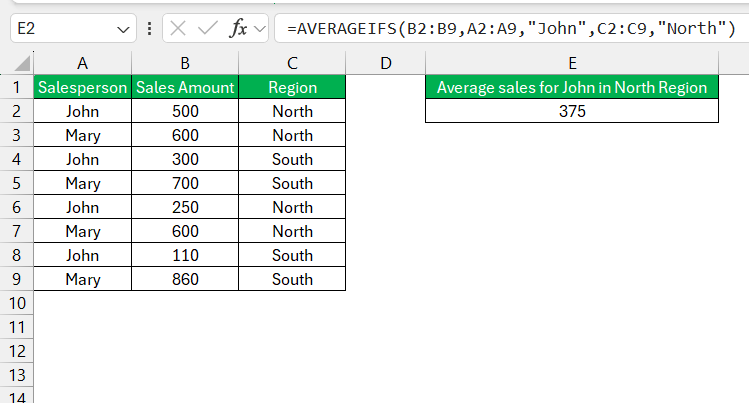
The AVERAGEIFS function is used to calculate the average (mean) of values that meet one or more conditions.
FAQs
How to use minif in Excel?
To use MINIFS in Excel, enter this formula:
=MINIFS(min_range, criteria_range1, criteria1, [criteria_range2, criteria2], ...)
What version of Excel has Minifs?
MINIFS was introduced in Excel starting with the 2016 version. So, it is not available in versions before 2016.
What are Maxifs and Minifs in Excel?
In Excel, MAXIFS and MINIFS are functions designed to find the largest and smallest values in a range based on one or more criteria.
Can MINIFS Handle Arrays and What are the Limitations?
Yes, MINIFS can handle arrays.
Are there Alternatives to MINIFS in Older Excel Editions?
Yes, there are alternatives. If you’re working in an Excel version prior to 2016, you can combine MIN and IF functions.

John Michaloudis is a former accountant and finance analyst at General Electric, a Microsoft MVP since 2020, an Amazon #1 bestselling author of 4 Microsoft Excel books and teacher of Microsoft Excel & Office over at his flagship MyExcelOnline Academy Online Course.

 30 Days - Full Access









